MOONDROP Dawn Pro 2 vs FiiO KA13: Sound, Power, Portability and Features Compared
The MOONDROP Dawn Pro 2 and FiiO KA13 take different approaches to portable USB DACs. This comparison looks at sound quality, amplifier power, noise, portability, DSP, hardware controls, battery consumption, and headphone compatibility to explain which features matter for sensitive IEMs, everyday headphones, and more demanding full-size models.
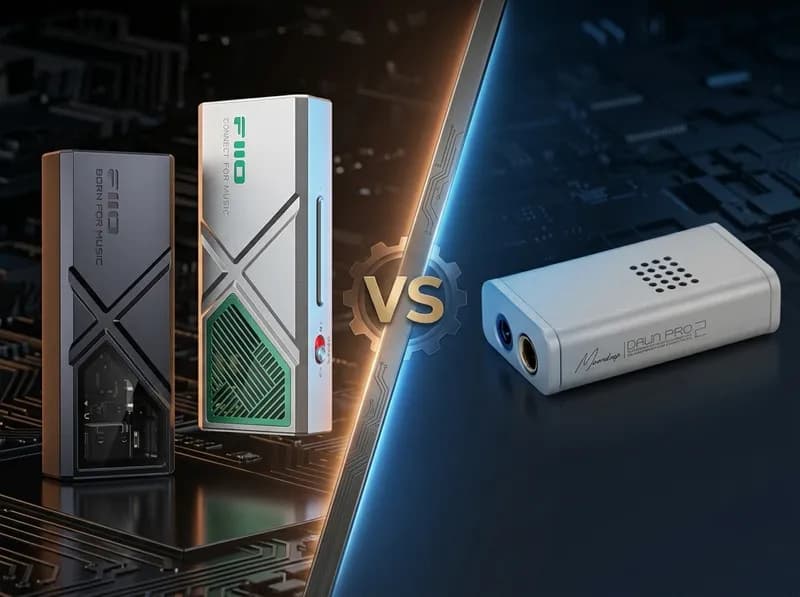
The MOONDROP Dawn Pro 2 and FiiO KA13 are both compact USB DAC/amp dongles, but they are designed around different priorities. The Dawn Pro 2 puts more emphasis on low noise, IEM compatibility, hardware volume control and DSP customization, while the KA13 focuses much more heavily on amplifier power, particularly through its 4.4mm balanced output and Desktop Mode.
For most ordinary IEM users, both devices already provide more than enough output. In that situation, noise performance, volume control, portability and EQ functionality can matter more than maximum wattage. The KA13 becomes more interesting when the connected headphones are harder to drive or when you want additional headroom for a future upgrade.
In other words, the Dawn Pro 2 is not simply a lower-powered version of the KA13, and the KA13 is not a universal upgrade over the Dawn Pro 2. They occupy a similar price range but target somewhat different users. With efficient IEMs, the audible difference between them may be relatively small. With higher-impedance or more demanding headphones, the KA13's stronger amplifier becomes much more relevant.
MOONDROP Dawn Pro 2 vs FiiO KA13: Key Specifications
Specification | MOONDROP Dawn Pro 2 | FiiO KA13 |
|---|---|---|
DAC architecture | Dual Cirrus Logic CS43198 | Dual Cirrus Logic CS43131 |
Amplification | MOONDROP TYPE-UA01 control/amp architecture | Dual SGM8262 op-amps |
3.5mm | Yes | Yes |
4.4mm | Yes | Yes |
Official output | 124mW + 124mW @16Ω, THD+N <1% | 170mW + 170mW @32Ω SE; 550mW + 550mW @32Ω balanced with Desktop Mode |
Output voltage | 4.1Vrms @0dBFS | High-voltage balanced output, depending on operating mode |
Output impedance | Not fully specified separately in current public documentation | <1.7Ω SE / <1.8Ω balanced |
THD+N | 0.00014% @1kHz | <0.0005% |
Dynamic range / SNR | 132dB | ≥122–123dB depending on output |
PCM | Up to 32-bit/384kHz | Up to 32-bit/384kHz |
DSD | DSD256 | DSD256 |
Weight | About 13g | About 18.5–19g |
Dimensions | About 42.5 × 23.2 × 11.4mm | About 56.3 × 22 × 10.5mm |
App | MOONDROP app / Web DSP | FiiO Control |
Hardware volume | 100-step independent hardware volume | Hardware volume buttons |
Desktop Mode | No | Yes |
SPDIF | Not a primary feature | Yes |
Current reference price | About $59.99 from MOONDROP's current product listing | Varies by market; around ¥13,200 in Japan |
These specifications need to be interpreted carefully. MOONDROP rates the Dawn Pro 2 at 124mW + 124mW at 16Ω under its stated conditions, while FiiO rates the KA13 at up to 550mW + 550mW at 32Ω with Desktop Mode enabled and the 4.4mm output. Those are not equivalent test conditions, so the numbers should not be compared as a simple wattage multiplier.
Size and Portability
Both products are small enough to qualify as genuine dongle DACs, but the Dawn Pro 2 has the advantage when minimum size is the priority.
The Dawn Pro 2 is approximately 42.5 × 23.2 × 11.4mm and weighs around 13g. The KA13 is longer at roughly 56.3 × 22 × 10.5mm and weighs around 18.5–19g before accounting for the USB cable.
That difference is noticeable when the DAC is attached to a smartphone and placed in a pocket.
The Dawn Pro 2 feels more like a purpose-built portable IEM accessory. Its short body is easier to carry alongside a phone, and its relatively low weight makes it less noticeable during commuting.
The KA13 is still highly portable, but its additional size is largely justified by its more powerful amplification hardware and Desktop Mode.
Both devices use detachable USB cables, which is important for long-term usability. The KA13 also comes with connection options intended for different host devices, including USB-C and Lightning-related configurations.
For a daily setup of phone + IEM + commuting, the Dawn Pro 2 has the more convenient physical design.
For phone + 4.4mm headphones + occasional computer use, the KA13's larger body becomes easier to justify.
DAC Chips Do Not Determine Sound Quality by Themselves
The Dawn Pro 2 uses dual CS43198 DACs, while the KA13 uses dual CS43131 DACs.
It would be tempting to assume that the newer or higher-positioned DAC chip automatically produces better sound. That is not how a complete DAC/amp works.
The DAC chip is only one component. The analog output stage, amplifier design, power supply, filtering, output impedance and implementation all contribute to the final result.
The same is true of dual-DAC designs. Using two DAC chips can provide separate conversion paths for the left and right channels, but it does not automatically make a product sound better than a well-designed single-DAC device.
The same principle applies to specifications such as 32-bit/384kHz and DSD256. They describe the formats the device can accept; they do not tell you how much better music will sound.
For a typical buyer, the more useful questions are:
How much output power do my headphones actually need?
Is the noise floor low enough for my IEMs?
What is the output impedance?
How precise is the volume control?
How much power does the dongle draw from my phone?
Do I need EQ or DSP?
How portable does the device need to be?
Driving Power: The Biggest Difference Between the Two
Amplification is where the KA13 creates its strongest technical advantage.
FiiO rates the KA13 at 170mW + 170mW at 32Ω from the 3.5mm output, while the 4.4mm balanced output reaches 550mW + 550mW at 32Ω with Desktop Mode enabled. With Desktop Mode disabled, the balanced output is rated at 260mW + 260mW at 32Ω.
The Dawn Pro 2 is officially rated at 124mW + 124mW at 16Ω with THD+N below 1%, along with a maximum output level of approximately 4.1Vrms under the specified conditions.
Again, these figures cannot be converted into a simple “KA13 is X times more powerful” conclusion because the impedance and test conditions differ.
What they do show is the design philosophy.
The Dawn Pro 2 is designed primarily around IEMs and efficient headphones.
The KA13 is designed to stretch further toward demanding portable headphones.
16Ω, 20Ω and 32Ω IEMs
For low-impedance, high-sensitivity IEMs, both devices have more than enough output.
This is an important point because more power does not automatically produce better sound.
If an IEM only needs a small amount of power to reach a comfortable listening level, hundreds of additional milliwatts do not automatically add detail, soundstage or resolution.
For sensitive IEMs, noise and volume control can actually matter more.
The Dawn Pro 2 has an official dynamic-range specification of 132dB, and professional reviews have found its noise performance extremely good with sensitive IEMs.
The KA13 is also designed with a low noise floor. FiiO lists a noise floor of below 1.7μV for its single-ended output and below 3.1μV for balanced output under its stated conditions. Professional testing has likewise found the device generally quiet with sensitive earphones.
So for ordinary IEMs, the KA13's higher output rating should not be treated as an automatic advantage.
60Ω, 120Ω and 150Ω Headphones
Once you move into moderate-impedance headphones, the KA13's additional headroom becomes more useful.
A 150Ω headphone with relatively modest sensitivity can benefit from the additional output capability, particularly when connected through the balanced output.
The Dawn Pro 2 can drive many portable headphones without difficulty, but professional reviews have noted that its limitations become more apparent with demanding planar headphones and higher-impedance models.
This leads to a useful distinction:
The Dawn Pro 2 is better suited to headphones that are already relatively easy to drive, while the KA13 gives you more room for future headphone upgrades.
250Ω and 300Ω Headphones
At 250Ω or 300Ω, looking only at a 32Ω power specification becomes misleading.
Voltage capability becomes increasingly important, and headphone sensitivity still determines how much output is actually required.
FiiO lists the KA13 at up to 78mW + 78mW at 300Ω from its balanced output in Desktop Mode, compared with approximately 19.5mW + 19.5mW from the 3.5mm output.
That does not mean the KA13 replaces every desktop headphone amplifier. Different 250Ω or 300Ω headphones can have very different sensitivities.
But it does give the KA13 a meaningful advantage when the goal is to use one small USB DAC with both IEMs and more demanding full-size headphones.
What Does the KA13 Desktop Mode Actually Do?
Desktop Mode is one of the KA13's defining features.
It is not simply an EQ preset. It changes the operating mode of the amplifier to provide higher output and gain for headphones that need more power.
FiiO specifically positions Desktop Mode for higher-impedance and harder-to-drive headphones.
There is, however, a trade-off.
Higher output requires more power from the USB host. When the KA13 is connected to a smartphone, that means greater battery consumption and potentially more heat.
FiiO's own documentation acknowledges the increased power consumption in Desktop Mode, while Japanese support documentation indicates that the device can reach approximately 37–40°C after extended operation under normal conditions.
Independent testing has also found significantly higher phone battery consumption when using high-power modes.
Therefore, Desktop Mode should not be viewed as a permanent “better sound” switch.
It is better understood as:
Extra amplifier headroom that you turn on when your headphones actually need it.
For a 32Ω high-sensitivity IEM, it is usually unnecessary.
For a demanding planar headphone or high-impedance full-size headphone, it can be genuinely useful.
Sound Quality: The Difference Is Smaller Than the Power Difference
This is where comparisons between the Dawn Pro 2 and KA13 need some restraint.
The two devices do not have an enormous “one sounds dramatically better” gap.
The Dawn Pro 2 is generally described as clean, neutral and transparent, with controlled bass and relatively little coloration. Headfonia's testing found it particularly well suited to IEMs and noted its very low noise performance.
The KA13 is also broadly neutral and clean, while third-party reviews have described it as dynamic and spacious, with a capable amplifier section. Headfonics found improvements in staging and dynamics compared with some earlier FiiO dongles.
Bass
The Dawn Pro 2's bass presentation is relatively controlled and restrained. It does not rely on extra bass coloration to create an impression of warmth.
The KA13 also does not fundamentally turn the sound into a bass-heavy presentation. Its stronger amplifier section can, however, provide greater control and headroom when the headphone itself demands more current and voltage.
With efficient IEMs, the difference may be quite small.
With more demanding headphones and complex music, the KA13's amplifier advantage becomes easier to appreciate.
Midrange
Neither device is designed around a strongly colored midrange.
The Dawn Pro 2 tends to preserve a clean and relatively transparent presentation.
The KA13 likewise stays close to a neutral baseline, although its broader sense of dynamics can make complex material feel more effortless when the connected headphone requires additional power.
The actual IEM or headphone tuning will usually have a much larger effect on vocals and instrument balance than the difference between these two DACs.
Treble
The Dawn Pro 2 delivers a clean and direct upper range without relying on excessive treble emphasis to create detail.
The KA13 is also clear and extended, while FiiO provides several digital-filter options through its control software. These filters can slightly alter the digital filtering behavior, but they should not be treated as completely different sound signatures.
Soundstage and Dynamics
With ordinary IEMs, the difference in soundstage is not dramatic enough to justify choosing one product solely on that basis.
The KA13's stronger amplifier becomes more relevant with headphones that actually need additional headroom. Large-scale orchestral music, rock and electronic tracks with strong transient swings can benefit from the extra amplifier reserve.
The Dawn Pro 2 instead makes a strong case through its clean presentation and low-noise performance with IEMs.
So the most meaningful sound-related distinction is not really:
“Which DAC sounds better?”
It is closer to:
Which amplifier architecture is better matched to your headphones?
Noise and Sensitive IEMs
For multi-driver and highly sensitive IEMs, noise can matter more than maximum power.
If an IEM reaches a comfortable listening level with only a tiny fraction of the available output, additional power has little practical value.
The Dawn Pro 2's 132dB dynamic-range specification and very low THD+N figure are impressive, and independent testing has found it essentially silent with sensitive IEMs.
The KA13 is also a low-noise design rather than a visibly hiss-prone high-power amplifier. Its published noise specifications are low, and professional testing has generally found it quiet.
Therefore, this is not a case of “Dawn Pro 2 has no hiss while KA13 has obvious hiss.”
A better conclusion is:
Both are suitable for sensitive IEMs, but the Dawn Pro 2 places even more emphasis on low-noise IEM use, while the KA13 balances low noise with a substantially more powerful amplifier stage.
Android, iPhone, Windows and macOS
Android
Both devices work well as USB DACs with Android.
The KA13 can be configured through FiiO Control, including options such as digital filters, RGB behavior and related settings. FiiO's documentation notes that the iOS version of FiiO Control does not provide the same direct KA13 control experience.
The Dawn Pro 2's DSP system is one of its biggest differentiators. Its app and Web-based interface provide more extensive control over PEQ, filters, frequency, gain and Q settings.
If you enjoy adjusting EQ, the Dawn Pro 2 is clearly more interesting.
iPhone
USB-C iPhones can use both products directly with the appropriate USB-C cable.
Lightning-based iPhones require a suitable Lightning connection. FiiO provides connection accessories for different host devices with the KA13 package, which makes it relatively convenient for users with older Apple hardware.
Windows and macOS
Both devices work as USB DACs for computers.
The KA13 also supports SPDIF output through its 3.5mm connection, giving it functionality beyond simple headphone playback.
For a desktop computer setup, the KA13's higher-power mode and SPDIF support can therefore be more useful.
For a laptop paired with IEMs, the smaller Dawn Pro 2 remains perfectly practical.
App and Feature Experience
The two products have noticeably different philosophies.
The Dawn Pro 2's biggest feature is its DSP platform. Instead of simply offering a few basic settings, it allows users to build more detailed PEQ profiles and adjust parameters such as frequency, gain and Q.
It also has 100-step independent hardware volume control, which is useful when connected to phones and sensitive IEMs.
The KA13 is more hardware-oriented:
physical volume buttons
Desktop Mode
3.5mm and 4.4mm outputs
RGB sampling-rate indication
FiiO Control
digital filters
SPDIF functionality
detachable USB cable
A simple way to describe the difference is:
Dawn Pro 2 is more interesting if you want to shape and customize the sound.
KA13 is more interesting if you want to maximize hardware capability and amplifier output.
Heat, Battery Consumption and Long-Term Use
The Dawn Pro 2 does not have a high-power Desktop Mode like the KA13, so its portable operating behavior is relatively straightforward.
The KA13 can draw considerably more power when Desktop Mode is enabled. This is not a defect; it is the natural consequence of operating a more powerful amplifier.
On a smartphone, that additional power comes from the phone battery.
Therefore, if you use the KA13 with sensitive IEMs for several hours every day, leaving Desktop Mode permanently enabled makes little practical sense.
For ordinary IEMs, use the lower-power mode.
For a computer, where USB power is less of a concern, the trade-off is easier to accept.
Which One Fits Your Headphones?
User type | Recommended direction | Why |
|---|---|---|
Everyday IEM user | Dawn Pro 2 | Low noise, compact size and strong DSP functionality |
Highly sensitive IEM | Dawn Pro 2 | Excellent noise performance and fine volume control |
4.4mm balanced IEM | Either | Both provide 4.4mm; maximum power is not automatically beneficial |
16–32Ω headphones | Either / KA13 normal mode | Both generally provide ample output |
60–120Ω headphones | KA13 | More amplifier headroom |
Around 150Ω | KA13 | Greater output reserve becomes more useful |
250–300Ω | KA13 | Higher voltage and high-power mode are advantageous |
Smartphone-focused user | Dawn Pro 2 | Smaller and more portable |
PC-focused user | KA13 | Desktop Mode and SPDIF add useful functionality |
Maximum driving power | KA13 | Much higher balanced output |
Maximum portability | Dawn Pro 2 | Shorter and lighter |
EQ enthusiast | Dawn Pro 2 | More extensive DSP/PEQ |
Future headphone upgrades | KA13 | More amplifier headroom |
This is not a ranking of which product “wins.” The right choice depends on what the connected headphone actually needs.
Value: What Are You Paying For?
The current MOONDROP product listing places the Dawn Pro 2 around $59.99, while the Japanese launch price was ¥10,800.
FiiO's Japanese market reference price for the KA13 is around ¥13,200, although retail prices vary considerably by region and promotion.
When the two products are priced relatively close to each other, they offer value in different ways.
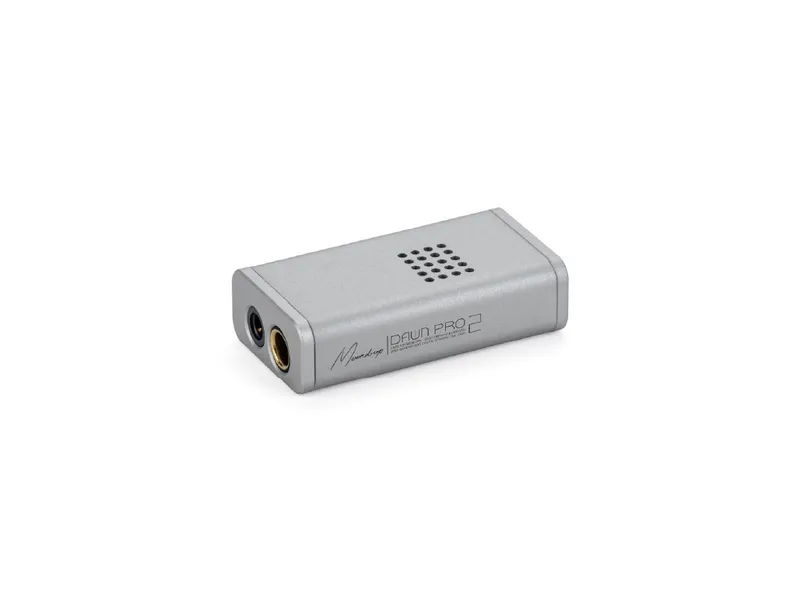
What you are paying for with the Dawn Pro 2
compact design
low noise
dual CS43198 architecture
100-step hardware volume
DSP and PEQ
IEM-oriented design
portable operation
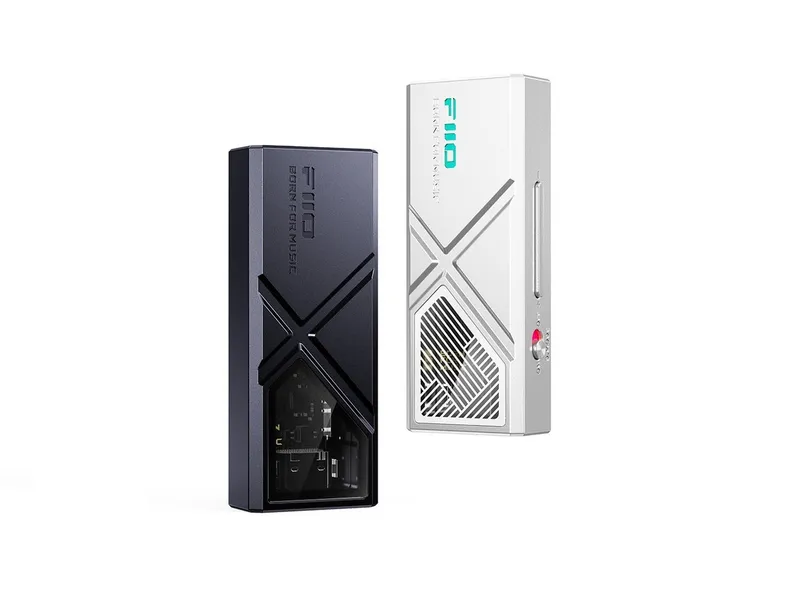
What you are paying for with the KA13
significantly stronger amplifier output
4.4mm balanced output
Desktop Mode
hardware controls
FiiO software ecosystem
SPDIF functionality
greater compatibility with demanding headphones
That is why neither product should be judged simply by DAC chip generation or maximum output power.
Don't Let the Specifications Mislead You
A DAC chip does not determine sound quality
The CS43198 is not automatically “better sounding” than the CS43131.
The complete analog and amplification implementation matters.
More output power does not mean better sound
The KA13's high power gives it more headroom.
If your IEM only requires a small fraction of that output, the additional power does not automatically create more resolution or detail.
Balanced does not automatically mean better sound
A 4.4mm balanced connection becomes useful when the particular DAC/amp provides a meaningful improvement in amplifier capability through that output.
The connector itself is not a guarantee of better sound.
32-bit/384kHz is not a decisive buying factor
Most users will never hear a meaningful difference simply because one dongle supports a higher maximum sample rate.
Headphone matching, noise, power and usability are much more relevant.
DSD support is not a core buying criterion
If your music library is primarily standard lossless or streaming content, the difference between DSD256 and higher theoretical formats is unlikely to determine your listening experience.
Specification differences do not equal audible differences
This is perhaps the most important point in this comparison.
Both products already have sufficiently strong DAC specifications. The differences that matter most in real-world use are more likely to come from amplifier headroom, noise, EQ, headphone matching, portability and power consumption.
Is the Dawn Pro 2 Better for IEMs?
For a system built primarily around sensitive IEMs, the Dawn Pro 2 is the more natural fit.
That does not mean it necessarily sounds better with every IEM. Its advantage is that the overall product design is more focused on IEM-oriented use: low noise, fine volume adjustment, compact size and extensive DSP.
If your IEM is difficult to drive or you expect to move to demanding headphones later, the KA13 offers more useful amplifier headroom.
Which Has More Driving Power?
The FiiO KA13 has substantially more amplifier output, particularly through its 4.4mm balanced output with Desktop Mode enabled.
FiiO rates the KA13 at up to 550mW + 550mW at 32Ω in Desktop Mode, compared with 260mW + 260mW at 32Ω with Desktop Mode disabled. MOONDROP rates the Dawn Pro 2 at 124mW + 124mW at 16Ω under its specified conditions and lists a 4.1Vrms maximum output level.
Because the measurements use different loads and conditions, the numbers should not be converted into a direct multiplier. But in terms of product design and intended use, the KA13 is clearly the more powerful amplifier.
Do You Need Desktop Mode All the Time?
No.
For ordinary IEMs, the standard operating mode is usually sufficient.
Desktop Mode is designed for headphones that need additional output. It also increases power consumption and heat, which is particularly relevant when the KA13 is powered by a smartphone.
It is better viewed as an extra tool rather than a permanent performance setting.
Final Verdict: Which One Should You Buy?
If you mainly use sensitive IEMs with a smartphone, the MOONDROP Dawn Pro 2 makes more sense. It is smaller, lighter, extremely quiet and offers substantially more DSP control. Its design is focused on the things IEM users are likely to notice every day.
If you use 4.4mm headphones, higher-impedance full-size headphones, or headphones that need more power, the FiiO KA13 is the more appropriate choice. Its amplifier section and Desktop Mode give it significantly more headroom.
If you use a typical 32Ω IEM, the difference between the two is much smaller than the raw specifications might suggest. Both are already capable devices, and the IEM's own tuning, ear tips and EQ are likely to have a much larger effect on what you hear.
If you enjoy EQ and sound customization, the Dawn Pro 2 has the more sophisticated toolset.
If you want one compact DAC that can handle IEMs today and more demanding headphones later, the KA13 provides more room to grow.
So the most useful way to think about this comparison is not:
Which is better, Dawn Pro 2 or KA13?
It is:
The Dawn Pro 2 is a compact, low-noise, DSP-focused dongle designed particularly well around IEMs, while the KA13 is a more amplifier-oriented dongle that pushes much further toward high-power headphone driving.
For most ordinary IEM users, both are already more than capable. The KA13's extra power becomes meaningful when you actually have headphones that need it; the Dawn Pro 2's advantages become meaningful when low noise, portability, precise volume control and DSP matter more.
Products in this guide
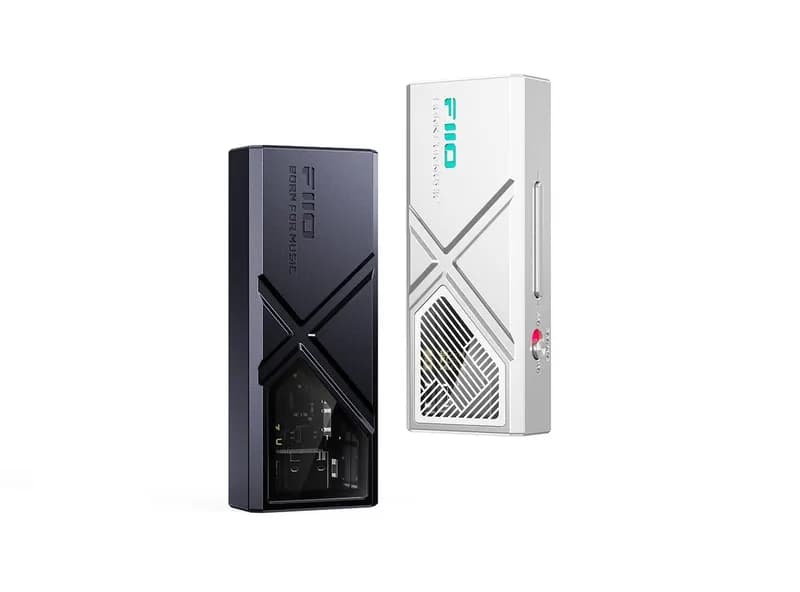
FiiO KA13 Dongle DAC
The FiiO KA13 is a compact USB DAC and headphone amplifier designed for listeners who want considerably more output power than a basic phone
¥373.96 (≈$52 USD)
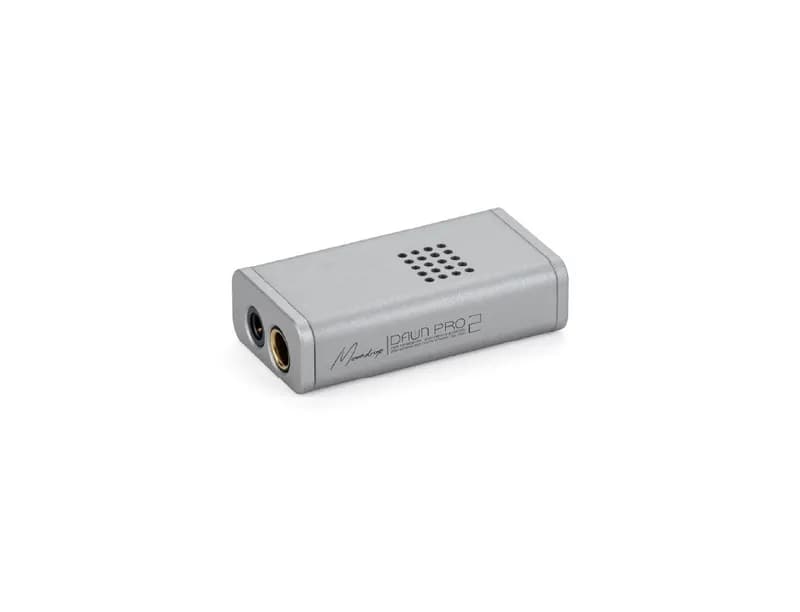
MOONDROP Dawn Pro 2 Dongle DAC
The MOONDROP Dawn Pro 2 is a compact USB DAC/amp designed primarily for IEM users who want a cleaner headphone output, 4.4mm balanced connec
¥273.96 (≈$38 USD)