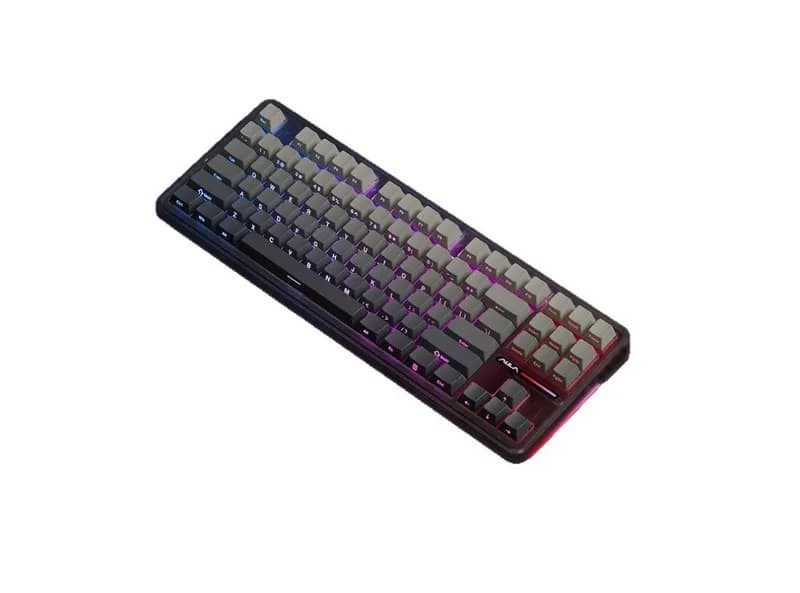
Key Specifications
Specification | Value |
Model | AULA F87 Pro |
Layout | TKL / 80% Layout (87 Keys) |
Structure | Gasket Mount |
Connectivity | Tri-Mode (2.4 GHz Wireless, Bluetooth 5.0/3.0, USB-C Wired) |
Polling Rate | 1,000 Hz (2.4 GHz & Wired) / 125 Hz (Bluetooth) |
Battery Capacity | 4,000 mAh / 8,000 mAh (Variant dependent) |
Hot-Swappable | Yes (3-pin & 5-pin Mechanical Switches) |
Keycaps | PBT Double-shot Keycaps |
Plate & Sound Dampening | Flex-cut PC Plate, PORON Sandwich Cotton, IXPE Switch Pad, PET Sound Film, PORON Case Foam, Silicone Bottom Pad |
Backlight | RGB Backlighting with Side Light Strips (South-facing LEDs) |
Dimensions (L x W x H) | 365.9 mm x 139 mm x 41.1 mm |
Weight | ~1,023 g |
Compatibility | Windows, macOS, Android, iOS |
ReviewFull Review →
The AULA F87 Pro is a TKL mechanical keyboard designed for users who want a balance between gaming, everyday typing, wireless connectivity, and entry-level customization. Rather than competing directly with high-end Hall Effect keyboards, the F87 Pro focuses on offering a broad set of practical features at a relatively accessible price. Its 80% layout keeps the dedicated function row and arrow keys while removing the number pad, making it noticeably more compact than a full-size keyboard without requiring the major layout compromises of a 60% board.
Depending on the specific version, the F87 Pro is available with different mechanical switches and features a gasket-mounted construction, hot-swappable PCB, PBT keycaps, RGB lighting, and tri-mode connectivity through USB-C, 2.4GHz wireless, and Bluetooth. This combination is one of the keyboard's strongest selling points. For a user who wants one keyboard for both gaming and work, the ability to switch between wired and wireless connections can be more useful than extreme polling-rate specifications.
The gasket structure and internal sound-dampening materials are also important to the F87 Pro's overall experience. Instead of using a completely rigid mounting system, the keyboard allows some flex and cushioning around the plate and PCB. The resulting feel depends heavily on the switch and specific configuration, but the overall design is aimed at producing a softer and less harsh typing experience than a basic budget mechanical keyboard.
The F87 Pro is also hot-swappable, giving buyers the option to replace the switches without soldering. This makes it a reasonable entry point for people who want to experiment with mechanical-keyboard customization without building a keyboard from individual components.
However, the F87 Pro has an important limitation: it is a conventional mechanical keyboard rather than a Hall Effect magnetic keyboard. It therefore does not offer the adjustable actuation and Rapid Trigger functionality found on magnetic gaming keyboards. Competitive FPS players who specifically want extremely sensitive actuation or Rapid Trigger may therefore have better reasons to consider a Hall Effect model.
Another consideration is that the F87 Pro name covers multiple configurations, and the later F87 Pro V2 should not automatically be treated as identical to the original model. Polling rate, battery capacity, internal construction, and other specifications can vary by version.
For the U.S. market, the F87 Pro is generally positioned in the affordable mechanical-keyboard segment, with pricing varying by configuration, retailer, and promotions. Its strongest case is therefore not one spectacular specification, but the combination of a practical TKL layout, tri-mode connectivity, gasket mounting, hot-swappable switches, and a relatively accessible price.
For buyers looking for a reasonably priced keyboard for both gaming and everyday work, the AULA F87 Pro is a model worth considering. Competitive FPS players looking specifically for Rapid Trigger, while enthusiasts demanding a premium aluminum custom keyboard, should look at different categories instead.
Related Guides
MCHOSE Keyboard Series Guide: Ace, Jet, Mix, K99, and GX87
MCHOSE offers a wide range of keyboards, from Hall Effect gaming models such as the Ace, Jet, and Mix to traditional mechanical boards including the K99, G98, G75, GX87, and UT98. This guide compares their layouts, switches, gaming features, connectivity, customization, and use cases to help you choose the right MCHOSE keyboard for FPS gaming, office work, programming, or everyday typing.
Read guide →Wooting 80HE vs Huntsman V3 Pro 8KHz: Which Gaming Keyboard Should You Buy?
The Wooting 80HE and Razer Huntsman V3 Pro 8KHz are premium gaming keyboards built around adjustable actuation, Rapid Trigger, and high polling rates. This comparison examines their switch technologies, gaming performance, typing feel, build quality, layouts, software, connectivity, and value to help competitive gamers decide which keyboard better matches their setup and priorities.
Read guide →Logitech Mouse Guide: Choosing Between MX, ERGO, Signature and G
Logitech’s mouse lineup spans productivity, ergonomics, portability and gaming, but the differences between series are not always obvious. This guide breaks down the MX, ERGO, Signature, Pebble and Logitech G families, comparing their designs, controls, connectivity, software and performance. It also explains which features matter for office work, travel, competitive gaming and everyday computing.
Read guide →Ready to buy? Check the latest price for AULA AULA F87 Pro Keyboard.
Check PricePaid link