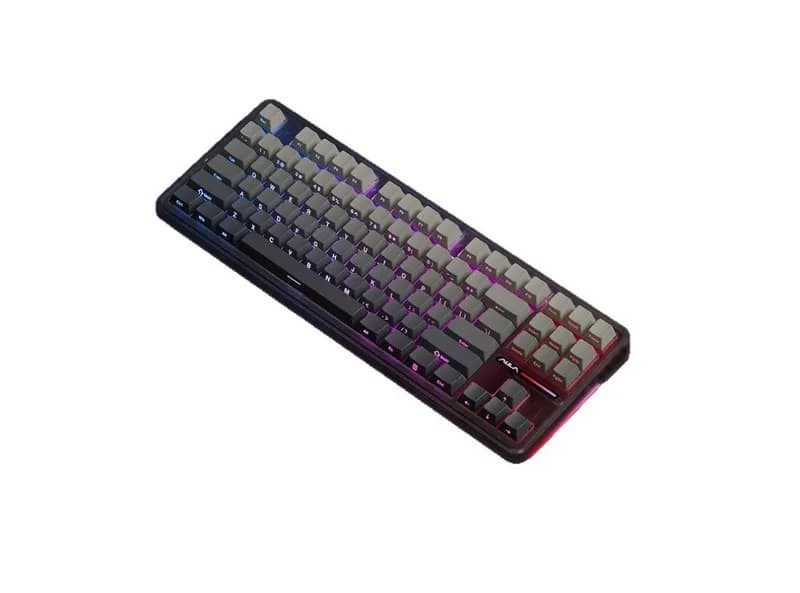
Detailed Review
If you're searching for an AULA F87 Pro review or wondering whether the keyboard is worth buying, its positioning is fairly straightforward: this is a traditional TKL mechanical keyboard that emphasizes features and versatility rather than extreme gaming specifications.
The F87 Pro's biggest strengths are its 80% layout, gasket-mounted construction, hot-swappable switches, and tri-mode connectivity. Depending on the version, it can combine USB-C, 2.4GHz wireless, and Bluetooth with PBT keycaps and RGB lighting.
Its biggest limitation is equally important: it is not a Hall Effect keyboard. There is no Rapid Trigger or adjustable magnetic actuation on the conventional F87 Pro configuration.
That makes it more interesting as an affordable all-purpose keyboard than as a dedicated competitive FPS keyboard. For users who want one board for gaming, programming, office work, and everyday typing, the feature balance is more important than having an extremely high polling rate.
What Is the AULA F87 Pro?
The AULA F87 Pro is an 80% or TKL mechanical keyboard with 87 keys.
Compared with a full-size keyboard, it removes the dedicated number pad while keeping the keys most users need for everyday desktop use:
Function row
Arrow keys
Navigation cluster
Standard alphanumeric section
This makes the F87 Pro substantially smaller than a 104-key keyboard while remaining much easier to adapt to than a 60% keyboard.
The exact configuration depends on the version and market. Different F87 Pro listings can use different switches, keycap configurations, batteries, and other hardware.
That distinction matters because the F87 Pro and F87 Pro V2 should not be treated as one identical product.
For buyers in the United States, pricing varies considerably by retailer, configuration, and promotions, so it is better to compare the actual configuration and current street price rather than rely on an old MSRP.
Typing Feel and Switch Experience
The F87 Pro's typing experience is strongly influenced by its switch option.
AULA has sold the F87 Pro with different mechanical switches, so there is no single typing feel that applies to every version.
The more important point is the keyboard's construction.
The F87 Pro uses a gasket-mounted design, with the PCB and plate supported by cushioning materials rather than being mounted as a completely rigid assembly.
In practice, this design is intended to provide a softer bottom-out feel and reduce the harshness associated with inexpensive rigid keyboard constructions.
That does not automatically make the keyboard more comfortable than every competing mechanical keyboard. Switch spring weight, keycap profile, stabilizer tuning, and the amount of internal dampening can have a substantial effect on the final result.
For long typing sessions, the TKL layout is one of the F87 Pro's strongest advantages.
You retain the function row and arrow keys without having to deal with the extra width of a number pad.
For programmers, writers, and general office users, that is a practical compromise.
Is the F87 Pro Good for Gaming?
Yes, but the answer depends on the type of gaming.
The TKL layout is naturally suitable for PC gaming because removing the number pad creates additional horizontal space for a mouse.
This can be particularly useful for FPS players who use relatively low mouse sensitivity and require large mouse movements.
The keyboard also retains the function row and arrow keys, so it doesn't force the user into the compromises associated with a 60% board.
However, the F87 Pro should not be confused with a competitive Hall Effect keyboard.
A conventional mechanical switch has a defined physical actuation mechanism. It does not provide the same adjustable actuation and Rapid Trigger behavior available from Hall Effect switches.
That means:
For general gaming: the F87 Pro is more than adequate.
For MOBA and RPG games: its traditional mechanical design is perfectly reasonable.
For casual FPS gaming: the TKL layout is useful and the keyboard is capable.
For competitive FPS players specifically looking for Rapid Trigger: a Hall Effect keyboard is the more relevant category.
This is an important distinction when evaluating an AULA F87 Pro versus a newer magnetic gaming keyboard.
What About Polling Rate and Latency?
Polling rate is one of the easiest specifications to overemphasize when shopping for a keyboard.
A higher polling rate can reduce the interval between USB reports, but that does not automatically translate into a proportionally better gaming experience.
The original F87 Pro and later F87 Pro V2 should also be distinguished here.
Some V2 configurations are marketed with significantly higher polling rates, while the original product should not automatically be assumed to have the same specification.
If you're comparing two listings, check:
Exact model name
Wired polling rate
2.4GHz polling rate
Firmware version
Switch type
PCB version
rather than assuming that every product called "F87 Pro" has identical hardware.
Sound Performance
The F87 Pro is designed around a relatively dampened sound profile rather than an intentionally loud or sharp acoustic character.
Its gasket construction and internal dampening materials can help reduce some of the hollow resonance commonly associated with inexpensive mechanical keyboards.
The final sound, however, depends heavily on:
Switch
Keycaps
Stabilizers
Plate
Internal foam
Assembly
Desk surface
This is why it would be misleading to describe every F87 Pro as having exactly the same sound.
A well-configured version can produce a relatively full and controlled sound, while individual stabilizers or switches can still introduce noticeable differences.
For buyers who care about acoustics, the exact switch configuration is therefore more important than simply reading "gasket-mounted" on the specification sheet.
Build Quality and Construction
The F87 Pro is fundamentally a budget-to-midrange mechanical keyboard rather than a premium CNC aluminum custom keyboard.
Its plastic construction keeps the price under control.
The more interesting part is how AULA uses that budget.
The keyboard combines:
Gasket mounting
Hot-swappable PCB
Internal dampening
PBT keycaps on supported configurations
Tri-mode connectivity
This is a stronger overall package than a basic budget mechanical keyboard with a rigid plate and wired-only connection.
However, buyers should not expect the weight, rigidity, or material feel of a premium aluminum keyboard costing several times as much.
The F87 Pro's value comes from configuration and functionality, not luxury materials.
Tri-Mode Connectivity
One of the F87 Pro's most useful features is its connectivity.
Supported configurations provide:
USB-C + 2.4GHz wireless + Bluetooth.
That gives the keyboard several practical use cases.
You can use USB-C for a desktop gaming setup, 2.4GHz for low-latency wireless gaming, and Bluetooth for a laptop, tablet, or secondary device.
For someone who switches between work and gaming, this can be more meaningful than a specification such as an extremely high polling rate.
Battery capacity also varies between versions, so buyers should verify the exact configuration rather than assuming that all F87 Pro listings use the same battery.
Software and Customization
The F87 Pro supports software configuration for functions such as key remapping, RGB lighting, and macros, depending on the version and software package.
For most users, that covers the important functions:
Remapping keys
Creating macros
Configuring lighting
Managing profiles
Updating firmware when supported
The keyboard is also hot-swappable, which is more important for long-term customization.
If you decide that you prefer a lighter linear switch or a different tactile switch later, you can replace the compatible switches without soldering.
However, the F87 Pro is not primarily aimed at the QMK/VIA enthusiast market.
If your priority is deep firmware-level customization and extensive open-source keyboard configuration, you should compare it with keyboards that explicitly support QMK or VIA.
macOS Support
The keyboard can be used with macOS through standard keyboard connections, but software functionality can differ between operating systems and specific versions.
This distinction is important.
Basic keyboard input is not the same as full configuration support.
If you are a Mac user who needs advanced remapping, macros, RGB controls, or firmware tools, check the current software support for the exact F87 Pro version before purchasing.
Windows users generally have the more straightforward configuration experience.
Major Advantages
Practical TKL layout
The 87-key layout is one of the safest choices for users who want a gaming keyboard that still works well for everyday computing.
Strong feature combination
Gasket mounting, hot-swappable switches, PBT keycaps on supported versions, RGB, and tri-mode connectivity create a relatively complete package for the price.
Easy switch replacement
Hot-swapping gives beginners a relatively simple way to experiment with different mechanical switches.
Good for both gaming and work
Unlike an extremely compact gaming keyboard, the F87 Pro doesn't require major compromises when used for programming, writing, or office work.
Competitive pricing
Its combination of features is particularly attractive when the keyboard is sold at an affordable street price in the U.S. market.
Major Disadvantages
No Hall Effect functionality
This is the biggest limitation for competitive gamers.
There is no Rapid Trigger on the conventional mechanical version.
Multiple configurations create confusion
The F87 Pro name covers different versions, switches, and generations.
A buyer should always inspect the detailed specification instead of purchasing based solely on the model name.
Plastic construction
The keyboard can offer good value without having the premium feel of a CNC aluminum custom keyboard.
Software is not the main selling point
The software covers common functions but does not turn the F87 Pro into an enthusiast-level programmable keyboard.
No number pad
This is an advantage for desk space but a disadvantage for users who frequently enter numbers.
Who Should Buy the AULA F87 Pro?
The F87 Pro makes sense for:
PC gamers
General FPS players
MOBA players
RPG players
Office workers
Programmers
Writers
Users who want a TKL layout
Users who want wireless connectivity
Beginners interested in hot-swappable keyboards
Buyers who want one keyboard for work and gaming
It is particularly suitable for someone who wants:
one affordable keyboard that can handle gaming, office work, wireless devices, and basic customization.
Who Should Skip It?
You should consider another keyboard if you specifically need:
Rapid Trigger
Adjustable magnetic actuation
Hall Effect switches
A number pad
Premium aluminum construction
QMK/VIA
Deep enthusiast-level customization
Competitive VALORANT and Counter-Strike 2 players who specifically want Rapid Trigger should look at Hall Effect models rather than treating the F87 Pro as a direct substitute.
How Does It Compare With Other Keyboards in Its Price Range?
The F87 Pro's main competitive advantage is balance.
It isn't necessarily the fastest keyboard.
It isn't necessarily the most customizable.
It isn't an aluminum enthusiast keyboard.
Instead, it combines several features that are usually spread across different products:
TKL + gasket mounting + tri-mode connectivity + hot-swappable switches + RGB + a relatively accessible price.
When comparing it with another keyboard at a similar U.S. street price, focus on:
Feature | What to Check |
|---|---|
Layout | TKL vs. 75% vs. 98% |
Switch | Exact switch model |
Mounting | Gasket or rigid mounting |
Hot-swap | Full-key support |
Wireless | 2.4GHz + Bluetooth |
Battery | Exact capacity |
Keycaps | PBT or ABS |
Software | Remapping and macro support |
Gaming | Hall Effect / Rapid Trigger |
Price | Actual current street price |
This approach is more useful than simply comparing RGB lighting or advertised polling rates.
AULA F87 Pro Rating
Category | Score | Reason |
|---|---|---|
Build Quality | 4.0/5 | Good construction for the price, but plastic |
Typing Feel | 4.3/5 | Gasket design and switch options provide flexibility |
Gaming | 4.0/5 | Good TKL gaming layout, but no Rapid Trigger |
Sound | 4.2/5 | Dampened design, with results depending on configuration |
Software | 3.8/5 | Covers common functions but isn't an enthusiast ecosystem |
Connectivity | 4.5/5 | Tri-mode is a major advantage |
Customization | 4.2/5 | Hot-swappable switches provide useful flexibility |
Value | 4.6/5 | Strong feature combination at an affordable price |
Overall: 4.2/5
The score reflects its intended price segment rather than comparing it directly with premium custom keyboards.
FAQ
Is the AULA F87 Pro worth buying?
For buyers looking for an affordable TKL mechanical keyboard with gasket mounting, hot-swappable switches, and tri-mode connectivity, it is a compelling configuration. The exact switch and version should be checked before buying.
Is the AULA F87 Pro good for FPS games?
Yes for general FPS gaming. However, it is not a Hall Effect keyboard and therefore does not provide the Rapid Trigger and adjustable actuation features that competitive FPS players may specifically want.
Is the AULA F87 Pro good for office work?
Yes. The TKL layout retains the function row and arrow keys while taking up less desk space than a full-size keyboard. Users who frequently work with numbers may prefer a 98% or full-size keyboard.
What is the biggest weakness of the F87 Pro?
The biggest issue is not necessarily its construction. It is the confusing range of versions and configurations. Buyers should verify the exact switch, battery, polling rate, and generation.
Does the AULA F87 Pro work with Mac?
Basic keyboard connectivity can be used with macOS, but advanced software features may vary by version. Mac users should verify current software support before buying.
Can you replace the switches?
Yes, supported F87 Pro configurations use a hot-swappable PCB, allowing compatible mechanical switches to be replaced without soldering.
What is the difference between the F87 Pro and F87 Pro V2?
The V2 is a later generation and some configurations introduce higher polling rates, larger batteries, and other hardware changes. They should not be treated as identical products simply because both carry the F87 Pro name.
Final Verdict
The AULA F87 Pro is best understood as a balanced budget TKL mechanical keyboard rather than a specialist esports keyboard.
If your priorities are:
Gaming + office work → F87 Pro makes sense.
TKL layout → F87 Pro makes sense.
Wireless connectivity → F87 Pro is attractive.
Hot-swappable switches → F87 Pro is a practical entry point.
Rapid Trigger → look at Hall Effect keyboards instead.
Number pad → consider a 98% or full-size keyboard.
Premium aluminum customization → move into a higher price category.
Its strongest selling point is therefore not one headline specification. It is the combination of TKL layout, gasket construction, tri-mode connectivity, hot-swappable switches, and a relatively low price.
For a buyer who wants a versatile mechanical keyboard rather than a dedicated competitive gaming tool, that combination is what makes the AULA F87 Pro worth considering.