Razer Keyboard Lineup 2026: Which Model Should You Buy?
Choosing a Razer keyboard is less about the product family name and more about switch technology, layout, and the features you will actually use. This buying guide explains the differences between mechanical, optical, and Hall Effect magnetic switches, then compares current models across full-size, TKL, 75%, and compact layouts. It also covers wireless connectivity, hot-swappable switches, Razer Synapse, Mac compatibility, and how to judge value at different price points.
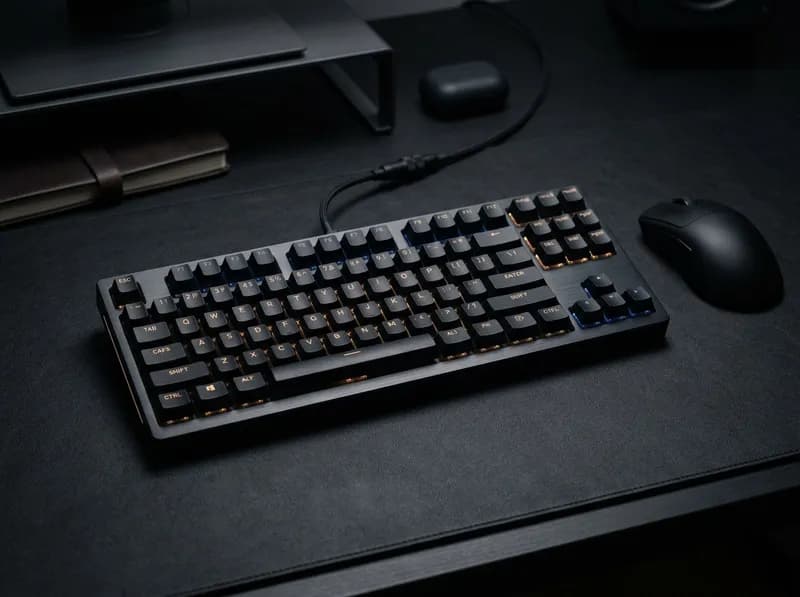
Razer's keyboard lineup is harder to shop than it needs to be. The Huntsman, BlackWidow, DeathStalker, Ornata and Reclusa families cover everything from inexpensive membrane keyboards to enthusiast boards with adjustable actuation, but the names alone tell you very little about how they differ.
Take the Huntsman V3 Pro and Huntsman V3 HE Magnetic. Both target competitive gamers, yet one uses analog optical switches and the other uses Hall Effect magnetic switches. They are not two versions of the same keyboard. The distinction affects how each key registers a press and which features are available.
Layout matters just as much. A full-size keyboard keeps the number pad but takes up more desk space. A TKL or 75% board gives your mouse more room without sacrificing dedicated arrow keys. A 60% keyboard goes further, but you have to be comfortable using function layers for keys that no longer have dedicated positions.
This guide compares Razer's keyboard families, current and announced models, approximate US prices, switch technologies and layouts. The goal is to identify which Razer keyboard makes sense for your setup—and which features are unlikely to justify the extra cost.
Quick Answer: The Best Razer Keyboard for Different Needs
What you need | Model to consider | Why |
|---|---|---|
Competitive FPS with adjustable actuation | Huntsman V3 Pro 8KHz | Analog optical switches, Rapid Trigger, adjustable actuation and 8,000Hz polling |
A Hall Effect magnetic keyboard | Huntsman V3 HE Magnetic | Magnetic switches with adjustable actuation at a lower price than the optical flagship |
One wireless keyboard for work and gaming | BlackWidow V4 TKL HyperSpeed | Tenkeyless layout, wireless connectivity and hot-swappable switches |
A compact keyboard with a dial and display | BlackWidow V4 Pro 75% | 75% layout, OLED display, Command Dial and hot-swap sockets |
A full-size keyboard with extra controls | BlackWidow V4 Pro | Number pad, dedicated macro keys, volume dial and underglow |
Shallow keys and a slim design | DeathStalker V2 Pro | Low-profile optical switches and wireless connectivity |
Mechanical switches for typing and casual gaming | BlackWidow V4 75% | Hot-swappable switches and a gasket-mounted design |
A budget Razer keyboard | Ornata V3 X | Full-size layout, low-profile membrane keys and an approximately $39.99 reference price |
A hot-swappable 65% keyboard under $50 | Reclusa X Mini 65% | Mechanical switches and sockets compatible with 3-pin and 5-pin switches |
A dedicated number pad | BlackWidow V4, BlackWidow V4 Pro or DeathStalker V2 Pro full-size | Full-size layouts retain the number pad |
For most people who want one keyboard for everyday work and gaming, the BlackWidow V4 TKL HyperSpeed is the sensible place to start, particularly when discounted. The Huntsman V3 Pro is more specialized: its price makes sense when you intend to use adjustable actuation and Rapid Trigger, not simply because you want a gaming keyboard.
Razer Keyboard Lineup: Models and Approximate US Prices
The table below summarizes the models covered in this guide. Prices are reference figures from the original research for October 2026, not guaranteed current selling prices. Razer frequently discounts its products, and some models have incomplete or difficult-to-confirm pricing.
Model | Approximate US price | Layout | Switch type | Best suited to |
|---|---|---|---|---|
Huntsman V3 Pro 8KHz | $249.99 full-size; $219.99 TKL | Full-size, TKL, 60% | Gen-2 analog optical | Competitive players who will tune actuation |
Huntsman V3 HE Magnetic 8KHz | $139.99 TKL; $119.99 Mini 65% | TKL, 65% | Hall Effect magnetic | Adjustable actuation at a lower price |
Huntsman Mini | About $119.99 | 60% | Optical, non-analog | Compact layout without adjustable actuation |
BlackWidow V4 Pro | About $229.99 | Full-size | Mechanical Green, Orange or Yellow | Full-size setup with dedicated controls |
BlackWidow V4 Pro 75% | About $299.99 | 75% | Mechanical, hot-swappable | Enthusiasts who want a dial, display and switch swapping |
BlackWidow V4 75% | About $189.99 | 75% | Mechanical, hot-swappable | Typing and gaming in a compact layout |
BlackWidow V4 | About $169.99 | Full-size | Mechanical Green or Yellow | Traditional full-size mechanical keyboard |
BlackWidow V4 TKL HyperSpeed | About $149.99 | TKL | Mechanical, hot-swappable | Wireless everyday and gaming use |
BlackWidow V4 Low-Profile HyperSpeed TKL | About $169.99 | Low-profile TKL | Low-profile mechanical | Wireless keyboard with shallow keys |
BlackWidow V4 Mini HyperSpeed | Not confirmed | 65% | Mechanical, hot-swappable | Compact wireless setup |
DeathStalker V2 Pro | Not confirmed | Full-size, TKL | Low-profile optical | Slim wireless keyboard |
DeathStalker V2 | Not confirmed | Full-size | Low-profile optical | Wired low-profile typing |
Ornata V3 | Not confirmed | Full-size | Mecha-membrane | Budget RGB keyboard |
Ornata V3 TKL | About $69.99 | TKL | Mecha-membrane | Budget board without a number pad |
Ornata V3 X | About $39.99 | Full-size | Membrane | Lowest-cost option in the lineup |
Reclusa X Mini 65% | $49.99 | 65% | Gen-3 Orange mechanical, hot-swappable | Budget mechanical keyboard with switch swapping |
Reclusa Mini 65% | Not released | 65% | Not announced | Announced model, not yet available for purchase |
These figures are useful for understanding the price tiers, but check the exact model, switch configuration and current listing before ordering. A discounted older keyboard can be a better deal than a newer model at full price, provided the feature differences do not matter to you.
Two naming distinctions are particularly important:
Huntsman V3 Pro vs. Huntsman V3 HE Magnetic: the former uses analog optical switches; the latter uses Hall Effect magnetic switches.
Reclusa X Mini 65% vs. Reclusa Mini 65%: the X Mini is the $49.99 wired model described here. The regular Mini was announced but had no confirmed price or full specifications in the source material.
How Razer's Keyboard Families Differ
Each Razer keyboard family has a different focus. Understanding those differences is a faster way to narrow the options than comparing every model in the catalogue.
Family | Main focus | What distinguishes it |
|---|---|---|
Huntsman | Competitive gaming | Adjustable actuation and Rapid Trigger on supported models |
BlackWidow | General mechanical keyboards | Broad choice of layouts, switch types, wireless models and extra controls |
DeathStalker | Low-profile typing and gaming | Shallow keys and a slim chassis |
Ornata | Budget keyboards | Membrane or mecha-membrane switches |
Reclusa | Enthusiast keyboards | Newer designs, including a low-cost hot-swappable 65% model |
Razer also sells products aimed at office use, including the Joro and Pro Type lines, as well as Tartarus gaming keypads. Those products serve different purposes and are not covered as full keyboard alternatives in the main comparison.
Mechanical vs. Optical vs. Hall Effect Switches
The switch system is one of the biggest differences between Razer keyboards. It affects how a key press is detected, whether actuation can be adjusted and which gaming features are available.
Switch technology | How it works | Razer models | Published latency figure in the source material |
|---|---|---|---|
Mechanical | A physical electrical contact registers the press. Green switches are clicky, Orange switches provide tactile feedback, and Yellow switches are linear. | BlackWidow V4 family and Pro Type Ultra | Not specified |
Analog optical | An infrared sensing system detects key movement, allowing the keyboard to respond to how far the key travels. | Huntsman V3 Pro family | 0.48 ms end-to-end |
Hall Effect magnetic | A magnetic sensor detects changes in the position of a magnet as the key moves. | Huntsman V3 HE Magnetic | 0.60 ms end-to-end |
The latency numbers are Razer's own figures under its chosen test conditions. They should not be treated as independent laboratory results or as a guarantee that every player will notice the difference.
Adjustable actuation
On supported Huntsman models, adjustable actuation lets you choose how far a key must travel before registering a press. The stated range is 0.1 mm to 4.0 mm.
A short actuation point can make a movement key respond with very little travel. A deeper setting can reduce accidental presses if you tend to rest your fingers on the keys. Neither setting is universally better; the useful point depends on your typing habits and the game you play.
Rapid Trigger
Rapid Trigger changes how a key resets after being pressed. Instead of requiring the key to return to a fixed reset point, the keyboard can re-arm it as the key starts moving back up.
That can help in games where you repeatedly tap movement keys, such as competitive shooters. For ordinary typing, office work and most casual games, it is much less important.
Snap Tap
Snap Tap is a separate input feature, not another name for Rapid Trigger. Its availability and acceptability can depend on the game and its competitive rules. If you play ranked or tournament games, check the current rules before enabling it.
The practical distinction is simple: the Huntsman V3 Pro prioritizes tunable input for competitive play, while the BlackWidow range offers a broader choice of mechanical keyboards for everyday use.
Razer Huntsman: Adjustable Actuation for Competitive Gaming
The Huntsman range is the one to examine if you specifically want adjustable actuation or Rapid Trigger. The flagship models use optical or magnetic sensing, but not every keyboard with the Huntsman name supports the same features.
Huntsman V3 Pro 8KHz
The Huntsman V3 Pro 8KHz is aimed at players who want to tune their keyboard rather than use it with factory settings. It combines analog optical switches with adjustable actuation, Rapid Trigger, Snap Tap and an 8,000Hz polling rate.
The range includes full-size, TKL and 60% versions. The approximate prices in the source material are $249.99 for full-size and $219.99 for TKL; the Mini's price was not confirmed.
The polling rate is a technical distinction, but it is not the feature most people are likely to notice first. The adjustable actuation point changes the feel of the keyboard more directly. A key configured to register at 0.5 mm behaves differently from one set to 2 mm, even though the keyboard itself has not changed.
That makes the software part of the purchase. If you do not intend to configure actuation or Rapid Trigger, a BlackWidow can provide a more practical everyday experience for less money.
There is also a price trap to watch for. The earlier, non-8KHz Huntsman V3 Pro was reportedly being cleared out at about $189.99 for full-size and $159.99 for TKL, down from reference prices of $249.99 and $219.99. Those are older-model promotional prices, not the regular prices of the 8KHz version. Check the exact product name before comparing deals.
Huntsman V3 HE Magnetic 8KHz
The Huntsman V3 HE Magnetic is Razer's Hall Effect keyboard. According to the original source material, it shipped at the end of July 2026 in wired TKL and 65% versions, at approximately $139.99 and $119.99.
Its magnetic switches are rated for a 40 g actuation force and 100 million presses. The stated actuation range is 0.1 mm to 4.0 mm, matching the range listed for the optical line.
This model is the more affordable route into Razer's magnetic-switch ecosystem. It is worth considering if you have used a Wooting or another Hall Effect keyboard and specifically want magnetic switches.
It is not automatically the fastest keyboard for every purpose. The optical Huntsman V3 Pro remains Razer's higher-positioned competitive model in the source material, while the magnetic model provides a different switch technology at a lower price.
Huntsman Mini and Older Models
The Huntsman Mini is a compact 60% keyboard with optical switches, but it does not have the analog sensing used by the Huntsman V3 Pro. It therefore lacks adjustable actuation and Rapid Trigger.
That distinction matters when shopping by family name. An optical switch does not automatically mean an analog optical switch, and a compact Huntsman is not necessarily a cheaper version of the flagship.
Older Huntsman V2, V2 Analog, Elite and Tournament Edition models also appear in existing reviews and buying guides. They should not be confused with the current lineup. If you find one on clearance, compare its exact features and price against the current models rather than assuming the older product is equivalent.
Razer BlackWidow: The Most Versatile Family
BlackWidow is the broadest Razer keyboard range. It includes traditional full-size mechanical boards, compact typing-focused models, wireless keyboards and enthusiast options with extra controls.
For buyers who use the same keyboard for work and gaming, BlackWidow is often the best place to start.
BlackWidow V4 Pro
The BlackWidow V4 Pro is a full-size mechanical keyboard with a number pad, dedicated macro keys, a volume dial and underglow lighting. Its reference price is about $229.99.
The extra controls are useful if you regularly assign macros, adjust volume from the keyboard or use media controls throughout the day. They are less compelling if you mainly type and play games with standard key bindings.
Compared with the standard BlackWidow V4 at about $169.99, the Pro costs roughly $60 more. The difference is easier to justify if you will use the macro keys and dial than if the keyboard will spend most of its time functioning as a conventional mechanical board.
BlackWidow V4 Pro 75%
The BlackWidow V4 Pro 75% is a compact enthusiast keyboard priced at about $299.99 in the source material. It retains the arrow keys and function row while removing the number pad.
Its main extras are an OLED display, a Command Dial and hot-swappable switch sockets. Razer documentation says the dial's eight default functions work without installing software, while custom assignments require Synapse.
This is a very different purchase from the standard V4 75%. The Pro makes sense if you want the display, dial and ability to change switches. If those features are not on your list, the standard V4 75% costs about $110 less and still provides a compact layout with hot-swap sockets and a gasket-mounted plate.
BlackWidow V4 and V4 75%
The standard BlackWidow V4 is a full-size mechanical keyboard, listed at about $169.99, with Green or Yellow switch options.
The V4 75% costs about $189.99. It drops the number pad but adds hot-swappable sockets and a gasket-mounted plate, making it the more interesting option for buyers who prioritize typing feel and future switch changes.
The BlackWidow V4 X is another model in the family, but the original research did not establish a current US price from two independent sources. Check the current product listing before treating it as a direct price competitor.
BlackWidow V4 TKL HyperSpeed
The BlackWidow V4 TKL HyperSpeed combines a tenkeyless layout, wireless connectivity and hot-swappable switches. Its reference price is about $149.99, with discounts reported regularly.
It is a strong all-purpose option because it avoids several compromises. You keep the arrow keys and function row, gain more mouse space than a full-size keyboard provides, and can replace the switches without buying an entirely new board.
It does not have the adjustable actuation of the Huntsman V3 Pro or the display of the V4 Pro 75%. Those omissions are not necessarily drawbacks. For many users, a reliable layout and wireless connection are more useful than features that require extra configuration.
BlackWidow V4 Low-Profile HyperSpeed
This wireless TKL model uses low-profile mechanical switches and has a reference price of about $169.99. A full-size version also exists, but its price was not confirmed in the source material.
Low-profile mechanical switches have less travel than conventional mechanical switches. They are not interchangeable with standard-height switches, so anyone planning to experiment with replacement switches should check compatibility before buying.
Consider this model if you prefer a thinner keyboard but still want mechanical switches and a familiar TKL layout.
BlackWidow V4 Mini HyperSpeed
The BlackWidow V4 Mini HyperSpeed is a wireless 65% keyboard with hot-swappable mechanical switches. Its current US price was not confirmed in the source material.
A 65% layout keeps dedicated arrow keys while removing the number pad and function row. It is worth considering when desk space is limited but a 60% keyboard would require too many function-layer shortcuts.
Razer DeathStalker: Low-Profile Keys
DeathStalker is Razer's low-profile line. Its keys sit closer to the desk, have less travel than standard-height keys and use a thinner overall chassis.
The current models covered in the source material use low-profile linear optical switches. The main reason to choose one is the shallow typing feel, not the number of gaming features.
DeathStalker V2 Pro
The DeathStalker V2 Pro is available in full-size and TKL layouts and adds wireless connectivity. Razer's stated battery life is up to 40 hours under specified conditions.
That figure should be treated as a best-case estimate. RGB brightness, lighting effects and the connection mode can all affect battery life, so actual results may be lower.
The low-profile design suits people who move between laptop and desktop keyboards and prefer shorter key travel. It is less suitable for someone who likes the deeper movement and pronounced feel of conventional mechanical switches.
If you have never used a low-profile keyboard, try one before committing to a premium model. The shorter travel is a preference, not a universal improvement.
DeathStalker V2 Pro TKL
The TKL version removes the number pad and reduces the keyboard's footprint. That leaves more room for the mouse, especially in games where you use a low sensitivity setting and make wider movements.
Choose it over the full-size model if you rarely use the number pad. If spreadsheets and number entry are part of your daily work, the full-size version may be worth the additional space.
DeathStalker V2
The wired DeathStalker V2 retains the low-profile optical approach without the wireless premium. It is worth considering for a desktop that never moves.
Compare its current selling price with the V2 Pro before buying. An older wired keyboard loses much of its appeal if it costs nearly as much as the wireless version.
BlackWidow vs. DeathStalker
The main difference between BlackWidow and DeathStalker is the typing experience.
BlackWidow uses conventional mechanical switches and offers a broader selection of layouts and controls. DeathStalker prioritizes low-profile optical switches and a slimmer design, with wireless connectivity on the Pro models.
If you prefer deeper key travel, start with BlackWidow. If you want shallow keys closer to a laptop keyboard, look at DeathStalker. That decision will usually narrow the choice faster than comparing RGB lighting or other secondary features.
Razer Ornata: Budget Membrane and Mecha-Membrane Keyboards
Ornata is the budget family, but the models do not all use the same switch technology. The V3 and V3 TKL use mecha-membrane switches, while the V3 X uses a conventional membrane design.
Mecha-membrane combines a membrane-based mechanism with a tactile element intended to give the press a more mechanical-style feel. It is not the same as a traditional mechanical switch, and the switches are not hot-swappable.
Ornata V3 and V3 TKL
The Ornata V3 is full-size, while the V3 TKL removes the number pad. Both use mecha-membrane switches and RGB lighting.
The TKL version has a reference price of about $69.99. A reliable current US price for the full-size model was not confirmed in the original research.
These keyboards make sense if you want a basic gaming layout and prefer a softer press to a conventional mechanical switch. They are less appealing if you want to change switches later or are specifically shopping for the feel of a mechanical BlackWidow.
If a standard BlackWidow is available for around $20 more, compare the two carefully. The additional cost may be worthwhile for a buyer who wants mechanical switches and a more upgrade-friendly design.
Ornata V3 X
The Ornata V3 X is the least expensive keyboard in this comparison, with a reference price of about $39.99. It uses low-profile membrane keys rather than the mecha-membrane system found in the other V3 models.
That is the main reason for the lower price. It is a straightforward full-size keyboard with RGB lighting, but it does not offer the switch characteristics or hot-swap flexibility of the mechanical models.
Cynosa, which still appears in older buying guides, has been discontinued according to the original research. If you find one on clearance, compare the price against the Ornata V3 X rather than paying a premium for an older model.
Razer Reclusa: An Affordable Hot-Swappable 65% Keyboard
Reclusa is the newest family discussed here. Razer describes it as an enthusiast line, although the first available model is priced well below most enthusiast keyboards.
Reclusa X Mini 65%
The Reclusa X Mini 65% costs $49.99 in the source material. It is a wired 65% keyboard with Gen-3 Orange tactile mechanical switches, south-facing LEDs and hot-swap sockets compatible with both 3-pin and 5-pin switches.
The appeal is straightforward: it offers mechanical switches and switch replacement at a low entry price. You can experiment with other compatible switches without paying nearly $200 for a BlackWidow V4 75%.
There are trade-offs. The board is wired, polling is 1,000Hz rather than 8,000Hz, and it lacks dedicated media controls, a wrist rest and adjustable actuation. Those omissions are consistent with its price and purpose.
For someone who wants a compact mechanical keyboard and is curious about switch swapping, it is one of the more interesting budget options in the Razer lineup.
Reclusa Mini 65%
The regular Reclusa Mini 65% had been announced but was not released in the source material. Razer's product page offered a sign-up option but did not provide a confirmed price, switch specification or connection details.
Until those details are published and the product is available to buy, it should not be treated as a direct alternative to the Reclusa X Mini.
Keyboard Layouts: Full-Size vs. TKL vs. 75% vs. 60%
Layout affects everyday use more than many headline specifications. A slightly higher polling rate will not compensate for a missing arrow key if you use the keyboard for spreadsheets, coding or document editing.
Layout | What you keep | What you lose | Best suited to |
|---|---|---|---|
Full-size | Main typing keys, function row, navigation keys and number pad | More desk space and less room for mouse movement | Spreadsheets, frequent number entry and users who want every key |
TKL | Arrow keys, function row and navigation cluster | Number pad | Gaming and general work on one desk |
75% | Arrow keys and function row in a compact arrangement | Number pad and some spacing between key groups | Compact desks where dedicated arrow keys still matter |
60% | Main typing block | Dedicated arrows, function row and navigation keys | Small desks and players comfortable with function layers |
A 60% keyboard is not automatically better for competitive gaming. It can leave more room for the mouse, but arrow keys and function keys usually require modifier combinations. If you use the same computer for work, a TKL or 75% board is often easier to live with.
The best layout is the one that fits both your desk and your routine. Consider how often you use the number pad, navigation keys and function row before deciding that a smaller keyboard is an upgrade.
Wired vs. Wireless Razer Keyboards
A wired keyboard does not need charging and has no wireless connection to reconnect. For a desktop that stays in one place, those advantages can be enough to make wired the more practical choice.
Wireless keyboards provide a cleaner desk and make it easier to move between devices. The available connection modes vary by model, however. Some Razer keyboards support both 2.4GHz wireless and Bluetooth, while others offer fewer options. Check the exact model rather than assuming that every wireless Razer keyboard supports both.
Razer HyperSpeed is a 2.4GHz connection designed for low-latency use. It is different from Bluetooth, so the two should not be treated as interchangeable when comparing gaming performance.
Battery-life claims also need context. The DeathStalker V2 Pro is rated for up to 40 hours under stated conditions, but lighting brightness and effects affect the result. If you keep RGB lighting bright, expect a different result from a setup with lighting reduced or switched off.
For competitive gaming, a well-implemented wireless connection can be suitable. The more important question is whether the specific keyboard offers the layout and switch features you want. In Razer's range, the most specialized adjustable-actuation models are wired, while several BlackWidow models provide a more conventional wireless experience.
Do You Need Razer Synapse? What About Mac Support?
Razer keyboards can perform basic typing functions without Synapse. The software matters when you want to configure the features that distinguish the more expensive models.
Depending on the keyboard, Synapse can be used for:
RGB lighting and lighting effects
Macros and key remapping
Adjustable actuation profiles
Rapid Trigger and related input settings
Snap Tap
Custom Command Dial assignments
Onboard-memory support varies by model and by feature. Do not assume every setting will remain active when the keyboard is connected to another computer or when Synapse is not running. If a particular function is essential, check the model's manual for its onboard-memory behavior.
Mac users should pay particular attention to software support. Basic keyboard input works on a Mac, but the source material identifies Synapse as Windows-only. That limits access to advanced configuration features, particularly on the Huntsman models whose value depends heavily on adjustable settings.
If you want a keyboard that works with minimal configuration, a conventional BlackWidow may be a better fit than paying extra for a Huntsman V3 Pro. If you use a Mac and want extensive remapping, also compare keyboards that support Mac layouts and configuration tools such as QMK and VIA.
What Razer Keyboard Prices Actually Buy
Razer's prices do not form a simple progression from slow to fast. Higher prices usually buy a particular feature, a different construction or a more specialized layout.
Price range | Models in this comparison | What the money buys | Buying advice |
|---|---|---|---|
Under $50 | Ornata V3 X, Reclusa X Mini 65% | A full-size membrane board or a compact hot-swappable mechanical keyboard | Choose based on switch preference and layout |
$60–$140 | Ornata V3 TKL, Huntsman Mini, Huntsman V3 HE Magnetic | Mecha-membrane, optical or magnetic switches, depending on the model | The magnetic TKL is notable if you specifically want adjustable actuation |
$140–$190 | BlackWidow V4 TKL HyperSpeed, BlackWidow V4, BlackWidow V4 75% | Wireless connectivity, hot-swap sockets or a gasket-mounted design | The most practical range for many everyday users |
$190–$260 | BlackWidow V4 Pro, Huntsman V3 Pro 8KHz full-size | Dedicated controls or advanced competitive input features | Pay more only if you will use those features |
$260 and up | BlackWidow V4 Pro 75% | OLED display, Command Dial and hot-swappable switches in a 75% layout | Best reserved for buyers who want those specific extras |
The BlackWidow V4 TKL HyperSpeed is a strong value candidate when discounted. It combines wireless connectivity, a familiar layout and hot-swappable mechanical switches without requiring you to pay for the advanced actuation controls of the Huntsman range.
The Reclusa X Mini 65% is the lower-cost alternative if you want to experiment with mechanical switches. The BlackWidow V4 75% is a step up for buyers who place more emphasis on typing feel and construction.
Before paying more, identify the feature you are buying. A dial, OLED display or adjustable actuation system has little value if it never becomes part of your routine.
Razer vs. Logitech G, Corsair, SteelSeries, Wooting and Keychron
The best alternative depends on what you want to improve. A direct comparison between two keyboards with similar layouts and features is more useful than choosing a brand based on reputation alone.
Razer vs. Logitech G
Logitech G offers a broad range of wired and wireless gaming keyboards and has a large retail presence. When comparing a Logitech wireless TKL with the BlackWidow V4 TKL HyperSpeed, check the current selling prices and switch options. Both brands discount their products frequently, so launch prices may not reflect the better deal today.
Razer vs. Corsair
Corsair's K70 family competes with the full-size BlackWidow V4 Pro. Both ranges include models with a number pad, volume controls and additional gaming features.
The useful comparison is the exact switch type, layout, control placement and sale price. Feature lists can look similar even when the typing experience differs.
Razer vs. SteelSeries
SteelSeries' Apex Pro family is a direct competitor to the Huntsman V3 Pro because it also offers adjustable actuation on supported models.
Compare the supported actuation range, available layouts, software controls and current price. This is a case where reading the specification tables side by side is more helpful than relying on broad claims about which brand is faster.
Razer vs. Wooting
Wooting is an important alternative for buyers specifically interested in magnetic switches and adjustable actuation. If those features are the main reason you are shopping, compare the current Wooting models with the Huntsman V3 HE Magnetic.
The decision should come down to price, layout, software preferences and the exact features each model supports. Do not assume that all Hall Effect keyboards behave identically simply because they use magnetic sensing.
Razer vs. Keychron
Keychron is worth considering if typing, Mac compatibility and key remapping matter more than gaming-specific features. Many Keychron keyboards offer Mac-oriented layouts and support QMK or VIA on compatible models.
Razer may be the more natural choice for someone already using its gaming software and peripherals. For a Mac user who wants extensive remapping without relying on Razer's Windows-focused software, a compatible Keychron model may be more practical.
Which Razer Keyboard Is Best for Your Game?
There is no single best Razer keyboard for every game. Layout, switch technology and the amount of configuration you want to do are more useful starting points.
Best Razer Keyboard for Competitive FPS
The Huntsman V3 Pro 8KHz is the specialist option for players who want adjustable actuation, Rapid Trigger and high polling rates. Choose TKL if you want a familiar layout, or 60% if you are comfortable using function layers.
The Huntsman V3 HE Magnetic TKL offers a lower-cost route to adjustable actuation and Rapid Trigger, with the source material placing it around $139.99. If you do not plan to configure either feature, the BlackWidow V4 TKL HyperSpeed is a more straightforward wireless option.
The keyboard is only one part of the setup. Sensitivity, key bindings and comfort still matter, and a more expensive board cannot compensate for settings that do not suit your play style.
Best Razer Keyboard for MMO and MOBA
A full-size keyboard is useful if you rely on the number pad or want a large set of dedicated keys. The BlackWidow V4 Pro adds macro keys and a volume dial, which may justify the higher price for players who use those controls.
If you want additional programmable controls without replacing your main keyboard, Razer's Tartarus keypad is another option. It is an accessory rather than a keyboard replacement.
Best Razer Keyboard for General Gaming
The BlackWidow V4 TKL HyperSpeed is a practical all-rounder when available at a discounted price. It retains the keys most people use regularly, leaves room for mouse movement and offers wireless connectivity.
For a tighter budget, the Ornata V3 X is a basic full-size option at about $39.99. Its membrane switches are a different experience from the mechanical BlackWidow models, so the lower price should be weighed against your preference for key feel.
Best Razer Keyboard for Gaming and Work
The BlackWidow V4 75% is worth considering if typing feel and a compact layout are priorities. It keeps the arrow keys and function row, adds hot-swap sockets and uses a gasket-mounted plate.
The BlackWidow V4 TKL HyperSpeed trades that gasket-mounted design for wireless connectivity. If you prefer shallow keys, look at the DeathStalker V2 Pro, but try a low-profile keyboard before spending money on one.
When a Razer Keyboard Isn't Worth the Extra Money
The premium models are easier to justify when you can name the feature you want. Without that, it is easy to spend more for a specification that has little effect on everyday use.
Skip the Huntsman V3 Pro if you will not tune it. Adjustable actuation and Rapid Trigger are central to its appeal. If you want a conventional gaming keyboard, a BlackWidow is likely to make better use of your budget.
Skip the BlackWidow V4 Pro 75% if you do not need its extras. If you will not use the display, dial or hot-swap sockets, the standard BlackWidow V4 75% costs considerably less.
Think carefully if you use a Mac. Basic typing works, but the source material identifies Synapse as Windows-only. That limits access to the advanced settings that make the most expensive Razer keyboards distinctive.
Do not pay for wireless if the keyboard never moves. A wired model avoids charging and connection management. The extra cost of wireless is worthwhile only if the convenience matters to you.
A more expensive keyboard is not automatically a better purchase. It is better only when the features match how you use it.
Frequently Asked Questions
Is the Razer Huntsman or BlackWidow better?
They serve different needs. Huntsman is the range to consider for adjustable actuation and Rapid Trigger on supported optical or magnetic models. BlackWidow offers conventional mechanical switches, a wider variety of everyday layouts and several wireless options.
If you do not intend to adjust actuation settings, a BlackWidow is likely to be the more practical choice.
What is the best Razer keyboard for competitive FPS?
The Huntsman V3 Pro 8KHz is the specialist choice for players who want adjustable actuation and Rapid Trigger. The Huntsman V3 HE Magnetic TKL provides similar core features at a lower reference price. For players who do not need tunable switches, the BlackWidow V4 TKL HyperSpeed is a reasonable all-round option.
What is the difference between the Huntsman V3 Pro and Huntsman V3 HE Magnetic?
The switch technology is different. The Huntsman V3 Pro uses analog optical switches, while the Huntsman V3 HE Magnetic uses Hall Effect magnetic switches.
The original research places the magnetic model at about $139.99 for TKL and $119.99 for 65%, making it a lower-cost option for buyers who want magnetic switches. It should not be described as a magnetic version of the optical keyboard; the two are separate products.
Is Rapid Trigger worth paying extra for?
Rapid Trigger is most relevant in games where you repeatedly press and release the same movement keys and want the key to reset quickly. Competitive shooters are the clearest use case.
For typing, office work and casual gaming, it is unlikely to be the first feature worth paying for. Layout, switch feel and comfort may make a bigger difference.
Do Razer keyboards work without Synapse?
Yes. Basic typing works without Synapse, but access to features such as lighting customization, macros, remapping, adjustable actuation, Snap Tap and custom Command Dial assignments depends on the model and software.
Onboard-memory support also varies. If you need a setting to remain active on another computer or without the software running, check the manual for the specific keyboard.
Do Razer keyboards work on a Mac?
Basic keyboard input works on a Mac. The source material identifies Synapse as Windows-only, which limits advanced configuration on macOS.
If you need extensive remapping on a Mac, compare compatible keyboards that support Mac layouts and tools such as QMK or VIA. Confirm support for the exact model before buying.
Which Razer keyboards are hot-swappable?
The models identified as hot-swappable in the source material are:
BlackWidow V4 75%
BlackWidow V4 Pro 75%
BlackWidow V4 TKL HyperSpeed
BlackWidow V4 Mini HyperSpeed
Reclusa X Mini 65%
The Reclusa X Mini supports both 3-pin and 5-pin switches. Check the socket and compatibility details for the other models before buying replacement switches.
Is the Reclusa X Mini 65% worth $49.99?
It is worth considering if you want a compact mechanical keyboard with hot-swap sockets at a low price. The trade-offs are a wired-only connection, 1,000Hz polling, no dedicated media controls and no adjustable actuation.
For someone who wants to try different mechanical switches without paying for a more expensive enthusiast keyboard, those compromises may be reasonable.
Is a wireless Razer keyboard suitable for competitive gaming?
Razer's HyperSpeed connection is designed for low-latency use and is different from Bluetooth. A wireless BlackWidow can be a practical gaming keyboard.
The more specialized adjustable-actuation models in the source material are wired, however. If adjustable actuation is your priority, check the connection type of the exact Huntsman model rather than assuming that all premium gaming keyboards are wireless.
Are Razer keyboards known for double-typing problems?
Reports of double-typing—where one key press registers twice—appear in Razer community discussions and on Reddit, including discussions about BlackWidow models. Individual reports do not establish how common the problem is, and the source material provides no reliable failure-rate data for the keyboards covered here.
A sensible precaution is to buy from a retailer with a clear return policy and keep your order details. Online complaints can identify issues worth investigating, but they are not enough to calculate the likelihood of a defect.
What is the Razer keyboard warranty in the United States?
Warranty coverage depends on the model. The original research notes that Razer's US store pages list up to two years for many keyboards, alongside a 14-day return window for orders placed directly with Razer.
Check the warranty and return terms for the exact product before ordering. A retailer's return policy is separate from the manufacturer's warranty.
Are Razer keyboards worth buying?
Razer offers a broad range of switch technologies and layouts, from inexpensive membrane keyboards to premium boards designed for competitive gaming. Whether a particular model is worth its price depends on how much you will use its distinctive features.
For most everyday gaming and work setups, a BlackWidow is the practical starting point. Choose a Huntsman when you specifically want adjustable actuation or Rapid Trigger, a DeathStalker when you prefer low-profile keys, and an Ornata when the budget matters more than switch customization.
The best Razer keyboard is the one that fits your hands, desk, games and typing habits—not necessarily the one with the highest polling rate or the most expensive feature list.
Related GuidesMore →
Best Lenovo Legion Gaming Laptops in 2026: Which Model Should You Buy?
Lenovo Legion's 2026 lineup includes gaming laptops, handheld PCs, Android tablets, desktop towers, and gaming monitors. This guide explains the differences between the Legion 5, Pro 5, 7i, Pro 7i, and flagship 9i, along with the newer 7a models and the entry-level LOQ series. Compare GPU power, displays, upgrade options, U.S. prices, and independent test results to find the right system for your budget and gaming needs.
Best 75% Keyboards in 2026: Top Picks for Gaming, Work, and Everyday Use
Looking for the best 75% keyboard for gaming, work, or everyday typing? This guide compares six keyboards across different budgets and priorities, including the Keychron V1 Max, EPOMAKER x AULA F75, WOBKEY Rainy75, NuPhy Air75 V3, Wooting 80HE, and ASUS ROG Azoth. Compare dimensions, connectivity, switch compatibility, battery claims, customization, and approximate U.S. prices to find a keyboard that fits your workflow and desk.
How to Choose a JBL Bluetooth Speaker: Go, Clip, Flip, Charge, Xtreme, and Boombox Compared
Choosing a JBL Bluetooth speaker is easier when you match the model to how you actually listen. This guide compares the Go 5, Clip 5, Grip, Flip 7, Charge 6, Xtreme 5, Boombox 4, and PartyBox lineup by sound, portability, battery life, durability, and price. Find out which JBL speaker suits travel, everyday listening, outdoor gatherings, or parties, and when an older generation may offer better value than the newest model.