Dawn Pro 2 vs KA13: Which Dongle DAC Should You Actually Buy?
The Moondrop Dawn Pro 2 ($59.99) and FiiO KA13 ($64.68–75.99) are both compact USB DAC dongles under $80, but they target different users. One is built around low noise, PEQ and IEM use; the other is built around raw amplifier power and Desktop Mode. Here's how to pick based on your headphones.
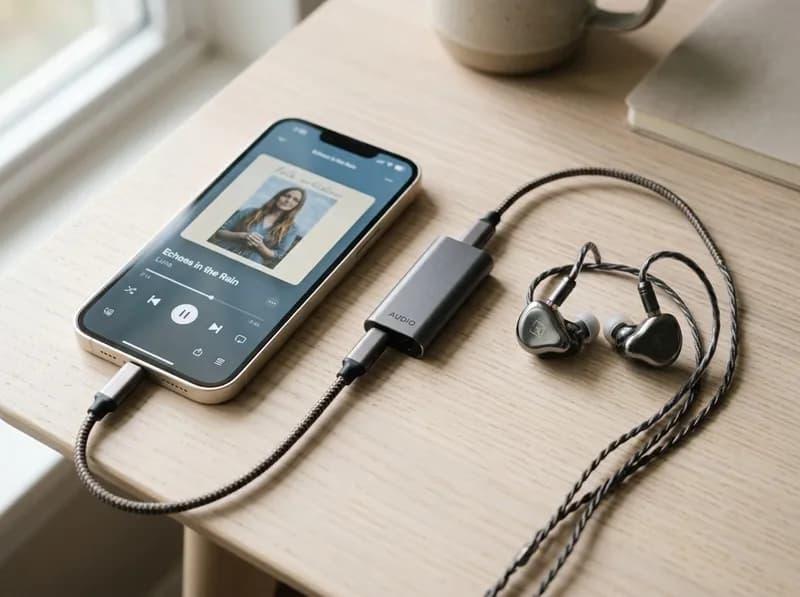
If you're shopping for a compact USB DAC dongle under $80, you've probably narrowed it down to these two. The Moondrop Dawn Pro 2 ($59.99) and FiiO KA13 ($65–79) sit in the same price bracket, but they were built around completely different priorities. One is for people who want low noise, PEQ and a tiny body for IEM use; the other is for people who want real amplifier headroom for harder-to-drive headphones. Here's how to figure out which one is actually for you.
Quick Answer
If you... | Look at | Why |
|---|---|---|
Use sensitive IEMs with your phone | Dawn Pro 2 | Lower noise floor, smaller body, finer volume control |
Want parametric EQ on the go | Dawn Pro 2 | 8-band PEQ via app and web — KA13 has no EQ |
Drive full-size headphones (60Ω+) | KA13 | 550mW balanced output with Desktop Mode |
Use 250–300Ω headphones | KA13 | Higher voltage capability matters here |
Want one dongle for IEMs now, bigger headphones later | KA13 | More amplifier headroom for future upgrades |
Want SPDIF output to an external DAC | KA13 | Dawn Pro 2 has no SPDIF |
Use a Lightning iPhone | KA13 | Includes a Lightning cable in the box |
Want maximum portability | Dawn Pro 2 | 13g vs 19g, shorter body |
The specs, side by side
Specification | Moondrop Dawn Pro 2 | FiiO KA13 |
|---|---|---|
DAC chips | Dual Cirrus Logic CS43198 | Dual Cirrus Logic CS43131 |
Amplification | Moondrop TYPE-UA01 architecture | Dual SGM8262 op-amps |
3.5mm output | Yes | Yes |
4.4mm balanced | Yes | Yes |
Official output | 124mW + 124mW @16Ω, THD+N <1% | 170mW + 170mW @32Ω SE; 550mW + 550mW @32Ω balanced (Desktop Mode); 260mW + 260mW balanced without |
Output voltage | 4.1Vrms @0dBFS | 2.3V SE / 4.2V balanced |
Dynamic range / SNR | 132dB | ≥122dB |
THD+N | 0.00014% @1kHz | <0.0005% |
Noise floor | Not specified numerically by Moondrop; Headfonia found it "Vanta black" with sensitive IEMs | <1.7μV SE / <3.1μV balanced (FiiO spec) |
PCM / DSD | 32-bit/384kHz / DSD256 | 32-bit/384kHz / DSD256 |
Hardware volume | 100-step electronic volume | Physical volume buttons |
Desktop Mode | No | Yes (hardware switch) |
SPDIF output | No | Yes (via 3.5mm, needs adapter) |
EQ / DSP | 8-band parametric EQ via app and web | No EQ (digital filters only) |
Weight | ~13g | ~18.5–19g |
Dimensions | ~42.5 × 23.2 × 11.4mm | ~56.3 × 22 × 10.5mm |
App | Moondrop app / Web DSP | FiiO Control (Android only for KA13) |
US price (Oct 2026) | $59.99 | $64.68–75.99 |
Prices verified at Apos Audio, Amazon, Audio46, HiFiCat, and Bestpeek/Walmart in October 2026. Promotional pricing may differ.
The power numbers don't mean what you think they mean
Before we get into which one is "more powerful," there's something you need to know about these specs.
Moondrop rates the Dawn Pro 2 at 124mW + 124mW at 16Ω. FiiO rates the KA13 at 550mW + 550mW at 32Ω, balanced, with Desktop Mode enabled. Those are different impedance loads, different outputs, and different test conditions. You cannot just divide 550 by 124 and conclude the KA13 is 4.4 times more powerful.
What the numbers do tell you is the design philosophy. Moondrop built the Dawn Pro 2 around efficient IEMs and portable use. FiiO built the KA13 to stretch further toward demanding headphones. The actual power gap is real, but it's not as dramatic as the raw specs suggest — and for most IEMs, it doesn't matter at all.
Driving power: where the KA13 pulls ahead
This is where the KA13 creates its strongest technical advantage.
Through the 4.4mm balanced output with Desktop Mode on, the KA13 can push up to 550mW per channel at 32Ω. Turn Desktop Mode off and it drops to 260mW — still more than the Dawn Pro 2's 124mW at 16Ω, but not by a wild margin. The Dawn Pro 2 tops out at 4.1Vrms, which is plenty for IEMs but starts to feel limited with demanding planar or high-impedance headphones.
Headfonia's KA13 review noted that it was the first dongle they'd tested that outpowered the iBasso DC06, and that it could even drive Sennheiser HD800 and Audeze LCD-4 through the balanced output — not something you'd expect from a $75 dongle. They also found it "perfectly silent most of the time" with sensitive IEMs, though "a little more hissy" compared to the iBasso DC04 Pro with ultra-sensitive IEMs.
The Dawn Pro 2, on the other hand, was found by Headfonia to have essentially zero audible hiss even with hyper-sensitive IEMs — they called the noise floor "Vanta black." But its amplifier runs out of headroom with inefficient headphones. As they put it, with planar headphones the bass "can sound restrained," and they recommended sticking to IEMs.
So the picture is: both are quiet enough for IEMs, but the KA13 has a much higher ceiling when you need raw power.
Noise and sensitive IEMs
If your IEM reaches a comfortable listening level with only a tiny fraction of the available output, extra power doesn't do anything useful. What matters then is how quiet the background is.
Both dongles are designed with low noise floors. FiiO specifies the KA13 at below 1.7μV (single-ended) and below 3.1μV (balanced). Moondrop doesn't publish a noise floor voltage, but Headfonia's testing found the Dawn Pro 2 essentially silent with hyper-sensitive IEMs like the 64 Audio U12t and VE PRO.
This isn't a "Dawn Pro 2 is silent, KA13 hisses" situation. It's more that the Dawn Pro 2's entire design — from the three independent LDO power supplies to the dedicated crystal oscillator — is built around pushing the noise floor as low as possible for IEM use. The KA13 balances low noise with a substantially more powerful amplifier stage. If you have an extremely sensitive multi-driver IEM and you listen at low volumes in a quiet room, the Dawn Pro 2 gives you a marginally darker background. For most people, the difference is academic.
Sound quality: smaller than the power gap
This is where you need some restraint. The two dongles do not have an enormous "one sounds dramatically better" gap.
Both are broadly neutral and clean. Headfonia described the Dawn Pro 2 as "neutral and transparent" with "controlled bass and relatively little coloration." Headfonics found the KA13 offered "improvements in staging and dynamics" compared to earlier FiiO dongles, with a "linear but energetic" signature.
The bigger point: your IEM or headphone's own tuning will have a much larger effect on vocals, instrument balance, and overall tonality than the difference between these two DACs. The Dawn Pro 2's bass is controlled and restrained — it doesn't rely on bass coloration to create warmth. The KA13's stronger amplifier can provide better control and headroom when the headphone demands more current, but with efficient IEMs, the audible difference is small.
The most useful question isn't "which sounds better?" — it's "which amplifier architecture is better matched to your headphones?"
What does the KA13 Desktop Mode actually do?
Desktop Mode is the KA13's defining feature, and it's worth understanding what it is and isn't.
It's a hardware switch on the side of the dongle that changes the amplifier's operating mode to provide higher output and gain. FiiO positions it for higher-impedance and harder-to-drive headphones. It's not an EQ preset, and it doesn't change the tonal signature.
But there's a trade-off. Higher output means more power draw from the USB host. When you're connected to a phone, that means faster battery drain and more heat. FiiO's Japanese documentation indicates the device can reach approximately 37–40°C during extended operation. Headfonics noted "high battery consumption in desktop mode" as one of the KA13's cons, and Headfonia measured standby power consumption at 140mA — higher than the KA2's 80mA or the KA5's 110mA.
So Desktop Mode is not a "better sound" switch you leave on permanently. Think of it as extra amplifier headroom you turn on when your headphones actually need it. For a 32Ω high-sensitivity IEM, it's unnecessary. For a demanding planar or a 250Ω full-size headphone, it can make a real difference.
DSP and PEQ vs hardware power: what you're paying for
This is where the two products diverge most sharply in philosophy.
The Dawn Pro 2's biggest feature is its DSP platform. Through the Moondrop Android app or a web-based interface, you get an 8-band parametric EQ with adjustable filter type, frequency, gain, and Q value. There's a community-driven preset library where you can download EQ profiles for popular IEMs. For someone who enjoys tuning their IEM to a target curve, this is genuinely interesting — you don't usually get desktop-level PEQ in a $60 dongle.
There is, however, a significant catch Headfonia flagged: the EQ settings don't persist. Every time you disconnect or reboot, your profiles vanish. You have to reapply them — or, on a PC, manually re-upload a saved TXT file through the web app. This turns what could have been a killer feature into something that works well for stationary use but is frustrating on the go.
The KA13 takes the opposite approach. No EQ, no DSP. Instead you get hardware volume buttons, a physical Desktop Mode switch, SPDIF output, RGB sampling-rate indication, and the FiiO Control app (Android only) for digital filters and settings. It's a hardware-oriented product: the money went into amplifier power and physical controls, not software flexibility.
So: Dawn Pro 2 if you want to shape and customize the sound. KA13 if you want to maximize hardware capability and amplifier output.
Size, build and portability
Both are small enough to be genuine dongles, but the Dawn Pro 2 wins when minimum size is the priority.
At 42.5mm long and 13g, the Dawn Pro 2 feels like a purpose-built portable IEM accessory. It's short enough to sit between your phone and a case without creating leverage, and light enough that you barely notice it in a pocket. The aluminum body has a sandblasted finish and feels dense and well-built. The one sore point Headfonia flagged is the volume button — it's wobbly, inherited unchanged from the original Dawn Pro, and prone to double-clicking if you're not precise.
The KA13 is longer at 56.3mm and heavier at 18.5–19g. The extra size is largely justified by the more powerful amplification hardware and the Desktop Mode switch. Its CNC aluminum body is flawlessly built — Headfonia called it "absolutely flawless" in build quality, preferring it even over the more expensive KA5. It also includes both USB-C to USB-C and USB-C to Lightning cables in the box, which is a real plus if you're using an older iPhone.
For a daily phone + IEM + commute setup, the Dawn Pro 2 is more convenient. For phone + 4.4mm headphones + occasional computer use, the KA13's larger body is easier to justify.
Android, iPhone, Windows and macOS
Both work as USB DACs with Android, Windows and macOS. USB-C iPhones can use both directly. Lightning iPhones need a suitable cable — the KA13 includes one in the box, the Dawn Pro 2 doesn't.
The Dawn Pro 2's DSP system works through the Moondrop Android app or a Chromium-based web app (Edge 135+ / Chrome 131+). If you're on iOS, you're limited to the web interface, and only on supported browsers. The KA13's FiiO Control app is Android-only for KA13-specific settings, so iOS users get fewer software options.
On a computer, the KA13's SPDIF output through the 3.5mm jack (with an adapter) gives it functionality beyond simple headphone playback — you can send a digital signal to an external DAC or speaker system. The Dawn Pro 2 doesn't have SPDIF.
Which one fits your headphones?
Your situation | Recommended | Why |
|---|---|---|
Everyday IEM user (16–32Ω, high sensitivity) | Either, Dawn Pro 2 slightly preferred | Both have plenty of output; Dawn Pro 2's lower noise and smaller size give a slight edge |
Highly sensitive multi-driver IEM | Dawn Pro 2 | Darkest background; 100-step volume is finer at low levels |
4.4mm balanced IEM | Either | Both have 4.4mm; maximum power is not automatically beneficial with IEMs |
60–120Ω headphones | KA13 | More amplifier headroom starts to matter |
~150Ω headphones | KA13 | Greater output reserve becomes useful |
250–300Ω headphones | KA13 | Higher voltage and Desktop Mode are advantageous |
Smartphone-focused user | Dawn Pro 2 | Smaller, lighter, less battery draw |
PC-focused user | KA13 | Desktop Mode, SPDIF, and higher power are more useful at a desk |
EQ enthusiast | Dawn Pro 2 | 8-band parametric EQ — KA13 has none |
Future headphone upgrades | KA13 | More amplifier headroom for harder-to-drive gear |
Lightning iPhone user | KA13 | Lightning cable included |
Price and value
The Dawn Pro 2 sells for $59.99 at Apos Audio, Amazon, and Moondrop's own listing. The KA13 ranges from about $64.68 (Walmart) to $75.99 (MSRP) depending on the retailer — Audio46 has it at $65.99, HiFiCat at $72.39. They're close enough in price that the decision should come down to what you're plugging into them, not which one is cheaper.
What you're paying for with the Dawn Pro 2: compact design, very low noise, dual CS43198 DACs, 100-step hardware volume, and the DSP/PEQ platform (with the caveat that it doesn't persist between sessions).
What you're paying for with the KA13: significantly stronger amplifier output, Desktop Mode, SPDIF, included Lightning cable, and the FiiO software ecosystem. Neither should be judged by DAC chip generation or maximum wattage alone.
4 misconceptions to drop
A newer DAC chip automatically sounds better. The CS43198 in the Dawn Pro 2 is positioned higher than the CS43131 in the KA13, but the complete analog output stage, amplifier design, power supply and implementation all contribute to the final result. The same chip in two different products can sound different; different chips in well-designed products can sound nearly identical.
More output power means better sound. The KA13's 550mW gives it more headroom, but if your IEM only needs a fraction of that output, the extra power doesn't add resolution or detail. It just sits there unused.
Balanced automatically means better. A 4.4mm balanced output becomes useful when the DAC/amp provides a meaningful improvement in amplifier capability through that output. The connector itself isn't a guarantee of better sound — and both these dongles already have balanced outputs anyway.
32-bit/384kHz is a decisive buying factor. Both dongles support it. Most people will never hear a meaningful difference from a higher maximum sample rate. Headphone matching, noise, power and usability are far more relevant.
FAQ
Is the Dawn Pro 2 better than the KA13?
Not universally. For sensitive IEMs, low noise, PEQ and portability, the Dawn Pro 2 is the more natural fit. For harder-to-drive headphones, amplifier headroom and Desktop Mode, the KA13 is the better choice. They target different users at a similar price point.
Does the KA13 Desktop Mode make a difference with IEMs?
Usually not. For ordinary 16–32Ω IEMs, the standard mode is more than sufficient. Desktop Mode increases power consumption and heat, and the extra output is wasted on IEMs that don't need it. It's best viewed as a tool for demanding headphones, not a "better sound" switch.
Does the Dawn Pro 2 PEQ stay after unplugging?
No — this is the biggest complaint in Headfonia's review. The EQ settings don't persist in hardware. Every time you disconnect or reboot, you have to reapply them. On a PC, you can save a profile as a TXT file and re-upload it through the web app, but it's still a manual step each time. On a phone, it's more cumbersome.
Can the KA13 drive 250–300Ω headphones?
Better than the Dawn Pro 2, yes. FiiO rates the KA13 at up to 78mW + 78mW at 300Ω through the balanced output in Desktop Mode, compared to about 19.5mW + 19.5mW from the 3.5mm output. That doesn't make it a replacement for every desktop amp — different 250Ω headphones have very different sensitivities — but it gives it a meaningful advantage if you want one small dongle for both IEMs and full-size headphones.
Is the CS43198 better than the CS43131?
Not in any way that automatically translates to "better sound." The CS43198 is a pure DAC, while the CS43131 integrates a headphone amplifier — they're designed for different implementation approaches. Both can achieve 130dB+ dynamic range and similarly low THD. The complete product design matters more than which Cirrus Logic chip is inside.
Should I buy the Dawn Pro 2 if I already have the original Dawn Pro?
Headfonia found them "sonically identical" — the only upgrades are the new CS43198 chips and the DSP system. If you don't care about PEQ, there's no meaningful reason to upgrade. If you do want parametric EQ and can live with the non-persistent settings, the Dawn Pro 2 offers something the original doesn't.
Related GuidesMore →
Best Lenovo Legion Gaming Laptops in 2026: Which Model Should You Buy?
Lenovo Legion's 2026 lineup includes gaming laptops, handheld PCs, Android tablets, desktop towers, and gaming monitors. This guide explains the differences between the Legion 5, Pro 5, 7i, Pro 7i, and flagship 9i, along with the newer 7a models and the entry-level LOQ series. Compare GPU power, displays, upgrade options, U.S. prices, and independent test results to find the right system for your budget and gaming needs.
Best 75% Keyboards in 2026: Top Picks for Gaming, Work, and Everyday Use
Looking for the best 75% keyboard for gaming, work, or everyday typing? This guide compares six keyboards across different budgets and priorities, including the Keychron V1 Max, EPOMAKER x AULA F75, WOBKEY Rainy75, NuPhy Air75 V3, Wooting 80HE, and ASUS ROG Azoth. Compare dimensions, connectivity, switch compatibility, battery claims, customization, and approximate U.S. prices to find a keyboard that fits your workflow and desk.
How to Choose a JBL Bluetooth Speaker: Go, Clip, Flip, Charge, Xtreme, and Boombox Compared
Choosing a JBL Bluetooth speaker is easier when you match the model to how you actually listen. This guide compares the Go 5, Clip 5, Grip, Flip 7, Charge 6, Xtreme 5, Boombox 4, and PartyBox lineup by sound, portability, battery life, durability, and price. Find out which JBL speaker suits travel, everyday listening, outdoor gatherings, or parties, and when an older generation may offer better value than the newest model.