MCHOSE Keyboard Review: Which Model Is Right for Your Setup?
MCHOSE makes a wide range of keyboards, from affordable Hall Effect gaming models to wireless mechanical boards for typing and productivity. This guide explains the differences between the two product lines and compares models such as the Ace 60 Pro, Ace 68 Turbo, Jet 75, Mix 87, GX87, K99, and UT98 to help you choose based on layout, features, connectivity, and actual use.
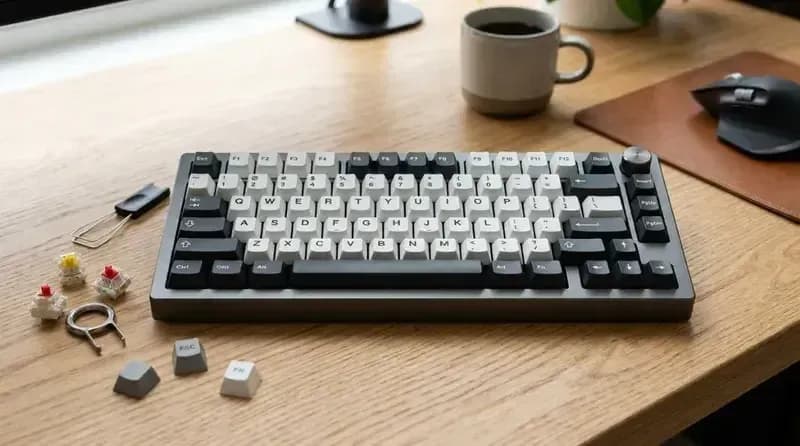
MCHOSE has become increasingly difficult to ignore in the mechanical keyboard market. The brand sells everything from inexpensive Hall Effect gaming keyboards to aluminum TKL boards, wireless 98% keyboards and high-end models advertising 16,000Hz polling.
That variety is also what makes MCHOSE confusing.
The biggest decision is not which model has the highest polling rate. It is whether you want a Hall Effect keyboard for competitive gaming or a conventional mechanical keyboard for typing, productivity and general use.
MCHOSE currently sells both types, and choosing the wrong product line can matter more than choosing the wrong individual model.
Quick Answer
If you... | Consider | Why |
|---|---|---|
Want an affordable Hall Effect keyboard for competitive FPS | Ace 60 Pro | 60% layout, 8K polling, adjustable actuation, Rapid Trigger and SOCD |
Want a compact HE keyboard with arrow keys | Ace 68 | 65% layout without giving up dedicated arrow keys |
Want MCHOSE's premium 65% HE keyboard | Ace 68 Turbo | Aluminum construction, Hall Effect switches and 16K polling |
Want a 75% Hall Effect keyboard | Jet 75 | Function row and arrow keys in a compact layout |
Want a TKL Hall Effect keyboard | Mix 87 | 87 keys with extensive trigger customization |
Mainly care about typing | GX87 | Aluminum construction, gasket mount, QMK/VIA and 8,000mAh battery |
Need a number pad | K99 / K99 V3 / G98 Pro / UT98 | 98% layouts with dedicated numpads |
Want extremely long battery life | UT98 | 10,000mAh battery and tri-mode connectivity |
Want an inexpensive wireless mechanical keyboard | G75 Pro / G98 Pro | Conventional mechanical switches and wireless connectivity |
Need true analog input for racing or flight games | Look beyond MCHOSE | MCHOSE's tested HE boards provide Rapid Trigger and adjustable actuation, not true analog output |
The short version is simple:
Competitive FPS → Hall Effect.
Typing and productivity → conventional mechanical.
That distinction makes the rest of the MCHOSE lineup much easier to understand.
Who Is MCHOSE?
MCHOSE, also known as 迈从, is a Shenzhen-based peripherals brand that has become increasingly visible outside its domestic market through mechanical keyboards, gaming mice and other PC accessories.
The company sits in the same broad generation of Chinese peripheral brands as Aula, Ajazz and Weikav: relatively aggressive pricing, large product catalogs and a strong emphasis on specifications.
MCHOSE products are sold through the company's own international store as well as retail channels such as Amazon.
The brand is still much less established in the English-speaking keyboard market than companies such as Logitech, Keychron or Wooting. That explains why many Western reviews introduce MCHOSE as an unfamiliar name.
But unfamiliarity is different from a lack of independently tested products.
The GX87 has received coverage from Tom's Guide, while PC Gamer and RTINGS have tested MCHOSE Hall Effect keyboards. Those reviews provide a useful picture of where the brand is strongest: hardware value and input performance, with software and documentation being less polished areas.
One other point is worth clearing up.
MCHOSE has not abandoned conventional mechanical keyboards. Its current lineup still includes mechanical models such as the GX87, K99, G98 Pro, G75 Pro and UT98, alongside its growing Hall Effect range.
MCHOSE Keyboard Lineup
The easiest way to understand the current lineup is to split it into two categories.
Model | Type | Layout | Main purpose |
|---|---|---|---|
Ace 60 / Ace 60 Pro | Hall Effect | 60% | Competitive gaming |
Ace 68 / Ace 68 Air | Hall Effect | 65% | Compact gaming |
Ace 68 GT | Hall Effect | 65% | Premium gaming |
Ace 68 Turbo | Hall Effect | 65% | High-end competitive gaming |
Jet 75 | Hall Effect | 75% | Gaming + everyday use |
Mix 87 | Hall Effect | TKL | Gaming + larger layout |
Ace 75 | Hall Effect | 75% | Newer gaming model |
GOD 60 | Hall Effect | 60% | Newer gaming model |
G75 Pro | Mechanical | 75% | General use |
G98 Pro | Mechanical | 98% | Productivity + gaming |
K99 / K99 V3 | Mechanical | 98% | Productivity |
GX87 | Mechanical | TKL | Typing + enthusiast use |
UT98 | Mechanical | 98% | Productivity + long battery life |
The Hall Effect lineup receives most of the attention because Rapid Trigger and high polling rates are easy to market.
The mechanical lineup is arguably easier to recommend to a much wider group of users, because wireless connectivity, battery life and familiar layouts matter more than extreme input specifications for everyday work.
Hall Effect vs Mechanical: Which MCHOSE Line Do You Need?
Hall Effect keyboards use magnetic sensing to detect key movement instead of relying on the conventional electrical contact mechanism found in ordinary mechanical switches.
That makes several features possible:
Adjustable actuation
Rapid Trigger
Per-key reset behavior
SOCD
DKS
Other configurable trigger functions
For competitive FPS games, these features can be useful because the keyboard can register and reset a key at configurable points in its travel.
MCHOSE's Ace 60 Pro, for example, supports adjustable actuation, Rapid Trigger, SOCD and DKS, while RTINGS measured very low latency in its testing.
But Hall Effect does not automatically mean analog input.
This distinction is important.
A keyboard can have Hall Effect switches, adjustable actuation and Rapid Trigger while still behaving as a digital keyboard. True analog input allows a key to produce a gradual controller-like signal rather than simply being pressed or released.
MCHOSE's tested Ace 60 Pro does not provide that kind of analog output. Wooting's comparable Hall Effect keyboards do.
So if your main goal is:
Rapid Trigger + adjustable actuation → MCHOSE is relevant.
True analog keyboard input for racing or flight simulation → check the specific model carefully, and consider alternatives such as Wooting.
If you mostly type, code, work in spreadsheets or use a number pad, the conventional mechanical lineup may make more sense.
MCHOSE Hall Effect Keyboards
Ace 60 Pro
The Ace 60 Pro is one of the clearest examples of what MCHOSE is trying to accomplish with its Hall Effect lineup.
It is a wired 60% keyboard designed around competitive gaming rather than productivity.
RTINGS found its latency extremely low and highlighted its adjustable actuation, Rapid Trigger, SOCD and DKS capabilities. It supports up to 8,000Hz polling.
The 60% layout is both an advantage and a limitation.
For competitive FPS players, the compact footprint leaves more room for mouse movement and keeps the keyboard easy to position at an angle.
For general desktop use, however, the lack of dedicated arrow and navigation keys can become inconvenient.
The Ace 60 Pro therefore makes the most sense when competitive gaming is the priority.
Best for: competitive FPS players who want Hall Effect features at a relatively low price.
Ace 68
The Ace 68 moves the Hall Effect concept into a 65% layout.
That adds dedicated arrow keys while keeping the overall footprint compact.
For many people, this is a more practical layout than 60%.
The difference is not about latency. It is about daily usability.
If you use the keyboard for gaming at night and work during the day, having arrow keys available without relying on function-layer combinations can be a meaningful improvement.
The Ace 68 is therefore the logical choice for someone who wants compact Hall Effect gaming without going all the way down to 60%.
Ace 68 Turbo
The Ace 68 Turbo is the MCHOSE model that has attracted the most attention for its headline specification.
It supports a 16,000Hz polling rate and uses a 512MHz dual-core microcontroller. PC Gamer reviewed the keyboard and highlighted both its polling rate and Mount Tai GT magnetic switches.
The 16K figure sounds dramatically faster than 8K, but the practical difference is much smaller than the number suggests.
PC Gamer estimated the latency improvement at roughly 0.02ms in the relevant context.
That means the 16K polling rate should not be treated as the primary reason to buy the Turbo.
The more meaningful differences are its premium construction, Hall Effect switches and overall positioning above the standard Ace 68.
The Turbo uses an aluminum case and weighs substantially more than a typical compact gaming keyboard. It is also wired, which is unsurprising for a keyboard focused heavily on competitive input performance.
Best for: users who want a premium 65% MCHOSE Hall Effect keyboard and specifically value its higher-end construction and performance features.
Ace 68 Air and Ace 68 GT
The Ace 68 family has expanded into multiple variants, including the Ace 68 Air and Ace 68 GT.
They should be understood as variations around the same basic concept rather than completely different keyboard categories.
When comparing these models, the most useful specifications are:
Switch type
Polling rate
Case material
Trigger resolution
Weight
Connectivity
Current price
This is particularly important with MCHOSE because the company frequently introduces multiple configurations of what appears to be the same keyboard.
A higher model name does not automatically mean a better choice for every user.
Jet 75
The Jet 75 takes the Hall Effect platform into a 75% layout.
This gives you:
Function row
Arrow keys
Navigation keys
while retaining a relatively compact footprint.
For people who use one keyboard for both gaming and work, this can be a more comfortable layout than the Ace 60 or Ace 68.
The Jet 75 is therefore less about maximizing a specification and more about finding a useful compromise between competitive gaming and everyday usability.
Best for: gamers who want Hall Effect features but still need a function row.
Mix 87
The Mix 87 is MCHOSE's TKL Hall Effect option.
The larger 87-key layout provides a conventional desktop experience while retaining the adjustable trigger behavior of the magnetic lineup.
The model is also notable for its multiple configurations.
The Advanced version uses a magnetic switch configuration advertised around 0.005mm accuracy, while the E-Sports configuration goes further with higher-end switches and advertised 0.001mm accuracy.
Both versions support functions including:
Dynamic Keystroke
Hold/Tap
Rapid Trigger
SOCD
Macros
This makes the Mix 87 more interesting for users who actively experiment with Hall Effect trigger behavior.
Best for: gamers who want a TKL layout and more trigger customization than a basic HE keyboard provides.
Ace 75 and GOD 60
MCHOSE has also introduced newer Hall Effect models such as the Ace 75 and GOD 60.
These are newer additions to the lineup, so pricing and availability can change more quickly than for established models.
The Ace 75 follows the 75% Hall Effect format, while the GOD 60 is positioned as another compact performance-oriented model.
Because these products are newer, buyers should check the current configuration rather than relying on specifications from early announcements or launch coverage.
MCHOSE Mechanical Keyboards
The mechanical side of MCHOSE's catalog is easier to overlook because Hall Effect keyboards dominate gaming coverage.
For typing and productivity, however, the mechanical models are often the more relevant products.
They generally emphasize:
Wireless connectivity
Long battery life
Hot-swappable mechanical switches
Gasket mounting
Typing acoustics
Larger layouts
GX87
The GX87 is arguably the most interesting conventional mechanical keyboard in MCHOSE's lineup.
It is an 80% TKL keyboard with aluminum construction, gasket mounting, hot-swappable switches, tri-mode connectivity and an 8,000mAh battery.
It also supports QMK/VIA, which is a major advantage for users who prefer open keyboard customization rather than relying entirely on proprietary software.
Tom's Guide reviewed the GX87 and was particularly positive about its typing feel and stock sound, describing the keyboard as one of the better-sounding stock boards it had tested.
The GX87 is not perfect.
Its gasket system is relatively firm, the design is fairly understated, and the available factory switch selection is limited compared with some enthusiast keyboard brands.
It is also heavy.
But those are relatively minor concerns if the keyboard is going to stay on a desk.
Best for: typing, programming and users who want a more enthusiast-oriented mechanical keyboard without building one from scratch.
K99 and K99 V3
The K99 family uses a 98% layout.
That means you retain the number pad while taking up less space than a traditional full-size keyboard.
For office users, spreadsheet work and anyone who frequently enters numbers, this layout can be more useful than a compact gaming keyboard.
The K99 family also offers wireless connectivity, gasket-mounted construction on relevant configurations and hot-swappable mechanical switches.
The main thing to watch is configuration.
MCHOSE has released multiple K99 variants, so specifications and prices should be checked against the exact model being sold rather than assumed from an older review.
Best for: productivity users who need a number pad but want a more compact keyboard than a full-size model.
G98 Pro
The G98 Pro is another 98% mechanical keyboard aimed at combining productivity and gaming.
Its main appeal is straightforward:
98% layout + wireless connectivity + conventional mechanical switches + relatively accessible pricing.
It does not need to compete with the Ace 60 Pro on Rapid Trigger.
Instead, it is aimed at users who want a conventional mechanical keyboard that can handle gaming, work and general desktop use.
The G98 Pro makes the most sense when its current price is substantially below more premium 98% models.
G75 Pro
The G75 Pro is the smaller mechanical option.
Its 75% layout retains the function row and arrow keys while eliminating the number pad.
For users who rarely use a numpad, this is often a more efficient desktop layout.
The G75 Pro is therefore one of the easier MCHOSE keyboards to recommend based simply on layout preference.
Choose it when you want a wireless mechanical keyboard but do not need the additional keys of a 98% board.
UT98
The UT98 is a collaboration with Unbox Therapy and one of the most distinctive conventional keyboards in the MCHOSE lineup.
It uses a 98% layout, tri-mode connectivity and a 10,000mAh battery.
That battery is one of its biggest selling points.
MCHOSE rates the keyboard for up to 909 hours with lighting disabled. Tom's Guide also highlighted its unusually long battery life, although actual runtime depends heavily on RGB lighting and usage.
The UT98 also includes:
Gasket mounting
Hot-swappable switches
PBT keycaps
Volume control
Calculator key
MacOS keycaps
Tri-mode connectivity
Its biggest compromise is the plastic body. Tom's Guide noted that the case can flex when twisted.
The UT98 therefore makes more sense as a distinctive productivity keyboard than as a premium aluminum enthusiast board.
Best for: users who want a 98% wireless keyboard and place unusually high value on battery life.
MCHOSE Mechanical Keyboard Comparison
Model | Layout | Main strength | Main consideration |
|---|---|---|---|
G75 Pro | 75% | Compact wireless mechanical | No number pad |
G98 Pro | 98% | Value + numpad | Larger footprint |
K99 / K99 V3 | 98% | Productivity | Multiple configurations |
GX87 | TKL | Build, typing feel and QMK/VIA | Heavy |
UT98 | 98% | Battery life + design | Plastic body |
The mechanical models are therefore not simply different price versions of the same keyboard.
The layout and intended use are more important than the model number.
What MCHOSE's Specifications Actually Mean
MCHOSE keyboards use specifications such as 8K polling, 16K polling, 128K scan rates, 256K scan rates and 0.001mm sensor resolution.
Those numbers are useful, but they should not be treated as a simple ranking system.
8K vs 16K polling
An 8,000Hz polling rate means the keyboard can report its state up to 8,000 times per second, while 16,000Hz doubles that theoretical reporting frequency.
But that does not mean a 16K keyboard feels twice as fast.
The practical difference is extremely small. PC Gamer's Ace 68 Turbo testing estimated the relevant latency improvement at roughly 0.02ms.
For competitive players chasing every possible reduction in input delay, 16K can be an interesting specification.
For most users, it should not determine the purchase.
Scan rate
Scan rate refers to how frequently the keyboard's controller scans the switches.
It is related to, but not identical to, USB polling rate.
A 256K scan rate therefore should not simply be compared with an 8K polling rate as though they represent the same measurement.
0.001mm accuracy
MCHOSE advertises extremely fine magnetic sensing on some of its Hall Effect keyboards.
That can allow very fine adjustment of actuation and trigger behavior.
But it does not mean a human can physically control a key with 0.001mm precision.
The practical value is in how the firmware uses that sensor resolution.
Battery capacity
A 10,000mAh battery is useful, but advertised battery life depends on how the keyboard is configured.
RGB lighting, wireless mode, polling rate and sleep behavior can dramatically change runtime.
The UT98's 909-hour figure, for example, is based on lighting-off conditions.
The lesson is simple:
Do not compare MCHOSE keyboards by the biggest number on the product page.
MCHOSE Software and M HUB
Software is one of the areas where MCHOSE is less mature than some established competitors.
The company uses M HUB, which is available in a web-based form and as a Windows application for supported devices.
The web version can handle functions such as:
Key remapping
Lighting
Macros
Rapid Trigger settings
Actuation settings
Firmware-related functions on supported models
The Windows client provides broader device management and additional functionality.
One useful advantage is that the browser-based driver can be used on macOS for supported keyboards.
There is an important limitation, however:
The keyboard needs to be connected through USB or the 2.4GHz receiver for configuration. Bluetooth cannot be used to configure the keyboard.
That is easy to miss if you buy a wireless MCHOSE keyboard.
Software polish is another consideration.
Independent reviews have generally found MCHOSE's software functional, but less mature than Wooting's software ecosystem. Documentation can also be less polished than what you get from larger established brands.
PC Gamer has also reported unusual documentation issues on some newer MCHOSE products, including Chinese-only terms in part of the Ace 68 Turbo web interface.
None of these issues make the keyboards unusable.
They simply mean that MCHOSE's hardware is currently a stronger selling point than its software ecosystem.
MCHOSE vs Wooting
MCHOSE and Wooting overlap most directly in the Hall Effect gaming market.
The difference is not simply price.
Feature | MCHOSE HE keyboards | Wooting |
|---|---|---|
Hall Effect switches | Yes | Yes |
Adjustable actuation | Yes | Yes |
Rapid Trigger | Yes | Yes |
SOCD | Selected models | Yes |
High polling rates | Yes | Yes |
True analog input | Not on tested Ace 60 Pro | Yes |
Software maturity | Developing | More established |
Entry price | Generally lower | Generally higher |
RTINGS' comparison of the Ace 60 Pro and Wooting 60HE found extremely strong performance from both keyboards. The MCHOSE achieved slightly lower measured latency in some tests, while Wooting provided analog input and a more mature offline software experience.
That illustrates why specifications alone are not enough.
If you primarily want Rapid Trigger and adjustable actuation at a lower price, MCHOSE is directly relevant.
If you need analog input for racing or flight games, Wooting's implementation has a functional advantage.
If software maturity is particularly important to you, that should also be part of the comparison.
MCHOSE vs Conventional Mechanical Keyboards
The same principle works in the other direction.
A Hall Effect keyboard is not automatically better than a conventional mechanical keyboard.
If you mostly type, a keyboard such as the GX87 gives you features that have nothing to do with competitive latency:
Wireless connectivity
Large battery
QMK/VIA
Conventional mechanical switches
Gasket mounting
Enthusiast-oriented acoustic tuning
For someone who spends most of the day writing code or documents and only occasionally plays games, these features can matter considerably more than moving from 8K to 16K polling.
MCHOSE Keyboard Prices
Approximate US pricing varies considerably because MCHOSE frequently runs promotions and offers multiple configurations.
Model | Type | Layout | Approximate US price |
|---|---|---|---|
Ace 60 Pro | Magnetic | 60% | ~$40–44 |
Ace 68 | Magnetic | 65% | ~$44–49 |
Mix 87 | Magnetic | TKL | ~$53–59 |
Jet 75 | Magnetic | 75% | ~$71–79 |
Ace 68 Turbo | Magnetic | 65% | ~$110–139 |
Ace 68 GT | Magnetic | 65% | ~$149 |
G75 Pro | Mechanical | 75% | ~$44–49 |
G98 Pro | Mechanical | 98% | ~$60–79 |
K99 V3 | Mechanical | 98% | ~$100–109 |
GX87 | Mechanical | TKL | ~$109 depending on configuration |
UT98 | Mechanical | 98% | ~$139 |
These should be treated as reference ranges rather than fixed MSRP.
MCHOSE frequently shows discounted prices against higher regular prices, and different configurations can look similar while using different cases, switches or keycaps.
The GX87 is a good example. Tom's Guide reviewed it at $109, while MCHOSE has also listed other GX87 configurations at significantly different prices.
Always check the exact configuration before comparing prices.
Four Things to Know Before Buying
A Hall Effect keyboard is not automatically analog
Rapid Trigger and adjustable actuation are separate from analog controller-style input.
If analog input is important, check the specific model rather than assuming that every Hall Effect keyboard supports it.
16K polling is not twice as fast in practical use
The theoretical polling interval is twice as frequent as 8K, but the practical latency difference is tiny.
Buy the Ace 68 Turbo for its complete hardware package, not simply because “16K” is printed on the box.
Mechanical MCHOSE keyboards are not obsolete
MCHOSE still has a substantial mechanical lineup.
If you do not need Rapid Trigger, the GX87, K99, G98 Pro, G75 Pro and UT98 may be more appropriate.
Layout can matter more than performance specifications
Moving from 60% to 65%, 75% or TKL can have a much larger impact on daily usability than moving from 8K to 16K polling.
Think about how you actually use the keyboard before comparing benchmark numbers.
FAQ
Is MCHOSE a good keyboard brand?
MCHOSE has developed a broad keyboard lineup covering both Hall Effect gaming keyboards and conventional mechanical keyboards. Several models have also received independent reviews from outlets such as RTINGS, Tom's Guide and PC Gamer.
Its hardware performance and specifications are generally the strongest part of the proposition. Software maturity, documentation and the complexity of its many product configurations are areas worth paying more attention to.
Which MCHOSE keyboard should I buy?
Start by choosing the product line.
For competitive FPS gaming and Rapid Trigger, look at the Ace 60 Pro, Ace 68, Jet 75 or Mix 87.
For a premium compact Hall Effect keyboard, the Ace 68 Turbo is the higher-end option.
For typing, the GX87 is the most obvious starting point.
If you need a number pad, look at the K99, G98 Pro or UT98.
Does MCHOSE make mechanical keyboards?
Yes.
MCHOSE's current lineup includes conventional mechanical keyboards such as the GX87, K99, G98 Pro, G75 Pro and UT98.
The company has not switched entirely to Hall Effect keyboards.
Do MCHOSE keyboards work with Mac?
Supported MCHOSE keyboards can be used with macOS, and the web-based M HUB interface provides configuration support for supported devices.
The Windows M HUB client has additional functions and is designed for Windows.
Check the documentation for the exact model before buying if macOS software support is important to you.
Are MCHOSE keyboards wireless?
Some are and some are not.
Most of the Hall Effect gaming models discussed here are designed primarily around wired operation, while many conventional mechanical models offer tri-mode connectivity through Bluetooth, 2.4GHz and USB.
Check the individual model rather than assuming that the entire MCHOSE lineup has the same connectivity.
Are MCHOSE keyboards hot-swappable?
The conventional mechanical models generally use hot-swappable mechanical switches.
Hall Effect keyboards use compatible magnetic switches instead. A standard mechanical switch cannot simply be installed into a Hall Effect keyboard because the sensing mechanisms are different.
Is the Ace 68 Turbo's 16K polling rate worth paying for?
The 16K polling rate is technically impressive, but the practical latency improvement over 8K is very small.
The aluminum construction, magnetic switches, trigger customization and overall build are more meaningful reasons to consider the Turbo.
Does MCHOSE support Rapid Trigger?
Yes. Rapid Trigger is available on its Hall Effect keyboard lineup, including models such as the Ace 60 Pro and Ace 68 Turbo.
The feature allows the reset point of a key to respond dynamically to the key's movement rather than relying on a fixed mechanical reset point.
Does MCHOSE have analog input like Wooting?
Not every Hall Effect keyboard does.
The Ace 60 Pro, for example, provides adjustable actuation and Rapid Trigger but does not provide the same true analog output capability associated with Wooting's Hall Effect keyboards.
If you need analog input for racing or flight simulation, check this feature specifically.
Is MCHOSE better than Wooting?
The two brands prioritize somewhat different things.
MCHOSE generally competes aggressively on hardware specifications and price, while Wooting has a more established software ecosystem and provides analog input on its Hall Effect keyboards.
The relevant choice depends on whether you prioritize Rapid Trigger and price, or analog functionality and software maturity.
What is the best MCHOSE keyboard for typing?
The GX87 is the most typing-focused model to look at first.
Its TKL layout, aluminum construction, gasket mounting, QMK/VIA support and large battery make it substantially different from MCHOSE's competitive Hall Effect keyboards.
If you need a number pad, the K99, G98 Pro and UT98 are more appropriate.
What is the best MCHOSE keyboard for competitive gaming?
The answer depends on the layout you want.
The Ace 60 Pro is the compact option, the Ace 68 provides arrow keys, the Jet 75 adds a function row, and the Mix 87 provides a TKL layout.
The Ace 68 Turbo is the premium 65% option if you specifically want its higher-end construction and 16K polling.
The important point is that the best choice depends on the layout and features you actually need, not simply the largest specification number.
Related GuidesMore →
Best Lenovo Legion Gaming Laptops in 2026: Which Model Should You Buy?
Lenovo Legion's 2026 lineup includes gaming laptops, handheld PCs, Android tablets, desktop towers, and gaming monitors. This guide explains the differences between the Legion 5, Pro 5, 7i, Pro 7i, and flagship 9i, along with the newer 7a models and the entry-level LOQ series. Compare GPU power, displays, upgrade options, U.S. prices, and independent test results to find the right system for your budget and gaming needs.
Best 75% Keyboards in 2026: Top Picks for Gaming, Work, and Everyday Use
Looking for the best 75% keyboard for gaming, work, or everyday typing? This guide compares six keyboards across different budgets and priorities, including the Keychron V1 Max, EPOMAKER x AULA F75, WOBKEY Rainy75, NuPhy Air75 V3, Wooting 80HE, and ASUS ROG Azoth. Compare dimensions, connectivity, switch compatibility, battery claims, customization, and approximate U.S. prices to find a keyboard that fits your workflow and desk.
How to Choose a JBL Bluetooth Speaker: Go, Clip, Flip, Charge, Xtreme, and Boombox Compared
Choosing a JBL Bluetooth speaker is easier when you match the model to how you actually listen. This guide compares the Go 5, Clip 5, Grip, Flip 7, Charge 6, Xtreme 5, Boombox 4, and PartyBox lineup by sound, portability, battery life, durability, and price. Find out which JBL speaker suits travel, everyday listening, outdoor gatherings, or parties, and when an older generation may offer better value than the newest model.