Do IEMs Need an Amp or a DAC? A Practical Guide to Power, Noise, and Compatibility
Buying a DAC or amplifier for your in-ear monitors can be worthwhile, but only if it solves a specific problem. This guide explains the differences between DACs, headphone amps, and combination devices, then walks through four checks for volume, hiss, output impedance, and balanced connections. It also covers when a simple USB-C adapter is enough, when an impedance adapter may help, and when more capable hardware is worth considering.
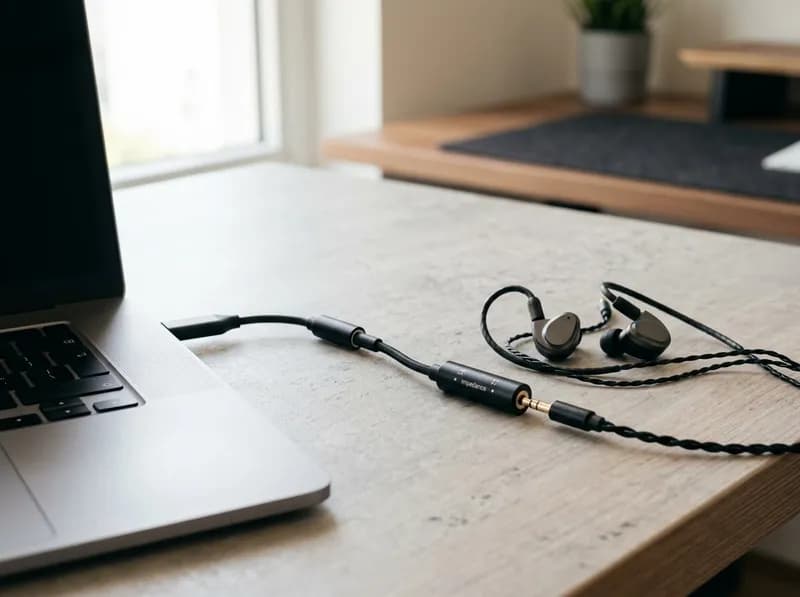
Short answer: usually not. If your in-ear monitors (IEMs) reach a comfortable listening volume from your phone, laptop, or existing USB-C dongle without audible hiss or distortion, you probably don't need an external DAC or amplifier. Most IEMs are designed to work with relatively modest output power.
An upgrade makes sense when it solves a specific problem: insufficient volume, background hiss, an output-impedance mismatch, or a missing headphone connection. The best approach is to identify the limitation first, then choose the least expensive solution that fixes it.
DAC vs. Amp vs. DAC/Amp: What Each One Actually Does
A DAC (digital-to-analog converter) turns digital audio into an analog signal. A headphone amplifier supplies the voltage and current needed to drive your earphones. Most phones, computers, and active USB audio adapters already contain both, so adding an external DAC isn't automatically an upgrade.
Device | What it does | When an IEM user might need it |
|---|---|---|
Built-in phone or computer audio | Converts and outputs audio through existing hardware | Often sufficient for everyday listening |
Passive adapter | Changes a connector without performing digital-to-analog conversion | Only when the source provides compatible analog audio |
Active USB DAC dongle | Converts digital audio and provides a headphone output | When a phone lacks a headphone jack or the current source has a limitation |
Headphone amplifier | Amplifies an existing analog signal | When the source cannot provide adequate clean output |
Portable DAC/amp combo | Combines conversion and amplification | When portability, low noise, power, or connectivity justifies an upgrade |
Two distinctions matter. A USB-C connector doesn't guarantee that an adapter contains a DAC: some adapters actively convert digital audio, while others pass through analog audio from compatible sources. And a standalone amplifier cannot replace a DAC when the source provides only digital audio.
The practical rule: identify the limitation before choosing the hardware.
Start Here: Diagnose Your Setup in Four Steps
Before comparing products, work through these questions. Each points to a different problem, and each may require a different fix. Buying a more powerful amplifier to solve background hiss, for example, is an expensive way to address the wrong issue.
Step 1: Can your source get loud enough?
Impedance, measured in ohms (Ω), describes the electrical load an IEM presents. Sensitivity describes how much sound pressure it produces for a given input. You need both specifications, and you must check their units: dB SPL/mW and dB SPL/V are not interchangeable.
When sensitivity is specified in dB/mW, the theoretical power needed for a target sound pressure level is:
[
P;(\mathrm{mW})=10^{(\mathrm{Target\ SPL}-\mathrm{Sensitivity})/10}
]
For example, an IEM rated at 100 dB/mW theoretically needs about 10 mW to reach a 110 dB peak. An IEM rated at 90 dB/mW needs about 100 mW for the same level—ten times the power for a 10 dB sensitivity difference.
These are illustrative calculations, not measured results or recommended listening levels. Manufacturer sensitivity figures can vary with measurement methods, and sustained loud listening can damage hearing.
In practice, start with what you can hear:
Comfortable volume, clean sound, no hiss: you probably don't need more amplification.
Maximum volume is still too low: check software volume limits and device compatibility before buying an amp.
Volume is sufficient, but you hear hiss: investigate the noise floor instead of adding power.
Sound changes between sources: check output impedance before assuming the DAC is responsible.
Step 2: Is background hiss the real problem?
Highly sensitive IEMs can reveal faint hiss during quiet passages or between tracks. Less sensitive headphones may not expose the same noise. This is a noise-floor problem, not necessarily a power problem: a device can deliver plenty of volume and still hiss.
Before spending money, work through these checks:
Test another source. If the hiss disappears when you switch phones or laptops, the original source may be responsible.
Lower the gain. If your DAC/amp has high- and low-gain settings, try low gain with sensitive IEMs.
Isolate the connection. Try another USB port. If noise appears only while charging, investigate the charger or grounding.
Check the cable and connectors. Crackling and channel imbalance may indicate a connection fault rather than a high noise floor.
Consider an impedance adapter. An inline adapter such as the iFi IEMatch, listed at $49 in the referenced pricing, offers −12 dB and −24 dB attenuation settings. It reduces the signal level reaching the IEM, including the source's noise. It can be a useful targeted fix for hiss with very sensitive IEMs.
There are trade-offs. Attenuation also reduces the music signal, and added resistance can change the tonal balance of IEMs with irregular impedance curves. An impedance adapter is therefore not a universal sound-quality upgrade; it is a potential solution to a specific noise problem.
For context, MOONDROP publishes background-noise figures of 1.5 μV for the Dawn Pro's 3.5 mm output and 1.3 μV for its 4.4 mm output, measured under its stated AES17, 20 kHz bandwidth conditions. Lower noise is generally preferable, but measurement conditions, gain, and load matter. A single figure cannot guarantee silence with every IEM.
If your IEMs are loud enough but noisy, prioritize low noise and suitable gain—not maximum output power.
Step 3: Does output impedance matter?
Yes, particularly with sensitive or multi-driver IEMs.
The source's output impedance and the IEM's impedance form a voltage divider. Because an IEM's impedance can vary across frequencies—especially in some multi-driver designs—a source with relatively high output impedance can alter its frequency response. The result may be a tonal difference between sources rather than a simple change in volume.
A common screening guideline is the one-eighth rule: keep the source's output impedance below roughly one-eighth of the IEM's nominal impedance.
For a 16-ohm IEM, that suggests a source output impedance of about 2 ohms or lower. This is a rule of thumb, not a guarantee. The actual effect depends on the IEM's impedance curve and the source's design.
Two published examples illustrate the range:
FiiO KA11: output impedance below 0.7 Ω under its stated 32-ohm load condition.
iBasso DC03 Pro: output impedance specified below 0.12 Ω in its U.S. listing.
Both figures are comfortably below the one-eighth threshold for typical IEM loads. They do not prove that one device sounds better than another; they indicate that output impedance is unlikely to be a compatibility problem for most IEMs.
If you hear a tonal difference between sources, check that it is repeatable and that volume, gain, and EQ settings match. A plausible electrical explanation does not, by itself, prove that a difference will be audible.
Step 4: Do you need a balanced output?
No—not simply for better sound.
Portable balanced connections, usually 2.5 mm or 4.4 mm, use a different wiring arrangement. Depending on the device, the balanced amplifier stage can provide more voltage or power. That matters if your IEMs genuinely need the extra output. It offers little practical benefit if a 3.5 mm connection already drives them cleanly and quietly.
The cable itself does not inherently improve sound quality just because it is balanced. Any meaningful benefit generally comes from the source's balanced amplifier stage or the connection options it provides.
One important safety point: never connect a single-ended IEM cable to a balanced output using an incompatible passive adapter. Incorrect wiring can short amplifier outputs together and potentially damage equipment.
For most IEMs, a properly functioning single-ended output is sufficient. Buy a balanced cable to solve a real connection or output-capability problem, not simply to get a different plug.
Do You Need a DAC for Your Specific Device?
Your source determines what kind of adapter, if any, you need.
Your setup | Practical recommendation |
|---|---|
Phone without a headphone jack | Use a compatible active DAC adapter or USB DAC/amp |
Phone with a headphone jack | Keep using it if volume, noise, and impedance compatibility are satisfactory |
Laptop or desktop PC | Try the built-in output first; use a USB dongle if it is noisy, weak, or affected by interference |
Gaming and voice chat | Check for microphone input, sidetone, and game/chat mixing; a standard headphone DAC dongle may not provide these |
Multiple devices | Consider a portable DAC/amp if you specifically want consistent connectivity, physical volume buttons, or shared EQ settings |
Phone without a headphone jack
A basic active adapter is often all you need. Apple's USB-C to 3.5 mm Headphone Jack Adapter, listed at $9 in the referenced pricing, contains a DAC and amplifier and has performed well in independent testing.
There is an important regional detail: Apple has shipped hardware revisions under the same product name. The U.S. version, A2049, produces roughly twice the output voltage of the international version, A2155, according to the measurements cited for this comparison. Some Android devices may also limit the adapter's output. If output headroom is important, verify the exact version and your device's compatibility rather than assuming all Apple dongles perform identically.
Phone with a headphone jack
If the built-in output reaches a comfortable volume, stays quiet, and is electrically compatible with your IEMs, there is little reason to replace it.
Laptop or desktop PC
Built-in audio is often adequate for IEMs. A USB dongle can help when the headphone output is noisy, underpowered, or affected by electrical interference. Testing the IEMs on another source first can help determine whether the computer is actually the problem.
Gaming and voice chat
A headphone DAC dongle does not automatically provide headset microphone input, sidetone, or game/chat mixing. If those features matter, check the device's supported connections and software before buying. You may need a compatible headset input or a separate microphone.
Multiple devices
A portable DAC/amp can provide one consistent connection, physical volume controls, or EQ across a phone and computer. Those conveniences may justify the purchase even when the built-in audio is technically adequate. Check operating-system compatibility, power consumption, and whether the device needs its own battery.
When Is a DAC/Amp Actually Worth Buying?
You probably don't need one if:
Your IEMs reach a comfortable listening volume without objectionable hiss or distortion.
Your source has suitable output impedance.
You're considering an upgrade only because your IEMs were expensive or have many drivers.
A DAC/amp is worth considering if:
Your current source cannot provide enough clean output.
Sensitive IEMs reveal audible noise that other troubleshooting steps or an impedance adapter don't adequately resolve.
Your phone lacks a suitable headphone connection.
You want physical volume controls, gain settings, or a consistent connection across multiple devices.
You may need a different solution if:
You need headset microphone input or chat mixing.
A faulty cable or connector is causing the problem.
Software settings or electrical interference are responsible.
The distinction matters. A more powerful device is not necessarily the right answer to hiss, and a low-noise DAC won't solve a missing microphone input.
The Exception: IEMs That Genuinely Need More Power
Most dynamic-driver and balanced-armature IEMs are sensitive enough to work well with a phone or basic USB adapter. But some designs can be more demanding.
Planar magnetic IEMs: Some models have relatively low sensitivity and benefit from a source with greater output capability. The Hidizs MP143 Salt is an example of a planar in-ear design worth checking against the source's power specifications rather than assuming every phone will drive it equally well.
Low-sensitivity designs: Some boutique IEMs have electrical requirements that make certain phones or dongles less suitable.
The clearest sign is still practical: comfortable listening volume remains unreachable despite correct configuration and sensible volume settings.
If you suspect your IEMs need more power, compare the source's documented output at the relevant impedance with the IEM's sensitivity and impedance. Don't assume every device marketed as an audiophile DAC/amp will provide the right combination of voltage, current, and clean output.
Best DACs for IEMs by Use Case
These options address different needs rather than forming a simple best-to-worst ranking. With IEMs, low output impedance, low noise, appropriate gain, and fine volume control often matter more than a headline power figure.
Prices and specifications below reflect the referenced manufacturer or U.S. listing information and may change. Manufacturer figures are identified as such where applicable; verify the exact model and current listing before purchasing.
1. Best simple starting point: Apple USB-C to 3.5 mm Headphone Jack Adapter
<text>Reference price: $9 · USB-C to 3.5 mm</text>
For efficient IEMs, the Apple adapter is a sensible baseline. It is inexpensive, compact, and includes a DAC and headphone amplifier. Independent testing of the U.S. version reported clean performance and approximately 0.9 Ω output impedance.
Strengths
Very low price.
Small and easy to carry.
Includes a microphone input.
Sufficient for many efficient IEMs.
Limitations
No gain control or physical volume buttons.
Limited output headroom for demanding loads.
The referenced version supports up to 24-bit/48 kHz.
Regional hardware revisions can differ in output voltage.
Best for: People who need a headphone connection or want to establish whether their IEMs actually need a more capable source.
2. Best compact wired upgrade: FiiO KA11
<text>USB-C · 3.5 mm output</text>
The FiiO KA11 is a compact USB DAC/amp built around a CS43131 DAC chip. FiiO specifies 200 mW per channel at 32 Ω, output impedance below 0.7 Ω, and noise below 1.7 μV under its stated conditions.
Strengths
More documented output capability than a basic phone adapter.
Low output impedance.
Compact, dongle-sized design.
Limitations
No balanced output, microphone input, or physical gain switch.
Can run warm and consume more power from the host device.
Uses a non-detachable cable.
Some users have reported mixed experiences with long-term reliability.
Best for: Users who want a small wired DAC/amp with more output headroom without moving to a larger device.
3. Best compact option with physical volume buttons: iBasso DC03 Pro
<text>Reference price: $69 · USB-C · 3.5 mm output</text>
The DC03 Pro's published specifications include output impedance below 0.12 Ω, noise below 900 nV, and output of 1.77 Vrms at 32 Ω. It also offers physical volume buttons and app-based configuration.
Strengths
Very low specified output impedance.
Physical volume controls.
Compact design and app-based configuration.
Limitations
No balanced output, microphone input, or Bluetooth.
Best for: Listeners who want convenient hardware volume control and low output impedance in a small wired device.
4. Best compact option with single-ended and balanced outputs: MOONDROP Dawn Pro
<text>USB-C · 3.5 mm and 4.4 mm outputs</text>
The Dawn Pro uses dual CS43131 DAC chips and provides both 3.5 mm and 4.4 mm connections. MOONDROP publishes noise figures of 1.5 μV for the single-ended output and 1.3 μV for the balanced output under its stated AES17, 20 kHz bandwidth conditions.
Strengths
Both common single-ended and balanced connections.
Published noise specifications.
Compact design.
Limitations
Balanced output is unnecessary for most IEMs.
Noise figures cannot be compared directly across manufacturers without matching measurement conditions.
MOONDROP has released the Dawn Pro 2, which adds app-based DSP and parametric EQ; check the exact version on the listing.
Best for: People who need both output types or have a specific balanced-connection requirement.
5. Best for EQ and multi-device use: Qudelix-5K
<text>Reference price: $109 · USB and Bluetooth · 3.5 mm and 2.5 mm balanced outputs</text>
The Qudelix-5K is especially useful for listeners who want parametric EQ without being tied to a particular phone or computer. It supports 10-band PEQ, AutoEQ import, major Bluetooth codecs including LDAC, and on-device presets. Its published maximum output is 2 Vrms single-ended or 4 Vrms balanced.
Strengths
Flexible parametric EQ.
USB and Bluetooth playback.
Saved presets and broad codec support.
Can serve multiple devices.
Limitations
More configuration than a basic dongle.
Uses 2.5 mm rather than 4.4 mm balanced.
Has a built-in battery.
Does not support MQA or DSD.
Best for: Listeners who want EQ, Bluetooth, and a portable device that can serve several sources.
6. Best for IEMs plus demanding headphones: FiiO K11
<text>Desktop DAC/amp</text>
The FiiO K11 makes more sense for someone who uses IEMs alongside full-size headphones. It offers desktop controls, multiple connections, three gain levels, and 6.35 mm and 4.4 mm outputs. FiiO specifies output impedance below 1.2 Ω single-ended and below 2.4 Ω balanced under its stated 32-ohm load condition.
Strengths
Desktop controls and multiple connections.
Three gain settings.
High output capability for demanding full-size headphones.
Limitations
Larger and externally powered.
Excessive for IEM-only use in most cases.
Its specified balanced output impedance is higher than the KA11's or DC03 Pro's published figures.
Best for: A mixed setup that includes full-size headphones with more demanding power requirements.
Product specification comparison
Product | Main use | Output impedance | Noise / output evidence | Main trade-off |
|---|---|---|---|---|
Apple USB-C adapter | Basic phone connection | ~0.9 Ω in cited independent measurements of the tested version | Independent measurements from 2018 | Limited controls and output; regional variants |
FiiO KA11 | Compact wired DAC/amp | Below 0.7 Ω, manufacturer figure at 32 Ω | Below 1.7 μV noise; 200 mW/channel at 32 Ω | No balanced output, mic input, or gain switch |
iBasso DC03 Pro | Compact DAC/amp with buttons | Below 0.12 Ω, published specification | Below 900 nV noise; 1.77 Vrms at 32 Ω | No balanced output or Bluetooth |
MOONDROP Dawn Pro | 3.5 mm and 4.4 mm | Not stated in the cited specifications | 1.5 μV single-ended / 1.3 μV balanced | Check Dawn Pro vs. Dawn Pro 2 |
Qudelix-5K | EQ, Bluetooth, portability | Not stated in the cited specifications | 2 Vrms single-ended / 4 Vrms balanced maximum | App configuration, 2.5 mm balanced, battery |
FiiO K11 | Desktop use with demanding headphones | Below 1.2 Ω single-ended / below 2.4 Ω balanced, manufacturer figures at 32 Ω | Manufacturer-published output and noise specifications | Overkill for IEM-only use |
The table separates published information from specifications not established by the cited material. For sensitive IEMs, don't choose by maximum power alone. Noise floor, output impedance, gain, and usable volume steps can matter more.
Other models worth considering
The market also includes the Fosi DS2, FiiO KA13 and KA15, Questyle M15i, and MOONDROP Dawn Pro 2. These target different combinations of output power, connection options, and DSP features. Their existence doesn't change the decision process: identify the limitation first, then match the specifications to your needs.
Common Myths About IEMs and DACs
“Every IEM needs a dedicated amplifier.” Most reach ordinary listening levels from a suitable phone or computer. The need for amplification depends on electrical requirements, not price or driver count.
“Low impedance always means easy to drive.” Low impedance can increase current demand. Sensitivity and the source's current capability matter too.
“High impedance always requires a powerful amp.” Higher impedance generally requires more voltage for a given power level, but a sufficiently sensitive IEM may still reach comfortable volume from a modest source.
“A more expensive DAC always sounds better.” Price alone says nothing about noise, distortion, output impedance, or compatibility.
“More maximum power is always better for sensitive IEMs.” Maximum power doesn't tell you how quiet the device will be at your normal listening level.
“Balanced output automatically sounds better.” Its benefits are additional output capability or connection flexibility on some devices, not inherently better sound.
“A dongle improves detail, soundstage, and imaging.” It can fix a source limitation, but it cannot guarantee an audible improvement over a competent existing output.
“Multi-driver IEMs always need an amp.” Driver count is not an electrical specification. Sensitivity, impedance, and design determine the load.
“High sample-rate support makes a DAC better.” A higher supported sample rate doesn't automatically reduce noise or improve compatibility for ordinary listening.
Final Verdict: Should You Buy a DAC for Your IEMs?
For most IEM users, the best first purchase is no purchase at all—until you've identified a real limitation.
Keep your current source if your IEMs reach a comfortable volume without audible noise or distortion.
Buy a basic active adapter if your phone lacks a suitable headphone output. The $9 Apple dongle is a reasonable starting point for many efficient IEMs.
Try an impedance adapter such as the iFi IEMatch if hiss is the problem and you otherwise like your source. It is a targeted option worth considering before replacing the entire DAC/amp.
Choose a low-noise USB DAC dongle such as the FiiO KA11, iBasso DC03 Pro, or MOONDROP Dawn Pro family when your current source has a genuine noise, output-impedance, or power limitation.
Choose the Qudelix-5K for its combination of parametric EQ and Bluetooth, or the FiiO K11 if demanding full-size headphones are also part of your setup.
The right choice is the one that fixes your problem. If your IEMs already sound clean, get loud enough, and connect properly, there is no technical reason to upgrade simply because a DAC/amp is available.
Frequently Asked Questions
1. Do IEMs need an amp?
Usually not. Most IEMs reach normal listening levels from a suitable phone, computer, or USB adapter. An amplifier is useful when the source cannot provide adequate clean output.
2. Do IEMs need a DAC?
Digital playback requires digital-to-analog conversion somewhere, but your phone or computer already performs that job. An external DAC matters when the existing output has a specific limitation or when you need a different connection.
3. Do IEMs sound better with an amp?
Not inherently. If an IEM is already receiving adequate clean power, adding more amplification doesn't guarantee an audible improvement. If a new source changes the sound, investigate possible causes such as insufficient output, noise, or an output-impedance mismatch.
4. How do I know if my IEMs need more power?
If you cannot reach a comfortable listening level despite correct settings, compare the source's output capability with your IEM's sensitivity and impedance. Also check software volume limits and device compatibility before buying an amplifier.
5. Can a DAC dongle improve IEM sound quality?
Yes, when it fixes an identifiable limitation, such as hiss, unsuitable output impedance, inadequate power, or a missing headphone connection. It is not guaranteed to outperform a competent built-in output.
6. Why do my IEMs hiss, and how do I fix it?
Sensitive IEMs can reveal noise from the source. Test another device, lower the gain, try another USB port, check chargers and cables, and consider an impedance adapter or a lower-noise source if the hiss persists. A more powerful amplifier is not, by itself, a fix for hiss.
7. What output impedance is best for IEMs?
Lower is generally preferable. The one-eighth rule suggests keeping the source's output impedance below roughly one-eighth of the IEM's nominal impedance, although the actual effect depends on the IEM's impedance curve.
8. Do multi-driver IEMs need an amplifier?
Not necessarily. Multiple drivers do not automatically mean higher power requirements. Check sensitivity, impedance, and the source's output capability.
9. Do planar IEMs need an amp?
Some do, particularly less-sensitive models. Check the specific IEM's sensitivity and the source's documented output power rather than assuming all planar in-ears have the same requirements.
10. Do balanced cables make IEMs sound better?
Not by themselves. Any practical benefit generally comes from the source's balanced amplifier stage or connection options. Most IEMs work well with a suitable single-ended output, and incompatible adapters can damage equipment.
11. Is a cheap USB-C DAC enough for IEMs?
Often, yes. The Apple USB-C adapter is a competent baseline for many efficient IEMs, while the FiiO KA11 offers more documented output capability. Check compatibility if your IEMs are unusually demanding or sensitive to noise.
12. Do IEMs need burn-in?
There is no strong, reliable evidence that routine driver burn-in produces an audible improvement in most IEMs. Fit and ear-tip seal can make a much more obvious difference, particularly to bass response. Experiment with tip sizes and insertion before assuming the source or drivers need to change.
13. Is an impedance adapter like the iFi IEMatch worth it?
It can be useful if your IEMs hiss with a source you otherwise like. The IEMatch provides −12 dB and −24 dB attenuation settings, reducing the signal level reaching the earphones. Potential trade-offs include reduced available volume and tonal shifts with some IEM impedance curves.
14. Can I use IEMs directly with a laptop?
Yes, if the laptop has a compatible, sufficiently quiet headphone output. If that output is noisy or too weak, a USB DAC dongle is a practical alternative.
15. Should I buy a DAC/amp before upgrading my IEMs?
Not automatically. If your current IEMs are limited by their tuning, fit, or ear-tip seal rather than the source, a DAC/amp will not address the underlying issue. Identify what you want to improve first.
16. Can an amplifier damage sensitive IEMs or my hearing?
An amplifier can produce unsafe listening levels, and electrical faults or incompatible connections can damage equipment. Start at low volume, adjust gain carefully, and never use adapters that connect incompatible single-ended and balanced wiring.
Related GuidesMore →
Best Lenovo Legion Gaming Laptops in 2026: Which Model Should You Buy?
Lenovo Legion's 2026 lineup includes gaming laptops, handheld PCs, Android tablets, desktop towers, and gaming monitors. This guide explains the differences between the Legion 5, Pro 5, 7i, Pro 7i, and flagship 9i, along with the newer 7a models and the entry-level LOQ series. Compare GPU power, displays, upgrade options, U.S. prices, and independent test results to find the right system for your budget and gaming needs.
Best 75% Keyboards in 2026: Top Picks for Gaming, Work, and Everyday Use
Looking for the best 75% keyboard for gaming, work, or everyday typing? This guide compares six keyboards across different budgets and priorities, including the Keychron V1 Max, EPOMAKER x AULA F75, WOBKEY Rainy75, NuPhy Air75 V3, Wooting 80HE, and ASUS ROG Azoth. Compare dimensions, connectivity, switch compatibility, battery claims, customization, and approximate U.S. prices to find a keyboard that fits your workflow and desk.
How to Choose a JBL Bluetooth Speaker: Go, Clip, Flip, Charge, Xtreme, and Boombox Compared
Choosing a JBL Bluetooth speaker is easier when you match the model to how you actually listen. This guide compares the Go 5, Clip 5, Grip, Flip 7, Charge 6, Xtreme 5, Boombox 4, and PartyBox lineup by sound, portability, battery life, durability, and price. Find out which JBL speaker suits travel, everyday listening, outdoor gatherings, or parties, and when an older generation may offer better value than the newest model.