Best Mice for Small Hands: Find the Right Fit for Your Hand Size and Grip
Not every compact mouse feels comfortable in a small hand. Shell width, button reach, hump placement, and side curvature can matter as much as overall length. This guide compares wired and wireless gaming mice alongside compact office and travel options, helping you identify which designs may suit palm, claw, or fingertip grip and which trade-offs to consider before buying.
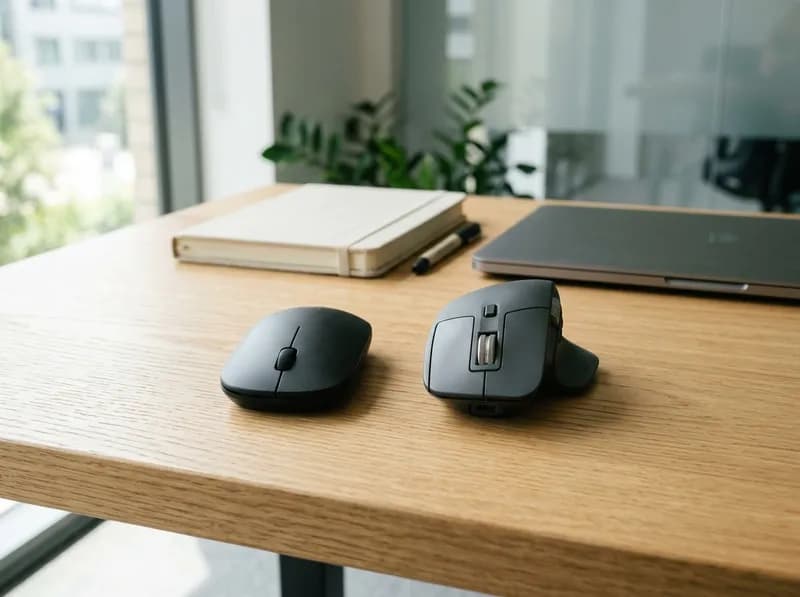
A gaming mouse can have a top-tier sensor and excellent wireless performance and still feel uncomfortable if the shape does not suit your hand. For people with small hands, the problem often shows up in the details: fingers stretch to reach the buttons, the thumb has nowhere natural to rest, or the rear hump pushes the palm into an awkward position.
The best mouse for small hands is not necessarily the shortest or lightest one. Hand length and palm width help narrow the options, but grip style, finger length, side curvature, and hump placement often determine whether a mouse feels comfortable in everyday use.
This guide compares compact gaming mice and productivity mice using published dimensions, manufacturer specifications, and independent reviews. It also explains how to measure your hand, estimate a useful starting size, and choose a mouse for palm, claw, or fingertip grip. The sizing ranges are practical shopping guidelines, not scientifically validated rules that guarantee a perfect fit.
Best Mice for Small Hands: Quick Picks
Mouse | Best for | Main advantage | Main drawback |
|---|---|---|---|
Razer Cobra | Affordable wired gaming | Lightweight, conventional symmetrical shape | Wired connection; basic productivity features |
Pulsar X2V2 Mini | Compact wireless gaming | Short, lightweight shell for claw and fingertip grip | Low hump may not provide enough palm support |
Endgame Gear OP1 8K V2 | Claw and fingertip gaming | Narrow shape, low front, rear-oriented hump | Wired and focused on gaming |
Logitech G305 LIGHTSPEED | Budget wireless gaming | Long battery life and familiar shape | Heavy compared with modern lightweight mice |
Logitech MX Anywhere 3S | Office work and travel | Excellent scrolling and productivity controls | Relatively broad and heavy for its short length |
Logitech Pebble Mouse 2 M350s | Basic work and travel | Thin, portable design | Limited palm support and fewer advanced controls |
Best compact wired gaming mouse: Razer Cobra. It offers a straightforward shape and low weight without the price of a specialist enthusiast mouse.
Best compact wireless gaming mouse: Pulsar X2V2 Mini. Its dimensions and low hump make it worth trying if you use claw or fingertip grip.
Best for a narrow, controlled grip: Endgame Gear OP1 8K V2. Its shape is especially relevant if wider mice feel difficult to maneuver.
Best wireless value: Logitech G305 LIGHTSPEED, provided you are comfortable with a 99 g mouse.
Best for office work: Logitech MX Anywhere 3S for its scroll wheel and productivity controls, or the Pebble Mouse 2 M350s if portability and a flat profile matter more.
Prices and availability change, particularly for specialist gaming mice. Check the exact model and current retailer listing before buying.
How to Measure Your Hand for a Mouse
Measure the hand you actually use to control the mouse. Hand length and palm width will help eliminate unsuitable shapes, but they cannot tell you exactly how a mouse will feel.
Hand length
Place your dominant hand flat on a table, palm facing up, with your fingers naturally straight.
Locate the tip of your middle finger.
Find the wrist crease where your palm meets your wrist.
Measure the straight-line distance between these two points.
Record the result in centimeters.
For this guide, hand length means the distance from the middle fingertip to the wrist crease. Some anthropometric studies use wrist-bone landmarks instead, so their figures may not match this measurement exactly. When comparing hand-size recommendations, make sure the measurement endpoints are the same.
Palm width
Keep your palm facing up and your fingers relaxed together.
Measure across the widest part of your palm, just below the knuckles.
Start at the outer edge below your index finger and finish at the outer edge below your little finger.
Exclude your thumb and do not include the fingers beyond the knuckle line.
Record the measurement in centimeters.
This is a practical consumer measurement rather than a formal anthropometric definition. Research may measure hand breadth using specific bone landmarks. Including the thumb can also make your hand appear wider than it is for mouse-fit purposes.
Other measurements that can help
You do not need a complete set of hand measurements to choose a mouse, but a few details explain why two people with the same hand length may prefer different shapes.
Index-finger length: Affects where your fingertips land on the main buttons.
Thumb reach: Helps determine whether side buttons sit within comfortable reach.
Palm proportions: Two hands with identical lengths can differ substantially in width, finger proportions, and thumb position.
Measure more than once if necessary, using the same endpoints each time. Consistency matters more than millimeter-level precision.
What Size Mouse Is Best for Small Hands?
There is no universally validated formula that converts hand length and palm width into an ideal mouse size. Ergonomic guidance supports matching a pointing device to the user's hand and task, but it does not establish a rule such as “a 16 cm hand needs a 115 mm mouse.”
The U.S. Occupational Safety and Health Administration recommends choosing a pointing device that fits the user's hand and contour and trying it before committing to long-term use.
The ranges below are a practical starting point for comparing mice. They are not official size categories, and the boundaries overlap because shell shape and grip style can change what feels comfortable.
Hand length | Palm width | Initial mouse length | Initial maximum width | What to look for |
|---|---|---|---|---|
Below 16 cm | Below about 8 cm | 105–118 mm | 55–62 mm | Compact shell, comfortable button reach, and a hump that does not feel too tall |
Below 16 cm | About 8 cm or wider | 108–120 mm | 58–64 mm | A short shell with enough grip width for the palm |
16–17 cm | Below about 8.5 cm | 110–120 mm | 57–63 mm | Compare narrow, low-profile shapes with models offering more palm contact |
16–17 cm | About 8.5 cm or wider | 112–122 mm | 60–65 mm | Pay attention to side curvature and the width where the thumb rests |
17–18 cm | Below about 8.5 cm | 112–122 mm | 58–64 mm | Compact symmetrical shells may work well for claw or fingertip grip |
17–18 cm | About 8.5–9 cm | 115–125 mm | 61–66 mm | Compare rear support and hump placement |
Above 18 cm | Any width | Compare several sizes | Depends on grip and palm breadth | Do not rule out compact mice, particularly for fingertip grip |
These measurements are useful for building a shortlist, not for determining a perfect fit. Maximum width refers to the widest point of the shell, which may not be where your thumb and ring finger hold the mouse.
How to use the size chart
Start with the range closest to your measurements, then adjust according to how you hold the mouse.
If your fingers stretch to reach the buttons, try a shorter shell or a different front shape.
If your thumb and ring finger feel squeezed, compare the grip width and side curvature.
If the shell restricts finger movement, try a lower or less bulky hump.
If your palm feels unsupported, a slightly longer shell or a better-positioned hump may help.
If you use fingertip grip, do not automatically choose the smallest mouse. You still need enough width to hold it securely and enough button space for comfortable clicks.
A 16.5 cm hand, for example, might fit a 115 mm mouse or a 120 mm mouse. The better choice depends on the shape and how the mouse sits in the hand.
Why Mouse Dimensions Do Not Tell the Whole Story
Manufacturers usually publish length, maximum width, and height. These figures are useful, but they leave out several details that directly affect comfort.
Length: button reach and palm support
A longer mouse can provide more palm contact, but it may force someone with small hands to stretch forward to reach the buttons. A shorter shell gives the fingers more room to move, although it may feel unsupported for someone who rests much of the palm on the mouse.
Length is a useful first filter for claw grip. For palm grip, the relationship between length, height, and rear contour is often more important.
Width: look at the grip area
A mouse's maximum width does not necessarily reflect how wide it feels where your fingers hold it. Three areas deserve attention:
Front flare: How much the shell spreads beneath the index and middle fingers.
Waist width: How narrow the mouse becomes around the thumb and ring finger.
Rear width: How much support the back of the shell gives your palm.
A narrow waist can make a mouse easier to pinch and lift, particularly for claw and fingertip grip. A sharply tapered waist can feel uncomfortable, however, if your thumb sits low or your palm is broad relative to its length.
Height and hump placement
The position of the hump—the highest part of the shell—changes how a mouse contacts your hand.
Low-profile shell: Leaves more room for finger movement, but may offer less palm support.
Central hump: Provides contact closer to the middle of the palm and can suit several claw-grip variations.
Rear hump: Gives claw grippers a point of contact toward the back of the palm while leaving the front relatively low.
These are broad descriptions rather than fixed rules. A low-profile mouse is not automatically better for small hands, and a taller mouse is not necessarily too large. What matters is where the shell contacts your palm and whether your fingers can reach the buttons naturally.
The Razer Cobra measures 119.6 × 62.5 × 38.1 mm, while the Pulsar X2V2 Mini measures 115.6 × 60.6 × 36.6 mm. The Pulsar is shorter, narrower, and lower on paper. That does not automatically make it the better fit: hump position and side shape can matter as much as the overall dimensions.
Weight and balance
For gaming, a lighter mouse generally takes less effort to accelerate and reposition. That can be useful during repeated movements, but weight alone does not determine control. Shape, mouse feet, mousepad friction, sensitivity, and technique all play a role.
For office work, a heavier mouse may be a reasonable trade-off for longer battery life, a more capable scroll wheel, or convenient connectivity.
The Endgame Gear OP1 8K V2 weighs about 49.5 g, while the Logitech G305 weighs 99 g. Both are compact by length, but they serve different priorities: lightweight wired gaming versus wireless convenience and battery life.
Palm, Claw, and Fingertip Grip: What Should You Look For?
Grip style can change your preferred mouse size even when your hand measurements match someone else's.
Grip style | Important dimensions | Common fit problem | What to look for |
|---|---|---|---|
Palm | Length, height, rear contour, button reach | Too little palm support or fingers stretched forward | Natural palm contact without excessive reach |
Relaxed claw | Length, rear hump, waist and rear width | Hump forces an awkward finger arch | Compact shell with comfortable partial palm contact |
Aggressive claw | Hump position, front height, side grip | Front is too tall or shell too broad | Low front, secure sides, enough rear contact |
Fingertip | Width, side curvature, height, weight | Shell is bulky or difficult to reposition | Compact shape without excessive squeezing |
Mixed grip | Overall shape and button reach | Comfortable in one grip but awkward in another | A shell that accommodates natural changes in hand position |
Palm grip
With palm grip, much of your hand rests on the shell. Small-handed users should look for enough palm contact without pushing their fingertips too far forward.
A short, flat mouse may feel comfortable to one person and unsupported to another. A compact shell with a more pronounced hump can provide better contact, provided the hump does not force the fingers into an awkward position.
Claw grip
Claw grip arches the fingers while allowing partial contact between the palm and rear of the mouse. A compact shell can keep the buttons within reach, while the hump provides a point of contact for controlling the mouse.
The Endgame Gear OP1 family is worth considering because of its relatively narrow shape, low front, and rear-oriented hump. RTINGS describes the original OP1 8K as particularly suitable for claw and fingertip use, and the V2 retains the overall shape while updating internal components.
Relaxed claw users may prefer more rear support than aggressive claw users. A mouse described as claw-friendly is not guaranteed to suit every claw-grip variation.
Fingertip grip
Fingertip grip relies mainly on the fingers, with little or no palm contact. A shorter, lower mouse can leave more room for finger movement and make repositioning easier.
The smallest shell is not necessarily the best one. If the sides are too narrow or the mouse is too light for your preference, keeping it stable may require excessive finger pressure. Look for a shape you can move and click without constantly tightening your grip.
Mixed grip
Many people change their grip slightly between gaming, browsing, and work. If you move between palm and claw positions, prioritize comfortable button reach and a shell that remains controllable in both positions.
Small-Hand Mouse Comparison: Dimensions, Weight, and Use
The gaming mice and productivity mice below serve different purposes, so their specifications should not be compared on size alone. Dimensions are manufacturer-published unless noted. Weight can vary depending on whether the battery, cable, or receiver is included.
Mouse | Type | Dimensions (L × W × H) | Weight | Best suited to | Main trade-off |
|---|---|---|---|---|---|
Razer Cobra | Wired gaming | 119.6 × 62.5 × 38.1 mm | 58 g, cable excluded | Small-to-medium hands; claw or fingertip | Wired; basic scroll wheel |
Pulsar X2V2 Mini | Wireless gaming | 115.6 × 60.6 × 36.6 mm | 51 g ±1 g | Compact claw or fingertip grip | Low hump may not suit palm grip |
Endgame Gear OP1 8K V2 | Wired gaming | 118.2 × 60.5 × 37.2 mm | 49.5 g | Claw/fingertip gaming | Wired; limited productivity features |
Logitech G305 LIGHTSPEED | Wireless gaming | 116.6 × 62.15 × 38.2 mm | 99 g | Budget wireless gaming | Heavy compared with modern ultralights |
Logitech MX Anywhere 3S | Wireless productivity | 100.5 × 65 × 34.4 mm | 99 g | Travel and office work | Short but relatively broad and heavy |
Logitech Pebble Mouse 2 M350s | Wireless productivity | 106.7 × 58.7 × 26.6 mm | About 76–80 g | Travel and everyday tasks | Very flat; fewer advanced controls |
The figures reflect different source conventions. Razer lists the Cobra at 58 g without its cable; Pulsar lists the X2V2 Mini at 51 g ±1 g; Endgame Gear lists the OP1 8K V2 at 49.5 g. Logitech lists the G305 and MX Anywhere 3S at 99 g. Logitech's regional Pebble specifications give 76 g with battery, while RTINGS reports roughly 80.4 g in testing.
At the time of checking, official listings showed the Razer Cobra at $39.99, the MX Anywhere 3S at $89.99, and the Endgame Gear OP1 8K V2 at $89.99. The Logitech G Pro X Superlight 2c discussed later lists at $159.99. Prices and stock can change, so verify the exact SKU before purchasing.
Detailed Reviews: Best Mice for Small Hands
Razer Cobra: Best Compact Wired Gaming Mouse for Many Small Hands
The Razer Cobra is a lightweight, symmetrical gaming mouse with a relatively low-profile shell. At 119.6 mm long, it falls within the range many small-handed users may want to try. Its 62.5 mm maximum width and 38.1 mm height mean it is not the narrowest or flattest mouse in this group.
Razer specifies an 8,500 DPI optical sensor with tracking up to 300 IPS and 35 G, six programmable buttons, third-generation optical switches, and a 1,000 Hz polling rate over a Speedflex USB cable. These specifications are sufficient for mainstream and competitive gaming. For small hands, the more relevant features are its size, weight, and conventional shape.
RTINGS describes the Cobra as a low-profile symmetrical mouse best suited to small or medium hands. That makes it a sensible starting point, although no review can establish that its shape will suit every hand or grip.
Best for: Small-handed gamers who want an affordable wired mouse for claw, fingertip, or a relatively light palm grip.
Consider another mouse if: You need wireless connectivity, a particularly narrow grip area, or more palm support. The Pulsar X2V2 Mini is shorter, while the G305 offers wireless connectivity at the cost of considerably more weight.
Verdict: A straightforward all-round gaming option. Its 58 g weight is appealing, but the symmetrical shell may feel broader than expected if you judge fit by length alone.
Pulsar X2V2 Mini: Best Compact Wireless Mouse for Claw Grip
The Pulsar X2V2 Mini is shorter, narrower, and lower than the Razer Cobra according to published dimensions. Pulsar describes it as symmetrical, with a wide waist and low hump, and recommends it for claw and fingertip grip.
It uses a PixArt PAW3395 sensor with up to 26,000 DPI and 650 IPS tracking, a standard 1,000 Hz polling rate, and 2.4 GHz wireless connectivity. Pulsar advertises up to 100 hours of battery life at 1,000 Hz, although actual battery life varies with use.
Its dimensions make it worth considering if you want a compact gaming mouse without moving to a very flat travel design. Still, “Mini” is not a standardized size. The 60.6 mm maximum width and shape of the waist must work with your thumb and ring finger.
Best for: Small-to-medium hands using claw or fingertip grip, especially when wireless connectivity and low weight matter.
Consider another mouse if: You prefer a taller hump, substantial palm contact, a wider rear, or a more productivity-focused scroll wheel.
Verdict: A strong candidate for compact wireless gaming if your grip does not depend on a tall, palm-filling shell. Check the exact X2V2 Mini revision: the original X2 Mini, X2V2 Mini, X2 CrazyLight Mini, and full-size X2V2 are different products with different specifications.
Endgame Gear OP1 8K V2: Best for Narrow, Performance-Focused Grip
The OP1 8K V2 is worth a look if broad mice make precise finger movements feel awkward. It measures 118.2 × 60.5 × 37.2 mm. Its relatively narrow shape, low front, and rear-oriented hump give it a more specialized feel than the Cobra.
The V2 uses a PixArt PAW3950 sensor, supports up to 26,000 CPI and 8,000 Hz polling, and weighs 49.5 g over USB. The high polling rate is mainly relevant to competitive gaming. For most users, comfortable shape, reliable tracking, and consistent clicks matter more than the maximum number on the specification sheet.
Reviews of the original OP1 8K highlight its narrow middle and rear hump, particularly for claw and fingertip grip. The V2 retains the overall shape while updating the internal components, so use V2 specifications when comparing performance.
Best for: Small-to-medium hands that prefer a narrow, controlled shell for claw or fingertip gaming.
Consider another mouse if: You want wireless connectivity, a productivity-focused scroll wheel, or a shape designed around relaxed palm grip.
Verdict: A specialist option for gamers who know they prefer a compact shape. It is less suitable as a general-purpose office or family mouse.
Logitech G305 LIGHTSPEED: Best Wireless Value if Weight Is Not a Priority
The G305 is compact by length, but its 99 g weight sets it apart from modern lightweight gaming mice. Logitech lists dimensions of 116.6 × 62.15 × 38.2 mm. It uses the HERO sensor with sensitivity from 200 to 12,000 DPI, LIGHTSPEED wireless at a 1,000 Hz report rate, and a claimed 250 hours of battery life from a single AA battery.
The short body can keep the buttons within reach, but the rear shape and height deserve attention. Its maximum width of 62.15 mm is not particularly narrow, and a short mouse can still feel bulky if its hump meets the palm in the wrong place.
Best for: Buyers who want a familiar wireless gaming mouse with long battery life without paying for an enthusiast ultralight.
Consider another mouse if: You make frequent, fast movements and strongly prefer a lighter mouse. The X2V2 Mini is substantially lighter, while the Cobra is also lighter but wired.
Verdict: The G305 remains worth considering when wireless value and battery life matter more than weight. Its length alone does not make it a good fit for small hands.
Logitech MX Anywhere 3S: Best Compact Productivity Mouse for Travel
The MX Anywhere 3S is much shorter than the gaming mice in this guide, but it is also wider and relatively heavy. Its 100.5 mm length makes it portable, while its 65 mm maximum width and low, rounded shell give it a different feel from a narrow gaming mouse.
Logitech specifies Darkfield tracking with sensitivity up to 8,000 DPI, Bluetooth connectivity, compatibility with the Logi Bolt receiver (sold separately), six buttons, and a scroll wheel that switches between ratcheted scrolling and fast free-scrolling. The built-in rechargeable battery is rated for up to 70 days per charge, depending on use.
This is a productivity-first design. Its wheel and programmable controls are useful for documents, spreadsheets, and browsing, but its weight and shape make it less obvious as a competitive FPS mouse.
Best for: Small-handed users who travel, work across documents, or want a compact mouse with a capable scroll wheel.
Consider another mouse if: You have a narrow palm and dislike broad side contact, want a lightweight shell, or prefer more substantial palm support. The Pebble Mouse 2 is flatter and less expensive but has fewer productivity controls.
Verdict: Choose the MX Anywhere 3S for work features and portability, not simply because its 100.5 mm length looks small.
Logitech Pebble Mouse 2 M350s: Best Slim Travel Mouse
The Pebble Mouse 2 M350s has the lowest profile in this shortlist. Logitech's regional specifications list dimensions of 106.7 × 58.7 × 26.6 mm and a weight of 76 g including battery. RTINGS reports a tested weight of about 80.4 g. The difference reflects measurement and reporting conventions, so the weight is best treated as approximate.
The mouse connects over Bluetooth and can pair with multiple devices. It also supports Logitech's Logi Bolt receiver, which is sold separately. Its flat design fits easily into a laptop bag, but it provides less palm contact and fewer productivity controls than the MX Anywhere 3S.
RTINGS describes the Pebble as portable and quiet, but not especially comfortable for long periods of desktop work.
Best for: Basic office tasks, travel, and users who prefer a flat, unobtrusive mouse.
Consider another mouse if: You want a substantial palm hump, programmable side buttons, free-scrolling, or gaming-focused features.
Verdict: The Pebble is a portability choice rather than a general ergonomic recommendation. If you use a mouse throughout the workday, compare it directly with the MX Anywhere 3S and pay attention to comfort, not just its footprint.
Logitech G Pro X Superlight 2c: A Premium Wireless Option
The Logitech G Pro X Superlight 2c is worth considering if you want a compact esports mouse and are willing to pay a premium. It measures 118.4 × 61.4 × 38.5 mm and has a listed weight of 51 g, although some independent reviews report 53 g using their own measurement methods.
Its specifications include Logitech's HERO 2 sensor with up to 44,000 DPI, LIGHTFORCE hybrid switches, wireless polling up to 8,000 Hz, and up to 95 hours of battery life.
Reviews aimed at smaller-handed competitive players have generally been positive about its compact footprint. The main drawbacks are its $159.99 list price, lack of Bluetooth, and side buttons that some reviewers describe as soft.
Best for: Competitive players with small-to-medium hands who prefer claw or fingertip grip and want a premium wireless mouse.
Consider another mouse if: You do not need its esports-focused features or would rather spend less. The Pulsar X2V2 Mini offers a compact wireless gaming experience at a much lower price.
Verdict: A high-end option worth trying if its shape suits your grip. Its price makes a hands-on fit check especially valuable.
Matching Your Hand Measurements to a Mouse
Hand-size examples can help narrow the options, but they should not be treated as formal ergonomic categories. The dimensions below are starting points; the final choice still depends on how the mouse fits your hand.
Example: 15.8 cm hand length, 7.8 cm palm width
Start by comparing mice around 105–118 mm long and 55–62 mm wide.
Claw grip: Try the Pulsar X2V2 Mini if its waist and hump feel secure. The Endgame Gear OP1 8K V2 is another candidate if you prefer a narrow shape and low front.
Fingertip grip: Compare the same gaming mice, paying attention to whether you have to squeeze the sides to keep the mouse stable.
Palm grip: Check whether the shell supports your palm without pushing your fingertips forward.
The Cobra is slightly longer and wider than the two specialist gaming candidates, so it may be less appealing if broader shells already feel awkward. Side shape may matter more than a few millimeters of difference.
Example: 16.5 cm hand length, 8.2 cm palm width
A useful initial range is around 110–120 mm long and 57–63 mm wide. Both low-profile and more supportive shapes are worth trying.
Claw grip: Compare the OP1 8K V2 and X2V2 Mini. One is a narrow, performance-focused wired mouse; the other is a compact wireless model with a low hump.
Fingertip grip: The X2V2 Mini is a reasonable starting point because Pulsar explicitly recommends it for claw and fingertip use.
Palm grip: Compare the Cobra with the two specialist shapes. Its 38.1 mm height may provide more contact than the Pulsar's 36.6 mm height, but hump placement still determines where the shell meets your hand.
Check whether your index and middle fingers rest naturally on the buttons and whether the rear of the shell supports your palm without restricting finger movement.
Example: 17 cm hand length, 8.5 cm palm width
Start around 112–122 mm long and 60–65 mm wide. You do not necessarily need the smallest mouse category; a little more width or rear support may feel more natural.
Claw grip: Try the OP1 8K V2 if you prefer a narrow waist and rear-oriented hump.
Fingertip grip: Compare the OP1 8K V2 and X2V2 Mini based on side shape and button reach.
Palm grip: Start with the Cobra and compare how its shell contacts your palm. If all three feel too low or short, widen the search rather than forcing a fit.
Pay attention to the distance between your thumb and ring finger at their grip points. Palm width is a reason to examine grip width, not to match the mouse's maximum-width number to your hand measurement.
Example: 17.5 cm hand length, 9 cm palm width
A compact mouse may still work, especially for claw or fingertip grip, but you may want more palm contact. Start around 115–125 mm long and 61–66 mm wide.
Claw grip: Compare the Cobra and OP1 8K V2. The OP1 is narrower by published maximum width, while the Cobra has a slightly taller shell. The G Pro X Superlight 2c is another premium wireless candidate.
Fingertip grip: The X2V2 Mini remains worth trying if you prefer a shorter shell and can hold its waist securely.
Palm grip: Do not assume these models will provide enough support. Consider other shells with more rear contact, even if they are longer.
The key checks are whether your palm can rest naturally, whether your fingers reach the buttons without stretching, and whether the sides feel secure without squeezing.
What to change if your first choice feels wrong
Adjust one factor at a time rather than relying on hand measurements alone.
If your fingers stretch to reach the buttons, try a shorter shell.
If your grip feels cramped, compare waist width and side curvature.
If your palm feels unsupported, look at hump position and height.
If repositioning the mouse feels difficult, consider weight and how much shell you need to hold.
If the mouse remains awkward, try a different shape instead of trying to make the measurements fit.
Compact Gaming Mouse vs. Compact Office Mouse
A compact gaming mouse and a compact productivity mouse are designed around different priorities. A short office mouse may be excellent for travel but uncomfortable for long gaming sessions. A lightweight gaming mouse may track well but lack the scrolling and connectivity features that make office work easier.
Feature | Gaming mouse | Productivity mouse |
|---|---|---|
Sensor and tracking | Consistent tracking during fast movements; adjustable sensitivity | Reliable everyday tracking across common surfaces |
Click latency and polling | Important to competitive players, especially at high refresh rates | Usually less important than comfortable clicks and dependable response |
Weight | Low weight can help repeated repositioning | Balance, portability, and control may matter more |
Buttons | Side buttons and configurable controls can help in games | Shortcuts, back/forward, and programmable functions can improve workflow |
Scroll wheel | Clear steps and a reliable middle click are useful | Free-scrolling, quiet operation, and horizontal scrolling can save time |
Connectivity | Wired or 2.4 GHz wireless often suits gaming; Bluetooth may add latency | Bluetooth and multi-device switching are convenient |
Battery | Important for wireless gaming and long sessions | Battery life and convenient charging matter |
Shape | Often designed around claw, fingertip, or gaming palm grips | May prioritize portability over substantial palm support |
Software | Sensitivity, polling rate, button assignments, and profiles | Productivity shortcuts, app profiles, and device switching |
The Razer Cobra and Pulsar X2V2 Mini are gaming-first choices. The MX Anywhere 3S focuses on office features such as free-scrolling and programmable controls, while the Pebble Mouse 2 M350s emphasizes a thin, portable design.
A high polling rate is not a substitute for a comfortable fit. If most of your time is spent browsing, writing, or working with spreadsheets, button reach and scroll-wheel behavior are generally more relevant than the difference between 1,000 Hz and 8,000 Hz. Likewise, a travel mouse is not automatically suitable for a full workday simply because it takes up little room in a bag.
How to Try a Mouse Before Buying
If possible, try the exact model in a store or buy from a retailer with a clear return policy. Spend a few minutes using it as you normally would rather than judging it from a quick grip.
Check the following:
Button reach: Can your index and middle fingers rest on the main buttons without stretching?
Thumb position: Does your thumb rest naturally, without being cramped or pulled forward?
Front clearance: Do your fingers have room at the front of the shell?
Palm contact: Does the shell support your palm as intended? For fingertip grip, can you control it without forcing palm contact?
Height: Does the hump push your hand upward or make your fingers feel too arched?
Width: Can you hold the sides without pinching too tightly?
Small movements: Can you make fine adjustments and click without repeatedly resetting your grip?
Arm and wrist position: Can you use the mouse with your wrist reasonably straight and your shoulder relaxed?
These are practical usability checks, not a medical assessment. OSHA recommends selecting a pointing device that fits the user's hand and task, maintaining a neutral wrist position, and adjusting sensitivity so the mouse can be controlled without excessive force.
If you are shopping because of wrist discomfort, remember that mouse fit and ergonomics are related but separate issues. A compact vertical mouse designed for small or medium hands is a different category from the conventional mice compared here. Persistent pain warrants professional guidance rather than assuming a smaller shell will solve the problem.
Do not push through pain to adapt to a new mouse. If a model causes persistent discomfort, stop using it and try a different shape or setup.
Common Mistakes When Buying a Mouse for Small Hands
Buying by the word “Mini.” The label is not a standardized size. Check the exact model's dimensions and shape.
Using length as the only measurement. A short mouse can still be too wide, too tall, or too bulky around the rear.
Ignoring palm width. Maximum width is not the same as grip width, but palm breadth can help identify when side curvature deserves closer attention.
Overlooking hump placement. A rear hump, central hump, and low-profile shell can feel very different despite similar overall dimensions.
Assuming palm grip always requires a large mouse. The right combination of length, height, and contour matters more than a broad size label.
Assuming fingertip grip requires the smallest mouse. A shell that is too narrow or too light can be difficult to stabilize.
Confusing low weight with good fit. A 50 g mouse may be easy to move but still have the wrong width or hump for your hand.
Buying a gaming mouse for office work without checking the wheel. Gaming mice may lack free-scrolling, tilt inputs, or connectivity features useful for productivity.
Treating hand-size ranges as hard rules. The ranges in this guide are shopping filters, not ergonomic standards.
Treating user reviews as universal proof. Two people with 16 cm hands may prefer different mice because their palms, fingers, and grip styles differ.
Mixing up model revisions. The original Pulsar X2 Mini, X2V2 Mini, X2 CrazyLight Mini, and full-size X2V2 are different products. Confirm the exact SKU, dimensions, weight, and warranty before ordering.
Frequently Asked Questions
What is the best mouse for small hands?
For gaming, the Razer Cobra, Pulsar X2V2 Mini, and Endgame Gear OP1 8K V2 are useful starting points. The Cobra is a straightforward wired option, the Pulsar is a compact wireless mouse, and the OP1 is aimed at performance-focused claw and fingertip users.
For productivity, the Logitech MX Anywhere 3S offers more advanced scrolling and controls, while the Pebble Mouse 2 M350s is a flatter, more portable option. The best choice depends on your hand measurements, grip style, and intended use.
What size mouse is best for a 16 cm hand?
Start by comparing mice around 110–118 mm long, then adjust for palm width and grip. Claw and fingertip users may prefer a compact shell with a low front, while palm-grip users may need more rear support. These dimensions are a practical shortlist, not a validated ergonomic rule.
What size mouse is best for a 17 cm hand?
A reasonable starting range is around 112–122 mm long. A narrow palm or fingertip grip may favor a compact shell, while a broader palm or relaxed palm grip may call for more width or support. There is no official boundary separating small and medium hands.
Is a mouse under 120 mm suitable for small hands?
It can be, but 120 mm is not a universal cutoff. The Razer Cobra is just under that length, while the shorter MX Anywhere 3S is wider and designed for productivity. Length alone cannot predict fit.
Is a 17 cm hand considered small for a mouse?
A 17 cm hand is often treated as small or small-to-medium in consumer mouse guides, but there is no industry-wide standard. Palm width, finger proportions, grip style, and shell shape can matter as much as hand length. Measure your hand consistently and use the result to narrow the shortlist rather than treating the category label as a verdict.
Is a smaller mouse always better for small hands?
No. A short shell may improve button reach but still feel too wide, too tall, or too low. A mouse that is too small can also leave the palm unsupported or make the sides difficult to hold securely. Compare the whole shape rather than choosing by length alone.
Is a lightweight mouse better for small hands?
Not necessarily. A lightweight mouse can be easier to reposition during gaming, but weight does not determine whether the shell fits. A 50 g mouse with the wrong hump or grip width can feel less comfortable than a heavier model with a better shape.
Which mouse is best for small hands and claw grip?
The Pulsar X2V2 Mini and Endgame Gear OP1 8K V2 are both worth considering. The Pulsar provides compact wireless gaming, while the OP1 has a narrow shape, low front, and rear-oriented hump. Choose based on how the sides and hump feel in your hand, not only on the dimensions.
Which mouse is best for small hands and palm grip?
Palm-grip users should pay particular attention to shell height, rear contour, and button reach. The Razer Cobra is a reasonable starting point, but its shape will not suit every palm. If the rear does not support your hand naturally or the front pushes your fingers forward, compare other shapes rather than assuming a compact mouse must work.
Is the Logitech G305 good for small hands?
The G305's 116.6 mm length makes it worth considering, and its wireless connection and claimed 250-hour AA-battery life are practical advantages. Its 99 g weight and rear shape are less appealing to users who want an ultralight mouse or prefer a different type of palm contact. It is a value-oriented wireless option, not an automatic fit for every small hand.
Should I choose a gaming mouse or an office mouse for small hands?
Choose according to how you use it. Gaming mice such as the Razer Cobra and Pulsar X2V2 Mini prioritize tracking, button response, and shapes suited to gaming grips. Productivity mice such as the MX Anywhere 3S emphasize scrolling, programmable controls, and convenient connectivity. If you spend most of the day working with documents and spreadsheets, the scroll wheel and long-session comfort may matter more than a high polling rate.
Final Recommendation
Start with hand length and palm width, then narrow the options by grip style and intended use. For compact gaming, compare the Razer Cobra, Pulsar X2V2 Mini, and Endgame Gear OP1 8K V2. For wireless value, the Logitech G305 is worth considering if its weight is acceptable. For office work, choose between the MX Anywhere 3S's productivity features and the Pebble Mouse 2 M350s's flat, portable design.
Treat dimensions as a way to rule out poor candidates, not to declare a winner on paper. The most suitable mouse is the one that lets your fingers reach the buttons naturally, keeps your grip comfortable, and supports the way you actually work or play.
Related GuidesMore →
Best 75% Keyboards in 2026: Top Picks for Gaming, Work, and Everyday Use
Looking for the best 75% keyboard for gaming, work, or everyday typing? This guide compares six keyboards across different budgets and priorities, including the Keychron V1 Max, EPOMAKER x AULA F75, WOBKEY Rainy75, NuPhy Air75 V3, Wooting 80HE, and ASUS ROG Azoth. Compare dimensions, connectivity, switch compatibility, battery claims, customization, and approximate U.S. prices to find a keyboard that fits your workflow and desk.
How to Choose a JBL Bluetooth Speaker: Go, Clip, Flip, Charge, Xtreme, and Boombox Compared
Choosing a JBL Bluetooth speaker is easier when you match the model to how you actually listen. This guide compares the Go 5, Clip 5, Grip, Flip 7, Charge 6, Xtreme 5, Boombox 4, and PartyBox lineup by sound, portability, battery life, durability, and price. Find out which JBL speaker suits travel, everyday listening, outdoor gatherings, or parties, and when an older generation may offer better value than the newest model.
2026 Smartwatch Innovations: Which New Features Are Worth Buying?
Smartwatches in 2026 bring new readiness scores, AI health coaches, dual-frequency GPS, sleep apnea notifications, and longer battery life—but not every upgrade is worth the money. This guide compares the latest Apple Watch, Samsung Galaxy Watch, and Google Pixel Watch models, separating manufacturer claims from independent testing. Find out which features justify an upgrade, which require a subscription, and when keeping your current watch is the smarter choice.