AULA Keyboard Buying Guide: Which Model Is Right for You?
AULA makes far more keyboards than the popular F75, and its lineup includes both conventional mechanical and Hall Effect models. This guide breaks down the F75, F99, Hero HE, WIN series and other keyboards by layout, switch technology, features and price. It also explains when magnetic switches and Rapid Trigger are useful and when a conventional mechanical keyboard may make more sense.
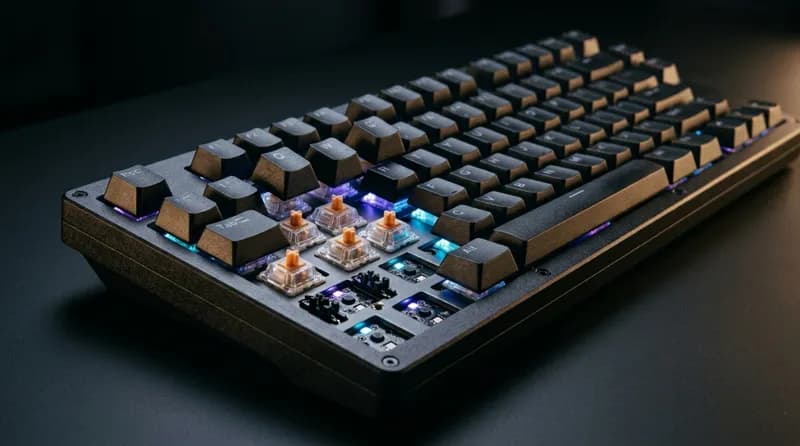
If you've looked for a budget 75% keyboard, you've probably come across the AULA F75. It is one of the better-known budget mechanical keyboards in this category, and there is a good reason it gets recommended so often.
The problem starts when you look beyond the F75. AULA now sells a large number of keyboards, including conventional mechanical models and Hall Effect magnetic keyboards. Some model names are surprisingly similar, even when the hardware is completely different. The F75 and F75 HE, for example, are not simply two versions of the same keyboard. The F75 Pro and F75 MAX also add different features to the standard F75.
So the useful way to look at AULA's lineup is not model number first, but keyboard type, layout, and intended use. Once you separate the mechanical and magnetic ranges, the lineup becomes much easier to understand.
Quick Answer
If you... | Get | Why |
|---|---|---|
Want the keyboard AULA is best known for | F75 / F75 Pro | 75% layout, gasket mount, hot-swap and tri-mode connectivity |
Want an F75 with a screen | F75 MAX | Similar core hardware with a small display |
Want a magnetic 75% keyboard | Hero 75 HE | Hall Effect switches, 8K polling, Rapid Trigger and aluminum construction |
Want an inexpensive magnetic keyboard | WIN60 HE | Compact 60% layout and a low entry price |
Want magnetic switches with a numpad | Hero 99 / F98X | Larger layouts with Hall Effect switches |
Need a numpad for work | F99 Pro | 96% layout, 8,000mAh battery and wireless connectivity |
Want a conventional full-size keyboard | F108 / F108 Pro | Traditional 108-key layout |
Want AULA's higher-end magnetic hardware | AG75 | Aluminum construction and flagship-level magnetic hardware |
Mostly type rather than play competitive games | F75 / F99 / F87 Pro | The mechanical range focuses more on typing, wireless use and everyday layouts |
The first decision is simple: do you actually need Hall Effect features such as Rapid Trigger and adjustable actuation? If not, the mechanical range makes more sense.
Who Is AULA?
AULA, known as 狼蛛 in Chinese, is a Chinese gaming-peripheral brand owned by Suoai Electronic Technology Group in Dongguan, Guangdong. The company dates back to 2011 and originally entered the market with gaming mice before expanding into keyboards and other peripherals.
The brand became much more visible internationally during the recent budget mechanical keyboard boom, particularly through models such as the F75 and F99. It now sells keyboards through several English-language storefronts as well as Amazon, which can make pricing and product information somewhat confusing.
There is another name you'll see regularly: EPOMAKER x AULA. EPOMAKER distributes a number of AULA keyboards internationally, so some models may have a different support or warranty route depending on where you buy them.
This inconsistency is not just an impression from browsing different listings. RTINGS, which purchased and tested the AULA F75 and F99, specifically noted that AULA's retail documentation and technical specifications can be inconsistent and confusing.
That is probably the most important thing to keep in mind when shopping for one. Check the exact model, switch type, layout and configuration rather than relying on a product title alone.
AULA Has Two Very Different Keyboard Lines
AULA's current lineup is easier to understand once you split it into mechanical keyboards and Hall Effect magnetic keyboards.
The mechanical range includes models such as the F65, F75, F75 Pro, F75 MAX, F87, F87 Pro, F98 Pro, F99, F99 Pro, F108, F108 Pro, F2088, H108, S75 Pro, S98 Pro and L99.
These use conventional mechanical switches and are generally focused on typing, wireless connectivity, hot-swappable switches, gasket mounting and long battery life.
The magnetic range includes the WIN series, MINI series, Hero series, F75 HE, F98X, AG60 and AG75.
These keyboards use Hall Effect switches. Instead of detecting a keypress through a conventional mechanical contact, the switches use magnetic sensing. That makes features such as Rapid Trigger and adjustable actuation possible.
The distinction matters because the two types are designed around different priorities.
If you play competitive FPS games and specifically want Rapid Trigger, look at the magnetic models. If you mainly type, work, browse or play ordinary games, a conventional mechanical AULA keyboard may be all you need.
The F75 Naming Trap
The F75 family is a good example of why you should check the full product name.
F75 — conventional mechanical keyboard
F75 Pro — mechanical keyboard with additional features such as a rotary knob
F75 MAX — mechanical F75 variant with a small display
F75 HE — Hall Effect magnetic keyboard
The F75 HE is therefore not simply a faster version of the standard F75. It uses a different switch technology and targets a different type of user.
The Hero 75 HE is also a separate magnetic keyboard. It shares the 75% layout, but it isn't an F75 variant.
The F75 Family
The F75 is the model that put AULA on the radar of many Western keyboard buyers.
AULA F75
The standard F75 is a 75% mechanical keyboard with an 80-key layout, gasket mounting, hot-swappable switches, tri-mode connectivity and a 4,000mAh battery.
Its appeal is straightforward. You get the compact layout many people want for a desktop, while keeping the function row, arrow keys and navigation keys that are often removed from smaller 60% and 65% keyboards.
The F75 is also the model behind much of AULA's budget-keyboard reputation.
F75 Pro and F75 MAX
The F75 Pro and F75 MAX are better thought of as feature variations than completely new generations.
RTINGS lists the Pro and MAX as sharing much of the same underlying hardware as the standard F75. The Pro adds a rotary knob, while the MAX adds a small display. Switch choices, case options and other configurations can vary.
That makes the decision relatively easy.
If you don't care about a knob or screen, there is little reason to pay extra simply because the product name says "Pro" or "MAX." If you regularly use a volume control, the F75 Pro's knob can be useful. The F75 MAX is mainly for people who like having a display on the keyboard.
F75 HE
The F75 HE moves the same general 75% concept into AULA's Hall Effect range.
It uses magnetic switches, 8K polling and Rapid Trigger, with pricing around the $80 range depending on configuration and retailer.
It should not be evaluated as an upgraded version of the standard F75. The two keyboards are aimed at different buyers.
AULA Keyboards With a Numpad
If you use spreadsheets, accounting software or other applications that make frequent use of the number pad, AULA has several options.
F99 and F99 Pro
The F99 is a 96% keyboard. It keeps the number pad while reducing some of the spacing found on a traditional full-size keyboard.
It also has an 8,000mAh battery, twice the capacity of the standard F75's 4,000mAh battery.
The F99 Pro adds a rotary knob and comes in several configurations.
The F99 is particularly useful because RTINGS actually purchased and tested it. Its results provide a better indication of the keyboard's real-world typing, latency and wireless performance than specifications alone.
F108 and F108 Pro
The F108 is a conventional 108-key full-size keyboard. The Pro version adds additional features depending on configuration.
These are less interesting if desk space is limited, but they make more sense for users who want a familiar full-size layout and use a number pad every day.
S98 Pro and F98 Pro
The S98 Pro is a 98% keyboard with a small LCD display and multifunction knob.
The F98 Pro uses a similar larger-format layout but adds transparent keycaps and an OLED display.
Both are more feature-oriented than the basic F99/F99 Pro, so it is worth checking the exact configuration before comparing prices.
H108
The H108 is another full-size option, with silent linear switches and a price around the mid-$80 range.
For someone who wants a conventional full-size keyboard with a quieter switch setup, it is one of the more office-friendly models in AULA's lineup.
TKL and Smaller Mechanical Keyboards
F87 and F87 Pro
The F87 and F87 Pro are 87-key TKL keyboards.
A TKL layout removes the number pad while retaining the function row and navigation cluster. It is a useful middle ground if you find a 75% keyboard too compact but don't need a numpad.
The F87 is generally around $60, while the F87 Pro is around $76 depending on configuration.
F65
The F65 is a 65% keyboard with 68 keys and an interchangeable knob module.
It is sold in some markets as an EPOMAKER x AULA product and typically sits around the $60 range.
The main reason to choose a 65% layout over a 60% keyboard is the dedicated arrow-key cluster.
F2088
The F2088 is one of the more unusual AULA keyboards. It uses a retro typewriter-inspired design and generally sells for around $40–50.
It is more of a style-driven option than a direct competitor to the F75 or F87.
AULA's Hall Effect Magnetic Keyboards
The magnetic range is where AULA has been adding more gaming-focused hardware.
The main features to look for are Rapid Trigger, adjustable actuation, polling rate, scan rate and magnetic switch type. These specifications can be useful, but they should not be treated as interchangeable measures of keyboard performance.
WIN60 HE and WIN68
The WIN60 HE is one of AULA's cheapest ways into Hall Effect keyboards.
It uses a 60% layout and Gray Wood magnetic switches, with prices generally around $40–44.
The WIN68 moves to a 65% layout and adds 8,000Hz polling. Prices are usually around $44–50.
For FPS players who want a compact keyboard and plenty of mouse space, both are straightforward options.
MINI60 HE and MINI60 HE Pro
The MINI60 HE and MINI60 HE Pro are another pair of compact magnetic keyboards.
Both use a 60% layout, 8,000Hz polling and a 128K per-key scan rate, with tri-mode connectivity. They generally sell around $46–50.
Their specifications overlap heavily with the WIN series, so price and availability can be more important than the model names when choosing between them.
Hero 68 HE
The Hero 68 HE is a 65% magnetic keyboard available with different Hall Effect switch options, including Shape, Sea Emperor and Black Emperor variants.
It generally sits around the $55–60 range.
The 65% layout makes it a useful option for someone who wants dedicated arrow keys without moving up to a 75% keyboard.
Hero 75 HE
The Hero 75 HE is one of the more interesting models in AULA's current magnetic lineup.
It uses an 84-key 75% layout, aluminum construction, gasket mounting, 8,000Hz polling, adjustable Rapid Trigger down to 0.005mm, tri-mode connectivity, an 8,000mAh battery and multiple layers of internal sound damping.
It also supports Bluetooth 5.0, 2.4GHz wireless and USB-C, with south-facing RGB lighting.
At roughly $88, it sits in a competitive part of the Hall Effect market. It is the AULA model worth looking at if you want a relatively complete magnetic 75% keyboard without moving into the company's much more expensive AG series.
Hero 84 HE, Hero 99 and F98X
The Hero 84 HE is a TKL-style magnetic keyboard with 84 keys and 8,000Hz polling. Depending on the configuration, it sells for roughly $60–82.
The Hero 99 adds a number pad and targets users who want Hall Effect switches without giving up the larger layout.
The F98X is another larger magnetic option, using a 96%-class layout and generally selling around $130.
For buyers who specifically need both Hall Effect switches and a numpad, these models are more relevant than the smaller Hero and WIN boards.
AG60 and AG75
The AG60 and AG75 represent the top end of AULA's magnetic range.
They use aluminum construction and are priced substantially higher than the WIN and Hero models. The AG60 is around $159, while the AG75 can reach roughly $250.
The AG75 is effectively AULA's flagship magnetic keyboard. However, independent English-language testing of these models is still limited, so it is harder to compare their real-world performance with better-tested keyboards.
What Independent Testing Says About AULA
There is a lot of online discussion about AULA keyboards, but considerably less independent laboratory testing.
RTINGS is particularly useful here because it purchased and tested the F99 and also covers the F75 family.
The results are fairly straightforward.
Typing Feel Is One of AULA's Strengths
RTINGS rated the typing quality highly.
The gasket mount gives the board a softer and more flexible feel, while the pre-lubed switches and stabilizers help produce a smooth typing experience.
That softer feel is not necessarily for everyone. If you prefer a firm, rigid keyboard, the gasket mount can feel overly soft or even slightly mushy.
Typing noise is another consideration. Despite the internal dampening and linear switches, the board is not especially quiet.
Latency Is Good
RTINGS rated the latency performance highly as well.
The tested keyboard uses 1,000Hz polling, N-key rollover and good chord-split behavior. That is sufficient for normal gaming and competitive gaming.
This is also an important reminder that a conventional mechanical keyboard does not automatically have poor gaming performance just because it lacks Rapid Trigger.
Wireless Performance Is Useful
The F75/F99 family supports 2.4GHz wireless and Bluetooth, with Bluetooth allowing multiple paired devices.
RTINGS found the wireless compatibility strong across mobile and tablet operating systems.
For a keyboard that is also intended for work and general desktop use, this is one of the more practical advantages of the mechanical range.
Build Quality Is the Trade-Off
Build quality is where the F75/F99 family receives more criticism.
RTINGS rated it only around the middle of the pack, pointing to a plastic case with noticeable deck flex.
The PBT keycaps are a positive, but the case itself does not feel like a premium aluminum keyboard.
RTINGS also noted that the keycaps do not have shine-through legends, which can make the keyboard harder to read in a dark room.
This gives a fairly clear picture of the F75/F99 family: strong typing experience, good latency and useful wireless features, but a case that reflects the budget price.
It is important not to automatically apply these findings to the Hero or AG keyboards. Those use different hardware and construction, and independent testing is much more limited.
AULA Software and Driver Support
Software is one area where AULA's large product range becomes inconvenient.
There isn't one universal driver covering every keyboard.
Different models use different tools, and several newer Hall Effect keyboards use browser-based configuration. AULA currently provides separate online drivers for models including the Hero 68 HE, WIN60 HE, WIN68 HE and Hero 84 HE.
RTINGS was not particularly impressed with the software used by the F75/F99. It found the Windows software unintuitive and more limited than some competitors, including Keychron.
Mac support also needs some caution.
RTINGS describes the F75/F99 software as Windows-only, while AULA's own driver pages list Windows and Mac support for several newer products. The Hero 75 HE is listed as compatible with Windows, macOS, iOS and Android.
There is no real contradiction if you treat these as model-specific statements.
The practical advice is simple: check the driver page for the exact keyboard you are considering before buying it, particularly if you use a Mac or frequently remap your keys.
If you configure a keyboard once and then leave it alone, this matters much less.
AULA Keyboard Prices
Approximate US street prices are shown below. Prices can change significantly between AULA's storefronts, Amazon listings and different configurations.
Model | Type | Layout | Approx. US price |
|---|---|---|---|
WIN60 HE | Magnetic | 60% | ~$40–44 |
WIN68 | Magnetic | 65% | ~$44–50 |
MINI60 HE | Magnetic | 60% | ~$46 |
MINI60 HE Pro | Magnetic | 60% | ~$50 |
Hero 68 HE | Magnetic | 65% | ~$55–60 |
Hero 84 HE | Magnetic | TKL / 84 keys | ~$60–82 |
F75 HE | Magnetic | 75% | ~$80 |
Hero 99 | Magnetic | 99 keys | ~$80 |
Hero 75 HE | Magnetic | 75% / 84 keys | ~$88 |
F98X | Magnetic | 96% | ~$130 |
AG60 | Magnetic | 60% | ~$159 |
AG75 | Magnetic | 75% | ~$250 |
F2088 | Mechanical | Full-size | ~$44 |
F65 | Mechanical | 65% / 68 keys | ~$60 |
F87 | Mechanical | TKL / 87 keys | ~$60 |
F75 | Mechanical | 75% / 80 keys | ~$70–80 |
S75 Pro | Mechanical | 75% | ~$74 |
F87 Pro | Mechanical | TKL / 87 keys | ~$76 |
F99 | Mechanical | 96% / 99 keys | ~$70–80 |
F75 MAX | Mechanical | 75% | ~$80 |
F99 Pro | Mechanical | 96% / 99 keys | ~$75–86 |
H108 | Mechanical | Full-size / 108 keys | ~$85 |
F108 | Mechanical | Full-size / 108 keys | ~$90 |
S98 Pro | Mechanical | 98% | ~$90 |
F108 Pro | Mechanical | Full-size / 108 keys | ~$78–100 |
F98 Pro | Mechanical | 98% | ~$130 |
L99 | Mechanical | Smart-screen board | ~$139 |
These are reference prices rather than fixed MSRP figures. AULA's listings frequently use sales pricing, and the same model can appear at different prices across different storefronts.
The F75 is a good example. One listing may show it around $79.99 while another shows a price closer to $69.90.
More importantly, make sure the listings actually refer to the same configuration. AULA uses the same basic model names across different switch, case and accessory combinations.
AULA vs Keychron
AULA and Keychron overlap heavily in the budget and mid-range mechanical keyboard market, but their priorities are somewhat different.
Keychron has a larger ecosystem, broader QMK/VIA support and generally more established software and documentation. Its Mac support is also a major advantage for users who regularly switch between macOS and Windows.
AULA tends to offer aggressive pricing, large batteries, gasket-mounted designs and a growing Hall Effect lineup.
For someone who wants a straightforward mechanical keyboard at a relatively low price, AULA can be attractive. For someone who cares heavily about firmware support, remapping and long-term software compatibility, Keychron deserves a close look.
AULA vs MCHOSE
MCHOSE is probably the closest comparison if you're specifically interested in Hall Effect keyboards.
Both brands now sell conventional mechanical keyboards alongside magnetic gaming keyboards, and both compete aggressively on specifications and price.
MCHOSE has pushed particularly hard on gaming specifications such as high polling rates, while AULA has a very large conventional mechanical lineup built around models such as the F75 and F99.
The more useful comparison is therefore model-to-model rather than brand-to-brand.
For example, a buyer considering the AULA Hero 75 HE should also look at magnetic 75% keyboards from MCHOSE rather than assuming the entire AULA or MCHOSE lineup is better.
AULA and EPOMAKER
EPOMAKER is a slightly different case because it is primarily a keyboard retailer and distributor rather than a direct competitor in the same sense as Keychron or MCHOSE.
Several AULA products are sold under EPOMAKER x AULA branding.
For a US buyer, this can make the purchasing and support route different from buying directly through an AULA storefront. Check the retailer, warranty terms and exact product configuration before placing the order.
Five Things to Know Before Buying an AULA Keyboard
The F75 Pro and F75 MAX aren't simply faster F75s
The standard F75, F75 Pro and F75 MAX share much of their underlying hardware. The main differences are features such as the rotary knob, display, switch options and case configuration.
Choose the extra features because you want them, not because "Pro" or "MAX" automatically means better typing performance.
The F75 HE is a different keyboard
The F75 HE uses Hall Effect switches and targets users who want Rapid Trigger and adjustable actuation.
The standard F75 is a conventional mechanical keyboard.
The shared "F75" name mainly reflects the layout.
The F99 isn't just a larger F75
The F99 uses a 96% layout and an 8,000mAh battery, compared with the F75's 4,000mAh battery.
If you spend most of your time at a desk and need a number pad, that difference may matter more than the size difference itself.
AULA does not have one universal software experience
Different keyboards can use different drivers.
This is particularly important for Mac users and anyone who frequently changes key mappings or firmware settings.
Check the exact product's software support rather than assuming another AULA keyboard's driver will work.
Hall Effect isn't automatically better for typing
Hall Effect keyboards are useful because they enable features such as adjustable actuation and Rapid Trigger.
If you don't use those features, a conventional mechanical keyboard can still offer excellent typing feel, good latency and wireless connectivity.
The F75 and F99's strong RTINGS results are a good example of this.
FAQ
Is AULA a good keyboard brand?
AULA makes competitive budget and mid-range keyboards, but it is not without compromises.
RTINGS' testing of the F75/F99 found strong typing quality, good latency and useful wireless performance, while build quality was more modest because of the plastic case and deck flex.
The brand's other limitation is its inconsistent product documentation and software support. That matters more if you frequently customize your keyboard.
Which AULA keyboard should I buy?
Start with the switch technology.
For a conventional mechanical keyboard, the F75 is the obvious starting point if you want a 75% layout. The F99 Pro makes more sense if you need a number pad, while the F87 Pro is a good fit for someone who wants a TKL layout.
For Hall Effect gaming, the Hero 75 HE is one of the more complete options in the lineup, while the WIN60 HE offers a cheaper entry into magnetic keyboards.
What is the difference between the AULA F75, F75 Pro and F75 MAX?
They share much of the same basic platform.
The F75 Pro adds a rotary knob, while the F75 MAX adds a small screen. Switch options and case configurations can also differ.
If you don't care about those additional features, the standard F75 is the simpler choice.
Is the AULA F75 mechanical or magnetic?
The standard F75 is mechanical.
The F75 HE is the Hall Effect version.
The two should not be treated as the same keyboard with different switches. Their feature sets and intended uses are different.
Which AULA keyboards have a number pad?
Mechanical options include the F99, F99 Pro, S98 Pro, F98 Pro, F108, F108 Pro and H108.
For Hall Effect keyboards, the Hero 99 and F98X are the main larger-format options.
A 96% or 98% keyboard keeps the number pad while taking up less space than a traditional full-size board.
Does AULA software work on Mac?
It depends on the model.
RTINGS describes the F75/F99 software as Windows-only, while AULA lists Mac support for several newer models. The Hero 75 HE, for example, is listed as compatible with macOS as well as Windows, iOS and Android.
Because AULA uses different software for different products, check the exact model before buying if Mac compatibility is important to you.
Are AULA keyboards hot-swappable?
Most of the conventional mechanical models are hot-swappable and support compatible 3-pin or 5-pin mechanical switches.
Hall Effect models use magnetic switches and are not interchangeable with standard mechanical switches. A conventional MX-style mechanical switch cannot simply be installed in a Hall Effect keyboard.
Why are AULA keyboards sold at different prices?
AULA uses several English-language storefronts and also sells through retailers such as Amazon and EPOMAKER.
Prices can therefore differ, and configurations may differ even when the product name looks similar.
Compare the exact model, switch, case and included accessories before deciding which listing is cheaper.
Is the AULA F75 good for gaming?
Yes. The F75 has good enough latency for gaming, and RTINGS found its latency performance strong.
The important limitation is that it does not provide the Hall Effect features found on AULA's magnetic keyboards.
If you specifically want Rapid Trigger or adjustable actuation for competitive FPS games, look at the F75 HE, Hero series or WIN series instead.
Should I buy an AULA mechanical or magnetic keyboard?
Choose magnetic if you specifically want Rapid Trigger, adjustable actuation or other Hall Effect gaming features.
For typing, office work, general gaming and everyday use, the conventional mechanical range is still highly relevant. The F75, F99 and F87 families cover the layouts most buyers are likely to want without requiring magnetic switches.
The important part is not which technology sounds more advanced. It is whether you will actually use the features that technology provides.
Related GuidesMore →
Best Lenovo Legion Gaming Laptops in 2026: Which Model Should You Buy?
Lenovo Legion's 2026 lineup includes gaming laptops, handheld PCs, Android tablets, desktop towers, and gaming monitors. This guide explains the differences between the Legion 5, Pro 5, 7i, Pro 7i, and flagship 9i, along with the newer 7a models and the entry-level LOQ series. Compare GPU power, displays, upgrade options, U.S. prices, and independent test results to find the right system for your budget and gaming needs.
Best 75% Keyboards in 2026: Top Picks for Gaming, Work, and Everyday Use
Looking for the best 75% keyboard for gaming, work, or everyday typing? This guide compares six keyboards across different budgets and priorities, including the Keychron V1 Max, EPOMAKER x AULA F75, WOBKEY Rainy75, NuPhy Air75 V3, Wooting 80HE, and ASUS ROG Azoth. Compare dimensions, connectivity, switch compatibility, battery claims, customization, and approximate U.S. prices to find a keyboard that fits your workflow and desk.
How to Choose a JBL Bluetooth Speaker: Go, Clip, Flip, Charge, Xtreme, and Boombox Compared
Choosing a JBL Bluetooth speaker is easier when you match the model to how you actually listen. This guide compares the Go 5, Clip 5, Grip, Flip 7, Charge 6, Xtreme 5, Boombox 4, and PartyBox lineup by sound, portability, battery life, durability, and price. Find out which JBL speaker suits travel, everyday listening, outdoor gatherings, or parties, and when an older generation may offer better value than the newest model.