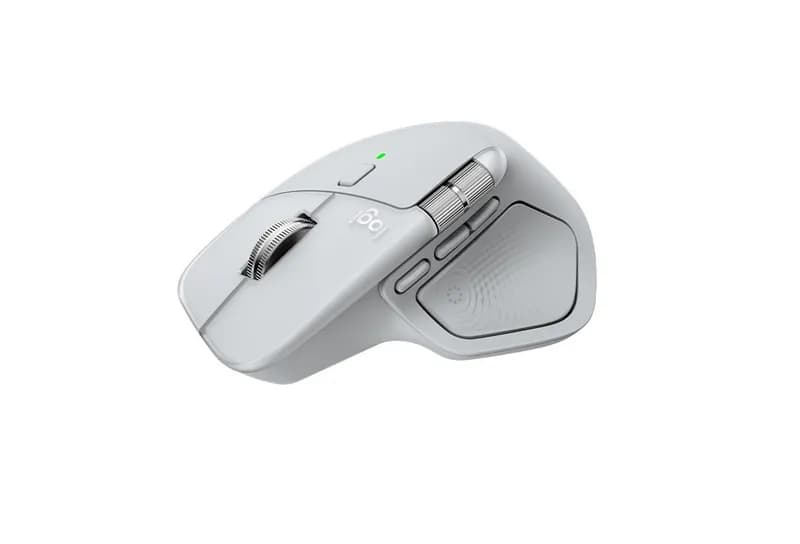
Key Specifications
Specification | Value |
Model | Logitech MX Master 4 |
Sensor | Darkfield High Precision Sensor |
Resolution | 200 – 8,000 DPI (Adjustable in 50 DPI increments) |
Buttons | Quiet Clicks, Haptic Touch Panel, Gesture Button, Middle Click, Back/Forward, Side Thumb Wheel |
Scroll Wheel | MagSpeed Electromagnetic Scroll Wheel (Smart-shift, Ratchet, Free-spin) |
Connectivity | Logi Bolt USB-C Receiver & Bluetooth Low Energy (BLE) |
Wireless Range | Up to 10 meters |
Multi-Device Support | Easy-Switch for up to 3 devices |
Haptic Feedback | Integrated Haptic Feedback Technology (Native Windows 11 integration) |
Battery Type | Rechargeable Li-Po Battery (650 mAh) |
Battery Life | Up to 70 days on a full charge (3 hours usage from 1-minute quick charge via USB-C) |
Dimensions (H x W x D) | 128.2 mm x 88.4 mm x 50.8 mm |
Weight | 150 g |
Software | Logi Options+ / Logi Tune |
Compatibility | Windows 10/11, macOS 12+, iPadOS 15+, ChromeOS, Linux, Android 12+ |
ReviewFull Review →
The Logitech MX Master 4 is a premium wireless productivity mouse designed for people who spend long hours working at a computer and want more control than a conventional mouse can provide. Its large ergonomic shape, thumb-operated controls, MagSpeed scroll wheel, horizontal scrolling, 8,000 DPI Darkfield sensor, and support for up to three devices make it particularly well suited to office work, programming, spreadsheets, creative applications, and multi-computer setups.
The MX Master 4 also introduces haptic feedback and an Actions Ring, adding another layer of customizable controls through Logitech’s Logi Options+ software. These features can turn frequently used commands, shortcuts, and application tools into mouse-accessible actions, although their usefulness depends heavily on how much customization you are willing to do.
At 150g, this is not a lightweight mouse, and its large right-handed shape will not suit everyone. It is also considerably more expensive than basic productivity mice. The question is therefore not whether the MX Master 4 has more features, but whether those features actually improve your workflow.
For programmers, office workers, designers, editors, and anyone who frequently works across multiple applications or computers, the MX Master 4 offers a particularly feature-rich approach to desktop control. For simpler tasks, however, much of what you are paying for may go unused.
Related Guides
Wooting 80HE vs Huntsman V3 Pro 8KHz: Which Gaming Keyboard Should You Buy?
The Wooting 80HE and Razer Huntsman V3 Pro 8KHz are premium gaming keyboards built around adjustable actuation, Rapid Trigger, and high polling rates. This comparison examines their switch technologies, gaming performance, typing feel, build quality, layouts, software, connectivity, and value to help competitive gamers decide which keyboard better matches their setup and priorities.
Read guide →Best Gaming Keyboards: Top Picks for Performance, Features, and Value
This gaming keyboard guide compares seven current models across responsiveness, switch technology, build quality, software, layouts, customization, and value. From the Wooting 80HE and Razer Huntsman V3 Pro 8KHz to Keychron’s Q1 HE 8K and Logitech G PRO X TKL RAPID, the guide explains which features matter most for competitive gaming, typing, and everyday use.
Read guide →Logitech Mouse Guide: Choosing Between MX, ERGO, Signature and G
Logitech’s mouse lineup spans productivity, ergonomics, portability and gaming, but the differences between series are not always obvious. This guide breaks down the MX, ERGO, Signature, Pebble and Logitech G families, comparing their designs, controls, connectivity, software and performance. It also explains which features matter for office work, travel, competitive gaming and everyday computing.
Read guide →