Detailed Review
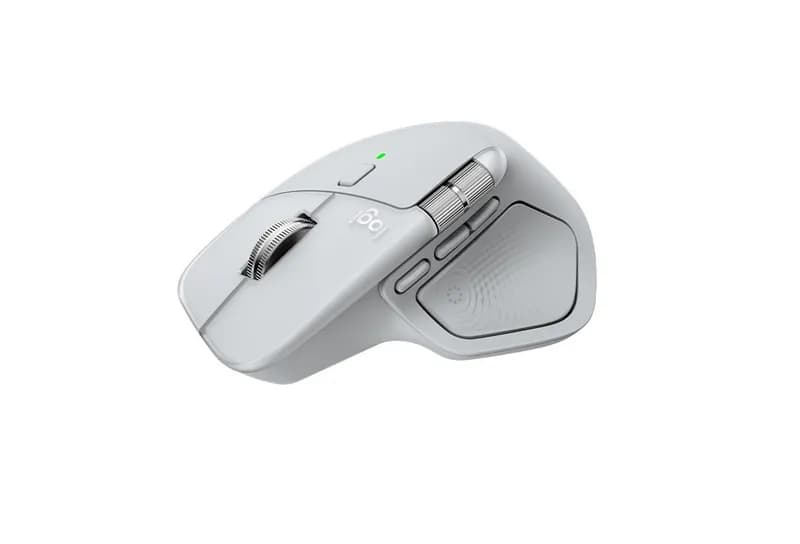
The Logitech MX Master 4 is a premium wireless productivity mouse built around a simple premise: give frequent computer users more control over scrolling, shortcuts, applications, and multiple devices without relying entirely on the keyboard. It combines a large right-handed ergonomic shape with an 8,000 DPI Darkfield sensor, MagSpeed scrolling, a dedicated thumb wheel, customizable buttons, haptic feedback, and Logitech’s new Actions Ring. Logitech currently lists it at $119.99.
The hardware is substantial, weighing about 150g, but the weight is accompanied by a solid, carefully sculpted design intended for palm-oriented use rather than fast mouse movements. Independent testing has found its tracking highly accurate across different surfaces, including glass, while long-term user reports generally praise its productivity controls but are more divided on the new haptic system and scroll-wheel behavior.
Overall Rating: 4.5/5
The MX Master 4 is exceptionally capable as a productivity mouse, but its large size, high weight, premium price, and feature-heavy approach make it less compelling for users with simpler needs.
Design & Comfort
The MX Master 4 has a large, strongly sculpted right-handed body with a pronounced thumb rest. Its approximately 128.2 × 88.3 × 50.8 mm dimensions and 150g weight make it substantially larger and heavier than a conventional wireless mouse.
The shape is primarily suited to a relaxed palm grip. Users who naturally rest much of their hand on the mouse are likely to get more from its design than fingertip users who prefer constantly repositioning a lightweight mouse.
The materials are also different from the soft-touch rubberized surface used on much of the previous generation. Independent testing notes that the MX Master 4 uses harder plastic and denser silicone areas, addressing some of the long-term wear concerns associated with the older coating.
The large shape is comfortable for extended desk work for many users, but it is not universally comfortable. Smaller hands may find some of the controls harder to reach, while users accustomed to lightweight gaming mice may find the 150g mass cumbersome.
Design & Comfort: 4.5/5
Tracking & Performance
The MX Master 4 uses Logitech's Darkfield sensor with a 200–8,000 DPI range, adjustable in 50 DPI increments. Logitech says it can track on virtually any surface, including glass, provided the glass meets its stated thickness requirement.
For a productivity mouse, this is more than enough performance. The benefit is not that office users need 8,000 DPI, but that the sensor provides precise pointer control across large high-resolution displays and unusual surfaces where a conventional optical mouse may struggle.
Independent testing found accurate tracking without noticeable skipping or shaking, including on difficult surfaces.
The MX Master 4 is not designed around gaming performance. Its high weight and productivity-focused controls make it poorly suited to competitive games requiring rapid, repeated repositioning. For normal casual gaming, however, the sensor itself is capable enough.
Performance: 4.5/5
Buttons & Scroll Wheel
Scrolling is arguably the MX Master 4's strongest hardware feature. Its MagSpeed electromagnetic wheel supports both ratchet and free-spin modes, allowing precise line-by-line navigation or extremely rapid movement through long documents. Logitech claims up to 1,000 lines per second in free-spin mode.
There is also a dedicated thumb wheel for horizontal scrolling. This is particularly useful in spreadsheets, timelines, wide documents, and creative applications. One long-term user specifically highlighted the thumb wheel's usefulness for Excel and video-editing workflows.
The mouse has eight buttons, including left and right click, back and forward controls, a gesture control, wheel mode switch, middle click, and the Actions Ring control.
The new haptic button and Actions Ring are more divisive. They can provide shortcuts and application-specific controls without moving the pointer to another part of the screen, but their value depends heavily on customization. Some users find the thumb control easy to trigger accidentally or simply unnecessary.
There are also recurring user reports concerning scroll-wheel looseness or inconsistent behavior. These are individual reports rather than evidence that every unit has the same problem, but they are worth considering for a $120 mouse.
Buttons & Scroll Wheel: 4.5/5
Connectivity & Battery Life
The MX Master 4 supports both Bluetooth Low Energy and Logitech's Logi Bolt USB-C receiver. It can remember and switch between up to three devices, making it particularly useful for people working across multiple computers or tablets.
This is one of the biggest practical advantages over a basic wireless mouse. You can keep the same mouse connected to several systems rather than maintaining separate peripherals.
Logitech rates the rechargeable 650mAh battery for up to 70 days on a full charge. Actual battery life varies with usage and computing conditions, so the figure should be treated as a manufacturer rating rather than a guarantee. Logitech also supports quick charging, with a short charge providing additional usage time.
Connectivity: 5.0/5
Battery Life: 4.5/5
Software & Features
The MX Master 4 is heavily dependent on Logi Options+ to reveal its full potential. The software allows users to customize buttons, assign application-specific commands, configure gestures, adjust scrolling behavior, and personalize the Actions Ring.
This matters because the mouse's extra controls are most useful when they are adapted to your workflow. A programmer might assign frequently used commands to buttons, while a designer or video editor can configure application-specific shortcuts.
The Actions Ring can place frequently used tools around the cursor, while haptic feedback can provide physical confirmation for selected actions. Logitech also supports plugins and integrations for compatible third-party applications.
The downside is complexity. If you prefer plugging in a mouse and never touching configuration software, many of the MX Master 4's headline features will be largely irrelevant.
Software & Features: 4.5/5
Real-World Use
For office work, the MX Master 4 is particularly well suited to long documents, spreadsheets, browsing, and general multitasking. The main and thumb wheels reduce the amount of repetitive pointer movement required for scrolling.
Programming is another strong use case. The combination of customizable buttons, application profiles, horizontal scrolling, and multi-device support can be useful when moving between an IDE, browser, terminal, documentation, and other applications.
Creative work also benefits from the controls. Horizontal scrolling is valuable for timelines and wide canvases, while customizable shortcuts can reduce trips to application menus.
For laptop use, the MX Master 4 is less appealing if portability is the priority. Its 150g weight and large body make it considerably less travel-friendly than compact mice such as the MX Anywhere series.
Gaming is similarly secondary. The sensor is precise, but the heavy chassis and productivity-oriented design are not optimized for competitive gaming.
Pros and Cons
Pros
Excellent productivity-oriented ergonomics
Highly capable Darkfield tracking
Excellent MagSpeed scroll wheel
Useful horizontal thumb wheel
Three-device connectivity
Long rated battery life
Extensive Logi Options+ customization
Haptic feedback and Actions Ring add flexible controls
Cons
Large and heavy
Expensive for a basic mouse
Not suitable for left-handed users
Haptic features may feel unnecessary
Some users report scroll-wheel issues
Requires software customization to get the most from its advanced features
Value for Money
At $119.99, the MX Master 4 is firmly positioned as a premium productivity mouse.
The value depends heavily on whether you will use its specialized features. The price buys much more than basic pointer control: advanced scrolling, horizontal navigation, multi-device connectivity, high-precision tracking, extensive customization, and additional haptic controls.
For someone working with spreadsheets, multiple computers, creative software, or complex desktop workflows, those features can have tangible value. For web browsing, email, and occasional office work, a much cheaper Logitech mouse can perform the essential functions just as well.
The MX Master 4 therefore makes more sense as a workflow tool than simply as a premium mouse.
Value for Money: 4.0/5
Who Should Buy It?
The MX Master 4 is particularly well suited to:
Office professionals
Programmers and developers
Spreadsheet-heavy workflows
Designers and creative professionals
Video editors
Users who switch between multiple computers
People who rely heavily on scrolling
Palm-grip users who prefer a large mouse
It is less suitable for:
Left-handed users
People with very small hands
Competitive gamers
Users who prefer lightweight mice
Travelers who need a compact mouse
Anyone who only needs basic pointer and clicking functions
Users who dislike configuring peripheral software
Final Verdict
The Logitech MX Master 4 is a highly capable productivity mouse whose value comes from how many small interactions it can simplify. The MagSpeed wheel, thumb wheel, customizable buttons, multi-device connectivity, and Logi Options+ profiles are genuinely useful for complex desktop workflows. The new haptic controls and Actions Ring are more dependent on personal preference and customization.
Its biggest drawbacks are the 150g weight, large right-handed design, premium price, and some user-reported concerns around the scroll wheel and haptic controls.
Overall Rating: 4.5/5
For users who spend much of the day working across documents, applications, and multiple computers, the MX Master 4 offers a deep set of productivity controls. For simpler workflows or users who prioritize low weight, portability, or gaming, another Logitech mouse may make more sense.