Detailed Review
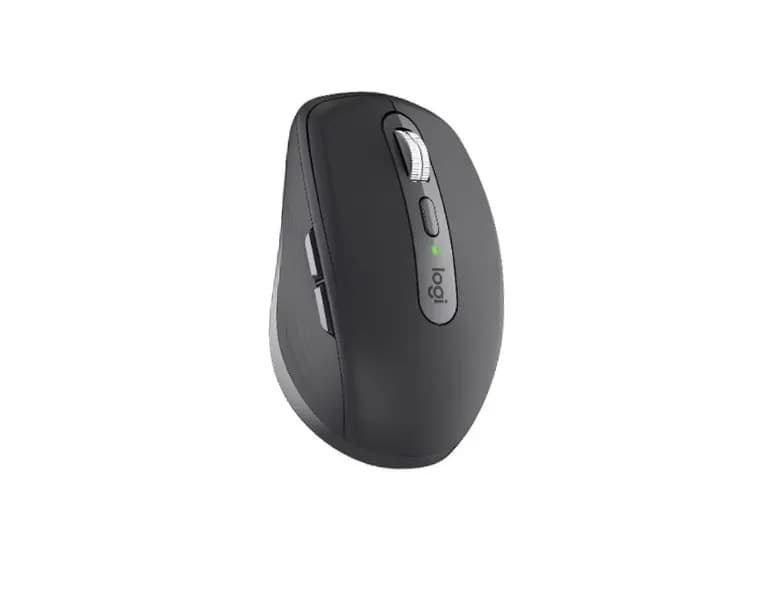
The Logitech MX Anywhere 3S is a compact wireless productivity mouse designed for people who want serious desktop controls without carrying a large ergonomic mouse. It combines a portable 100.5 × 65 × 34.4 mm body with a 99g weight, Logitech’s Darkfield sensor, an 8,000 DPI maximum sensitivity, MagSpeed scrolling, quiet clicks, and support for up to three devices.
The mouse is currently listed around $79.99, although pricing can vary by retailer and color. Logitech’s current product catalog continues to list the MX Anywhere 3S as part of its Master Series.
Its main advantage is portability. It provides many of the useful features associated with Logitech’s productivity mice while being small enough for a laptop bag. The main compromise is that compactness comes at the expense of some ergonomic support and advanced controls found on the larger MX Master series.
Overall Rating: 4.3/5
The MX Anywhere 3S is an excellent portable productivity mouse, particularly for people who work across multiple devices. Its limitations become more obvious for users who want a large ergonomic shape, horizontal scrolling, or gaming-oriented responsiveness.
Design & Comfort
The MX Anywhere 3S uses a compact, relatively symmetrical shape measuring 100.5 × 65 × 34.4 mm. Its 99g weight gives it a more substantial feel than many basic travel mice, while still making it considerably easier to carry than a full-size productivity mouse.
The symmetrical shell is useful for portability, but the mouse is still fundamentally designed for right-handed use because its two side buttons are positioned on the left.
Its shape works particularly well for claw and fingertip-style handling, while users with smaller or medium-sized hands can also use a relaxed palm grip. Larger hands may find the low profile less supportive during long sessions.
The build quality is a notable strength. Independent testing describes the construction as impressive, with a compact body and rubberized side areas that make the mouse feel more substantial than its size suggests.
This is not an ergonomic mouse in the same sense as the Lift or MX Master 4. Its design prioritizes portability and versatility rather than providing extensive palm or thumb support.
Design & Comfort: 4.0/5
Tracking & Performance
The MX Anywhere 3S uses Logitech’s Darkfield tracking technology with sensitivity up to 8,000 DPI. Logitech specifically positions it as an any-surface mouse, including glass, which is useful when working away from a conventional desk setup.
For productivity, 8,000 DPI is considerably more than most users need. Its practical advantage is precise cursor control across high-resolution displays rather than the ability to operate at extremely high sensitivity.
Independent testing found the sensor highly accurate, making it well suited to browsing, office applications, programming, and general desktop work.
Gaming is a different story. The mouse has a maximum polling rate of only 125Hz, and independent testing found its latency unsuitable for fast-paced competitive gaming. Casual gaming is possible, but gaming is clearly not its primary purpose.
Performance: 4.0/5
Buttons & Scroll Wheel
The MX Anywhere 3S has six buttons, including the left and right clicks, middle click, back and forward buttons, and a button for switching the scroll wheel mode.
One of its most useful upgrades over the previous MX Anywhere 3 is quieter main clicks. Logitech designed the Quiet Click system to reduce click noise while retaining a similar tactile feel.
The MagSpeed scroll wheel is the standout control. It supports both ratcheted scrolling for precise movement and a faster free-spinning mode for quickly moving through long webpages, documents, and other content. Logitech rates the wheel for speeds of up to 1,000 lines per second.
The main limitation is the absence of horizontal scrolling through wheel tilt. This matters more for spreadsheets, timelines, and wide documents than for normal browsing.
The side buttons are useful for browser navigation and application shortcuts, and most can be customized through Logitech’s software.
Buttons & Scroll Wheel: 4.5/5
Connectivity & Battery Life
The MX Anywhere 3S can connect through Bluetooth and supports up to three paired devices. Logitech also lists compatibility with the Logi Bolt receiver, although the receiver is sold separately rather than included with the standard mouse.
This makes the mouse particularly convenient for people who alternate between a laptop, desktop, and tablet or another computer. Device switching is much more useful in practice than simply having multiple connectivity standards on the specification sheet.
Compatibility includes Windows, macOS, ChromeOS, and Linux, while Bluetooth connectivity also extends to supported iPadOS and Android devices.
The internal rechargeable battery is rated for up to 70 days. Logitech also states that a one-minute charge can provide up to three hours of use. Actual battery life varies according to usage and other conditions.
USB-C charging is convenient because the mouse can continue to be used while charging.
Connectivity: 4.5/5
Battery Life: 4.5/5
Software & Features
The MX Anywhere 3S works with Logitech Options+, which is where much of its productivity potential becomes apparent.
Users can customize supported buttons, adjust sensitivity, create application-specific settings, and configure gesture-based controls. This allows the same physical buttons to behave differently depending on the application.
For example, a browser profile can prioritize navigation commands, while a creative application can assign shortcuts to the side buttons.
Logitech Flow can also extend the multi-device concept by allowing compatible computers to share a mouse and keyboard workflow and transfer content between them. The usefulness of these features depends on whether you regularly work across multiple systems.
The software adds genuine flexibility, but users who prefer a completely configuration-free mouse may find the extra options unnecessary.
Software & Features: 4.5/5
Real-World Use
The MX Anywhere 3S makes the most sense for laptop-based productivity and flexible workspaces.
For office work and web browsing, the compact shape, quiet clicks, and excellent scroll wheel make it easy to use without taking much desk space.
Programming is another good fit. The side buttons can handle navigation commands, while application-specific profiles can provide shortcuts for development tools and browsers.
For spreadsheets, the MagSpeed wheel is useful for moving vertically through large datasets, but the lack of horizontal scrolling is a genuine limitation compared with larger productivity mice.
Creative work is possible, especially when portability matters, but professionals who work extensively with timelines, large canvases, or wide interfaces may benefit more from a larger mouse with additional controls.
Travel is where the MX Anywhere 3S really distinguishes itself. It is compact enough for a laptop bag and sturdy enough to feel like a full-featured mouse rather than a minimal travel accessory. RTINGS currently lists it as a recommended travel wireless mouse.
Gaming should be considered secondary. Its sensor is accurate, but the 125Hz polling rate and productivity-oriented design make it unsuitable for competitive gaming.
Pros and Cons
Pros
Compact and highly portable
Excellent build quality
Accurate Darkfield sensor
MagSpeed free-spin and ratchet scrolling
Quiet main clicks
Three-device connectivity
USB-C charging
Strong battery life
Extensive customization through Logi Options+
Cons
No horizontal scrolling
Not truly ambidextrous
Compact shape may be less comfortable for large hands
Logi Bolt receiver is sold separately
125Hz polling rate limits gaming performance
Premium price for a compact mouse
Value for Money
At around $79.99, the MX Anywhere 3S is considerably more expensive than basic wireless mice, but its value comes from combining portability with features normally associated with more advanced productivity mice.
The price makes more sense for users who will actually use multi-device connectivity, MagSpeed scrolling, customizable buttons, quiet clicks, and rechargeable power.
Someone who simply needs a mouse for occasional browsing can spend considerably less without losing the basic pointer-and-click experience.
Compared with the larger MX Master family, the MX Anywhere 3S gives up some ergonomic support and advanced controls in exchange for a much smaller footprint. That is a meaningful trade rather than a simple downgrade.
Value for Money: 4.0/5
Who Should Buy It?
The MX Anywhere 3S is well suited to:
Laptop users
Frequent travelers
Office professionals
Programmers
Students and remote workers
Users who switch between multiple computers
People who prefer compact mice
Claw and fingertip grip users
Anyone who values quiet clicking and fast scrolling
It is less suitable for:
Competitive gamers
Users with very large hands
People who need extensive horizontal scrolling
Left-handed users who need side buttons
Users who want a large ergonomic mouse
Buyers who only need basic mouse functionality
Final Verdict
The Logitech MX Anywhere 3S succeeds because it does not try to be a miniature version of the MX Master 4. Instead, it focuses on the features that matter when portability is important: accurate tracking, excellent scrolling, quiet clicks, multi-device connectivity, rechargeable power, and useful software customization.
Its biggest compromises are the lack of horizontal scrolling, relatively high price, compact ergonomics, and limited gaming performance.
Overall Rating: 4.3/5
For a laptop-centered workflow or frequent travel, the MX Anywhere 3S is a particularly well-rounded Logitech mouse. Users who spend most of their time at one desk may get more practical value from a larger productivity mouse with additional controls and stronger ergonomic support.