FlexiSpot vs Autonomous: Which Standing Desk Should You Buy in 2026?
FlexiSpot vs Autonomous comes down to more than brand preference. This comparison examines current U.S. models, including the FlexiSpot E7 and E7 Pro and Autonomous Desk Pro lineup, covering height range, stability, desktop options, weight capacity, motors, controls, warranties, pricing, and real-world setup considerations. Find out which configurations make more sense for shorter users, taller users, programmers, creators, and multi-monitor workstations.
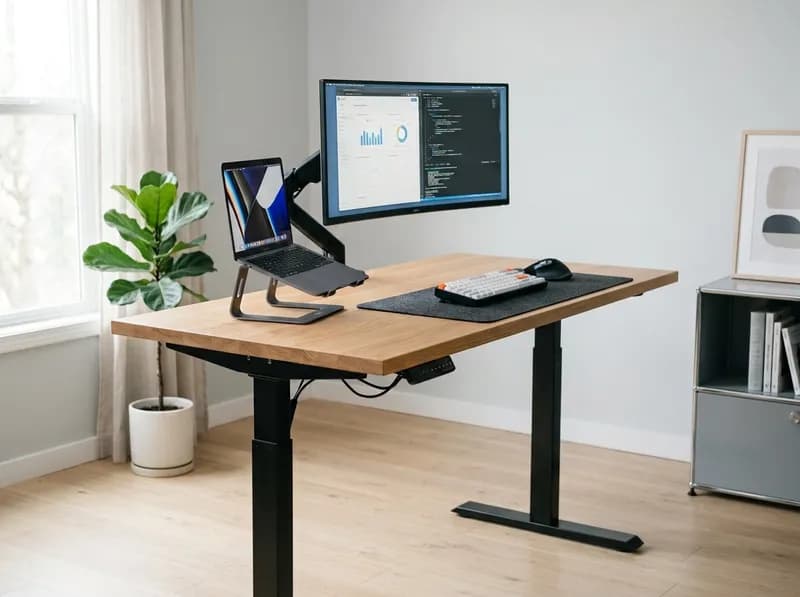
If you're shopping for an electric standing desk in the U.S., FlexiSpot and Autonomous are likely to end up on the same shortlist. Both offer dual-motor desks, programmable height controls, multiple desktop sizes, and models aimed at people who spend most of the workday at a desk.
The tricky part is that neither brand has just one desk.
FlexiSpot's current lineup includes the E5 and E7 families, along with the four-leg E7 Plus and heavier-duty E7 Pro. Autonomous has shifted its lineup toward the Desk Pro and Desk Pro AI, while the Desk 2 is still available.
Those differences matter more than the brand name.
A shorter user may care far more about the desk's minimum height than its maximum height. Someone running three monitors, a desktop PC, speakers, and a microphone arm may care more about desktop depth and stability at working height. And if you already have a 72-inch solid-wood top, buying a frame makes a lot more sense than paying for another complete desk.
So instead of asking whether FlexiSpot or Autonomous is "better," this comparison looks at the models, dimensions, frame designs, stability, prices, warranties, and features that actually affect how these desks work in a real home office.
Quick Comparison
The table below focuses on current U.S. models rather than older versions that still appear in search results and older reviews.
Category | FlexiSpot | Autonomous |
|---|---|---|
Representative models | E5, E7, E7 Pro, E7 Plus | Desk 2, Desk Pro, Desk Pro AI |
Current example price (promo) | E7 ~$299.99; E7 Pro ~$399.99 | Desk 2 from ~$399; Desk Pro from ~$499 |
Frame-only option | Yes | Less central to current lineup |
E7 / Desk Pro height range | E7: 22.8–48.4" | Desk Pro: 29.5–48.5" |
E7 Pro / Desk Pro 3-stage | E7 Pro: 25.0–50.6" | 27.2–52.7" |
Desk Pro AI | — | 24.25–53.5" |
E7 capacity | 355 lb | — |
E7 Pro capacity | 440 lb | Desk Pro: 330 lb |
Desk Pro AI capacity | — | 450 lb |
Rated lift-cycle testing | E7: 20,000+; E7 Pro: 30,000+ | Desk Pro: 50,000 bench-tested |
Frame type | E7: T-frame; E7 Pro: C-frame | Desk Pro: C-frame |
Memory presets | Yes | Yes |
Anti-collision | Yes on current configurations | Yes |
Warranty | 15 years on frame/motor/mechanisms; desktop 2–5 years depending on material | Desk Pro: lifetime frame, 2-year top |
Main buying approach | Frame + desktop customization | Complete-desk system |
Pricing needs a little context. FlexiSpot's current U.S. promotional pricing lists the E7 at $299.99 against a $339.99 reference price, the E7 Pro at $399.99 against $499.99, and the E7 Plus at $499.99 against $599.99.
Autonomous currently lists the Desk Pro from about $499 for the standard 53 × 29-inch configuration. The 3-stage version costs more, while the Desk 2 starts around $399.
Those numbers aren't directly comparable because FlexiSpot's headline prices can refer to the frame while Autonomous's Desk Pro price includes the desktop.
A $299.99 frame plus a $200 desktop is already around $500. The price section below breaks down the difference in more detail.
Which FlexiSpot and Which Autonomous?
Before comparing the brands, it's worth narrowing down the models.
FlexiSpot E5
The E5 sits below the E7 family and is aimed more at buyers who want a capable electric standing desk without moving into the higher-priced models.
The current E5-V3 uses dual motors and three-stage legs. It has a 23.6–49.2-inch height range, a 44–58.5-inch frame width, and a 276-pound maximum static load. Four memory presets and anti-collision protection are also included.
It's a more natural comparison with Autonomous's lower-priced desks than with the Desk Pro.
FlexiSpot E7
The E7 is the key FlexiSpot model for this comparison.
It uses dual motors, has a 22.8–48.4-inch height range, supports a frame width of 43.4–74.8 inches, and is rated for up to 355 pounds. FlexiSpot supports desktops from 47.2 to 80 inches wide, depending on configuration, and rates the E7 for 20,000+ lift cycles.
The low 22.8-inch minimum is particularly useful for shorter users. The catch is the T-frame design, which puts a crossbar across the front of the frame.
That crossbar is not a problem for everyone, but it can be noticeable if you sit very close to the front edge of the desk.
FlexiSpot E7 Pro
The E7 Pro moves the design in a more premium direction.
Its height range is 25.0–50.6 inches, capacity is 440 pounds, and the C-frame moves the front crossbar out of the knee area. The dual motors are rated for 30,000+ lift cycles.
The premium keypad adds a display, memory presets, child lock, and USB charging. FlexiSpot lists a 15-year warranty covering the frame, motor, and mechanisms.
For someone with a large desktop, heavy equipment, or a preference for open legroom, the E7 Pro is considerably more interesting than simply being a faster E7.
FlexiSpot E7 Plus
The E7 Plus is the four-leg option.
That makes it a different proposition from the two-leg E7 and E7 Pro. It's aimed at larger desktops and heavier setups where reducing movement at standing height is a priority.
If your setup is relatively light, the extra structure may not be necessary. If you're building a large workstation, it's worth considering.
Autonomous Desk 2
The Desk 2 remains relevant because it comes in both two-stage and three-stage versions.
The current U.S. product page lists the two-stage model at 28.3–47.5 inches and the three-stage version at 26.2–52 inches. Their rated capacities are 250 and 310 pounds respectively.
The two versions are also listed at different motor-noise levels, below 45 dB and 40 dB, and both provide four programmable settings.
Autonomous Desk Pro
The Desk Pro is the closest match to FlexiSpot's higher-end desks.
Its C-frame is the most noticeable physical difference. There is no front crossbar, so you can sit closer to the desk, push a chair farther underneath, or place a tower PC in the open space beneath the desktop.
The standard Desk Pro uses dual motors and is rated for 330 pounds. Its published height range is 29.5–48.5 inches, with a 53 × 29-inch desktop. A 70.5-inch Expanse option is also available.
Autonomous lists a lifting speed of 1.2 inches per second and motor noise below 30 dB. The company also offers a lifetime frame warranty and two years of coverage for the top.
The three-stage version extends the range to 27.2–52.7 inches while retaining the 330-pound capacity.
Autonomous Desk Pro AI
The Desk Pro AI is the most unusual desk in the lineup.
Its published specifications include a 24.25–53.5-inch height range and a 450-pound capacity, along with dual motors and anti-collision.
The desk also includes a sensor hub covering environmental and presence data. Autonomous lists sensors for CO₂, particulates, VOC/NOx, combustion gases, sound, presence, and distance. The system uses those readings to track environmental conditions and sit-stand behavior.
The interesting question is how useful those features are after the novelty wears off.
WIRED was skeptical of that part of the product, describing the AI features as something that mostly reports conditions the desk itself cannot change. That's a reasonable way to look at it. The sensors can tell you about the room, but they aren't going to improve the room's air quality.
For most buyers, the more tangible reasons to consider the Desk Pro AI are its 24.25–53.5-inch height range and 450-pound capacity. The sensor system is more of an extra feature.
Stability: Weight Capacity Is Only Part of the Story
Standing desk specifications often put a lot of emphasis on maximum weight.
That number is useful, but it doesn't tell you how stable a desk will feel.
Stability depends on the leg design, number of stages, frame width, desktop size, desktop rigidity, equipment placement, desk height, floor condition, and how well the frame is assembled.
A desk that feels solid at 29 inches can move noticeably more at 49 inches because the columns are extended farther and forces applied to the desktop create more leverage.
The FlexiSpot E7 has generally performed well in hands-on testing for normal multi-monitor setups. Movement tends to become more noticeable as the desk approaches maximum height or when a large desktop and heavy, off-center equipment are added.
Owner reports are mixed in much the same way. Some E7 owners report little movement during normal work, while others notice wobble with large tops or at maximum height. Both experiences can be real because the setup changes the mechanical behavior of the desk.
Autonomous provides an interesting data point with the Desk Pro AI. The company publishes a TÜV Rheinland stability measurement of 0.2344 inches under its specified test conditions.
That number should not be treated as a universal measurement of how the desk will feel in your office. It is one test under one set of conditions.
The same caution applies to lift-cycle figures. FlexiSpot lists 20,000+ cycles for the E7 and 30,000+ for the E7 Pro. Autonomous says the Desk Pro is bench-tested to 50,000 cycles.
Those are manufacturer-specific tests, so they aren't a clean head-to-head durability ranking. They do indicate that both brands are designing their higher-end desks for frequent use.
For a laptop or single-monitor setup, either brand's better dual-motor models provide plenty of capacity. Once you move to three monitors, a desktop PC, speakers, and a microphone arm, stability at your actual working height becomes much more important than the maximum number printed on the product page.
T-Frame vs. C-Frame: The Difference You'll Notice Every Day
The frame shape sounds like a technical detail until you spend eight hours sitting at the desk.
The E7 uses a T-frame, with a crossbar running across the front of the frame. The crossbar adds structural support, but it also occupies some of the space around your knees and shins.
Most users will never care.
People who sit very close to the desk can care a lot.
If your chair is usually pushed right up against the front edge, the crossbar can become something your knees or shins occasionally contact. This is one of the recurring complaints in owner discussions and hands-on reviews.
The E7 Pro takes a different approach. Its C-frame puts the legs farther toward the rear, eliminating the front crossbar. Autonomous uses a similar C-frame layout on the Desk Pro.
That creates more usable knee space and makes it easier to push a chair completely underneath the desk. It also leaves more room for a PC tower or under-desk storage.
There is a trade-off, though.
The E7 starts at 22.8 inches, while the E7 Pro starts at 25 inches. Once casters are added, the effective minimum height increases further.
That makes the E7 more interesting for shorter users, especially if the desk will be used with wheels.
So the frame choice is less about which design is "better" and more about what you need from the desk: the E7 prioritizes a lower minimum height, while the E7 Pro and Desk Pro provide more open legroom.
Height Range: Short Users and Tall Users Need Different Things
Height range is one of the biggest differences between these desks.
The FlexiSpot E7 reaches down to 22.8 inches, the E7 Pro to 25 inches, the Autonomous Desk Pro to 29.5 inches in its standard configuration, the three-stage Desk Pro to 27.2 inches, and the Desk Pro AI to 24.25 inches.
For shorter users, minimum height is often the number that matters.
If your comfortable seated desk height is around 25–27 inches, a desk that bottoms out near 29 inches may simply be too high. A taller chair can compensate for some of that difference, but it can also create problems with foot support and knee position.
This is why the E7's low minimum height is one of its strongest practical advantages.
Tall users have the opposite problem.
The E7 reaches 48.4 inches, the E7 Pro 50.6 inches, the three-stage Desk Pro 52.7 inches, and the Desk Pro AI 53.5 inches.
But maximum height shouldn't be treated as a number to maximize.
If your correct standing keyboard height is 43 or 44 inches, a desk that reaches 53 inches doesn't make your posture any better. Measure the height you actually need, then make sure the desk can reach it comfortably.
Desktop Size May Matter More Than the Brand
This is where FlexiSpot's frame-first approach becomes particularly useful.
The E7 and E7 Pro can support desktops up to 80 inches wide, depending on configuration. FlexiSpot also sells tops in sizes such as 48 × 24, 55 × 28, 60 × 30, 72 × 30, and 80 × 30 inches, with several material options.
That gives you considerably more freedom than buying a fixed desk package.
Autonomous takes the opposite approach. The Desk Pro comes as a complete desk with a 53 × 29-inch top, while the larger 70.5-inch Expanse option is available for buyers who need more surface area.
Neither approach is automatically better.
If you want something that arrives as one coordinated product, Autonomous is straightforward.
If you already have a desktop, want solid wood, or need an unusual width or depth, FlexiSpot's frame-only approach is more practical.
Desktop Material Matters
The desktop also affects stability.
A large, flexible desktop can move independently of the frame and make the entire desk feel less stable. A rigid 1.2-inch HDF top behaves differently from a thin particleboard surface or a very large solid-wood slab.
Don't forget that the weight rating includes the desktop itself.
Monitors, monitor arms, a PC, speakers, microphone arms, lighting, and accessories all add up. A 440-pound rating doesn't mean a 400-pound workstation is a sensible target.
Motors and Lifting Performance
The main models in this comparison use dual-motor systems.
That doesn't mean their lifting performance is identical. Controllers, gearing, synchronization, desktop weight, and frame geometry all affect how a desk moves.
Autonomous lists the Desk Pro at 1.2 inches per second, with the three-stage version listed at a higher speed. Motor noise is listed below 30 dB.
FlexiSpot's E5 page lists noise below 50 dB, while owner reports generally put the E7 family in the low-40-dB range.
Noise figures are difficult to compare directly because measurement distance, room acoustics, load, and movement direction all affect the result.
In normal use, the more important question is whether the desk moves smoothly and quietly enough that you don't think about the motor while you're working. Both product families are designed for that kind of everyday use.
Where You Buy: A 2026 Consideration
The sales channel is easy to overlook until you need to return a 100-pound desk.
FlexiSpot sells through its U.S. website and Amazon. Its current U.S. site advertises free shipping from 10 U.S. warehouses and 30-day returns with no restocking fee on qualifying like-new items.
The Amazon presence is useful because it gives buyers another purchasing and return channel, as well as a large pool of owner reviews.
Autonomous has moved toward a direct-only model. The current catalog is sold through autonomous.ai rather than an active Amazon storefront.
That isn't necessarily a disadvantage, but it changes the buying experience. Returns and support go directly through the manufacturer rather than through a marketplace.
For shoppers who strongly prefer Amazon for large-item purchases, the distinction is worth considering before ordering.
Controls and Smart Features
The height controller is something you'll probably touch every day, so the small differences matter more than they look on paper.
The current FlexiSpot E7 keypad can include an LED display, memory presets, child lock, and USB charging. The E5-V3 has four memory presets, a digital display, and anti-collision protection.
The exact feature set should be checked against the configuration you're ordering because FlexiSpot has changed keypad options between model years.
The Autonomous Desk 2 also offers four programmable height settings.
The Desk Pro takes a more integrated approach. Its keypad sits underneath the desktop, and the desk includes a built-in power strip that reduces the number of cables running from the desk to the wall.
That's one of the more meaningful differences between the two brands. FlexiSpot gives you more freedom to configure the frame and desktop; Autonomous puts more of the desk's infrastructure into the finished product.
The Desk Pro AI adds the sensor system discussed earlier.
For someone who just wants four height presets, those sensors probably won't change the experience much. For someone who wants environmental monitoring built into the workstation, they're a unique feature.
Anti-Collision: Helpful, Not Foolproof
Both brands offer anti-collision features on relevant current models.
The system is designed to stop or reverse the desk when an obstruction is detected while the desk is moving. That's useful when a chair, drawer, PC case, pet, or other object ends up underneath the desk.
It isn't a guarantee that the desk can never hit something.
Sensors don't detect every possible situation in the same way, and cables can still become trapped or pulled as the desk moves.
Monitor cables, wall-mounted displays, PC power cables, under-desk drawers, floor outlets, and power strips all need enough slack to accommodate the full height range.
Warranty and Long-Term Ownership
Warranty coverage is one of the more interesting differences between these brands, but you need to separate the frame from the desktop.
FlexiSpot lists a 15-year warranty on the E7 and E7 Pro frame, motor, and mechanisms, including the controller and electronics. The desktop has a shorter warranty depending on material: two years for some chipboard and solid-wood-texture options and five years for bamboo and solid wood.
Autonomous lists a lifetime frame warranty for the current Desk Pro and two years for the HDF desktop.
The Desk 2 has different terms, with the current product page advertising up to a 10-year warranty. Older reviews may list different coverage, which is another reason to check the warranty attached to the exact configuration you're buying.
The important point is that a "lifetime warranty" doesn't mean every component is covered for life.
Check the frame, motors, electronics, desktop, accessories, replacement parts, return period, and shipping responsibilities separately.
Price and Long-Term Value
This is where a simple FlexiSpot-versus-Autonomous price comparison can become misleading.
At the time of research, the FlexiSpot E7 was around $299.99 and the E7 Pro around $399.99 as promotional frame prices. The Autonomous Desk Pro started around $499 with its 53-inch desktop.
Comparing $299.99 with $499 doesn't tell you much because one price is for a frame and the other is for a complete desk.
First-year cost
For FlexiSpot, calculate:
frame + desktop + shipping + accessories + cable management
A $300 frame paired with a $250 desktop is already a $550 setup before accessories.
That can put a complete FlexiSpot desk surprisingly close to the Desk Pro.
Independent 2026 pricing breakdowns have put a complete standard E7 with FlexiSpot's own top around the high-$300 range and a complete E7 Pro around the high-$400 range, depending on the configuration.
Three-year cost
At this point, warranty coverage and replacement parts start to matter.
A lower purchase price isn't necessarily a long-term saving if an electronic component needs replacement after the warranty expires.
Five-year cost
The desktop becomes more important over a longer period.
A good frame can easily outlast the desktop sitting on it. That's one reason the ability to replace the top separately is useful if you're building a workstation intended to last for years.
Is Autonomous worth the extra money?
That depends on what you're paying for.
The Desk Pro's integrated power, built-in controls, C-frame, complete-desk design, and lifetime frame warranty are meaningful if you want a desk that arrives ready to use.
If you already have a desktop or want to choose your own, paying more for a complete package may not make much sense.
What About Autonomous's Own FlexiSpot Comparison?
Autonomous publishes its own comparison content, including a May 2026 article titled "Autonomous vs FLEXISPOT Desk: Desk Pro vs E6 MAX."
That comparison is useful for understanding how Autonomous positions the Desk Pro and which specifications the company emphasizes. It is not an independent review, however, and it compares the Desk Pro with the E6 MAX rather than the E7 family.
That distinction matters because the E7 is the FlexiSpot model many buyers will actually encounter when comparing higher-end standing desks.
As with any manufacturer comparison, the product page is a good source for specifications. It shouldn't be treated as independent evidence of which desk is preferable.
What Owners and Independent Reviewers Say
Owner feedback is useful for spotting recurring issues, but it isn't a controlled test.
FlexiSpot E7 discussions commonly mention easy assembly, good stability for normal setups, and the ability to use large custom desktops. Other owners report more movement near maximum height or with larger tops.
Independent testing shows why those reports can differ. One test measured only around 0.5 mm of monitor movement during fast typing, while another measured substantially more lateral movement at full height with a dual-monitor setup.
Those aren't necessarily contradictory results. The height, desktop, load, and test method were different.
Assembly also matters. A frame that isn't properly tightened or leveled can behave differently from the same frame assembled correctly.
The E7's front crossbar is another recurring point in owner discussions, particularly among people who sit very close to the desk.
Autonomous feedback is similarly dependent on the model. Desk Pro hands-on reports generally describe a solid frame and quiet motor, while broader discussions around the brand sometimes focus more on shipping and availability.
The useful lesson is simple: don't judge either brand from a single owner review.
Which Desk Fits Different Setups?
For Programmers
For a programmer, the priorities are usually a stable keyboard surface, enough depth for monitors, correct seated and standing heights, and sensible cable management.
FlexiSpot makes more sense if you want a 60 × 30, 72 × 30, or larger custom desktop.
Autonomous is appealing if you want a finished desk with integrated power and a cleaner built-in cable setup.
For Dual Monitors
Both brands can handle a dual-monitor setup.
Pay attention to the monitor sizes, arm position, desktop depth, and total weight rather than just the desk's maximum capacity.
Two 27-inch monitors are relatively straightforward. Two 32-inch displays on a long arm create considerably more leverage.
For Ultrawide Monitors
Desktop depth becomes especially important with a 34- or 49-inch ultrawide.
Once the monitor arm, keyboard, speakers, and other equipment are on the desk, a shallow desktop can feel crowded quickly.
FlexiSpot's support for larger custom desktops is useful here.
For Content Creators
Creators often have heavier and less evenly distributed setups: microphones, cameras, lights, audio interfaces, speakers, and several displays.
The location of that weight matters.
A microphone arm hanging off the rear edge creates more leverage than the same weight positioned near the center of the desktop.
For this kind of setup, the E7 Pro, E7 Plus, and Desk Pro AI provide useful capacity headroom.
For Tall Users
Look at the maximum working height rather than simply choosing the desk with the highest number.
The E7 Pro reaches 50.6 inches, the three-stage Desk Pro 52.7 inches, and the Desk Pro AI 53.5 inches.
Autonomous recommends the three-stage configuration for taller users, while the standard Desk Pro is aimed at users up to around 6'4".
If you're particularly tall, measure your standing elbow height before ordering.
For Short Users
Minimum height is the key specification.
The E7's 22.8-inch minimum is the lowest in this comparison. The Desk Pro AI reaches 24.25 inches, while the E7 Pro starts at 25 inches.
The standard Desk Pro's 29.5-inch minimum is relatively high and may not work well for shorter users.
Casters also change the calculation because they raise the entire desk.
For Heavy Equipment
The E7 Pro is rated for 440 pounds, the E7 Plus uses a four-leg design, and the Desk Pro AI is rated for 450 pounds.
Those numbers provide plenty of headroom for most home-office setups. They shouldn't be interpreted as recommended everyday operating loads, especially when heavy equipment is concentrated near the edge of the desktop.
FlexiSpot vs Autonomous: Pros and Cons
FlexiSpot
Pros
Wide range of frame and desktop configurations
E7 has a 22.8-inch minimum height
E7/E7 Pro support desktops up to 80 inches wide
E7 Pro is rated for 440 pounds
C-frame design on the E7 Pro
15-year warranty on frame, motor, and electronics
Four-leg E7 Plus option
Sold directly and through Amazon
Cons
More configuration choices can make the buying process confusing
Frame-only purchases require a separate desktop
E7's T-frame crossbar can bother users who sit very close
Stability varies with desktop size, height, load, and assembly
Promotional pricing makes simple MSRP comparisons difficult
Autonomous
Pros
Complete-desk approach
C-frame design on Desk Pro
Integrated keypad and power
Lifetime frame warranty on Desk Pro
Desk Pro is bench-tested to 50,000 cycles
Three-stage models offer greater height range
Desk Pro AI reaches 53.5 inches and is rated for 450 pounds
30-day direct returns
Cons
Standard Desk Pro starts at 29.5 inches
Direct-only purchasing
Less convenient if you already own a desktop
Several generations and configurations make older reviews easy to confuse with current models
Desk Pro AI's sensor features have limited independent validation
Which One Should You Buy?
Choose FlexiSpot if...
You want to build the desk around a particular desktop size or material.
It's also the more natural fit if you already own a desktop, need a 60-, 72-, or 80-inch workstation, or need a particularly low minimum height.
Within the current lineup, the E7 is the logical starting point for a low minimum height and lower price. The E7 Pro adds capacity, knee clearance, and more maximum height. The E7 Plus is the four-leg option for larger or heavier setups.
Choose Autonomous if...
You want a complete desk rather than a frame-and-top project.
The Desk Pro makes sense if you like its C-frame, integrated power, built-in controls, and lifetime frame warranty. The three-stage model is useful for taller users, while the Desk Pro AI offers the widest height range and highest capacity in the current comparison.
The sensor system is another reason to consider the Pro AI, although it shouldn't be the main reason for most buyers.
Neither is ideal if...
You need a height range outside these published specifications, need a specialized industrial workstation, or simply want a cheap fixed-height desk that rarely moves.
And if you already own a good desktop, the more useful question may be which frame fits that top rather than which brand is better overall.
Final Take
FlexiSpot vs Autonomous isn't really a choice between two identical types of standing desk.
FlexiSpot gives you more freedom to build around the desktop. The E7 has the lowest minimum height in this comparison at 22.8 inches, the E7 Pro reaches 440 pounds, and the company offers a 15-year warranty covering the frame, motor, and electronics. The E7 Plus adds a four-leg option for larger setups.
Autonomous takes a more integrated approach. The Desk Pro combines a C-frame with built-in controls and power, while its lifetime frame warranty and 50,000-cycle bench testing are notable. The three-stage Desk Pro and Desk Pro AI also offer more height range for taller users, with the Pro AI reaching 53.5 inches and carrying a 450-pound rating.
For a programmer, desktop depth and the height you actually work at matter more than the brand name.
For a shorter user, the E7's 22.8-inch minimum may be the deciding factor.
For a tall user, the three-stage Desk Pro's 52.7-inch range or the Pro AI's 53.5-inch range may be more relevant.
For a creator with a heavy setup, frame design, load distribution, and stability at working height deserve more attention than the maximum weight number.
Start with the workstation you need. Then choose the desk that fits it.
FAQ
Is FlexiSpot better than Autonomous?
There isn't one answer for every setup. FlexiSpot offers more flexibility around the frame and desktop, along with a lower minimum height on the E7 and higher capacity on models such as the E7 Pro. Autonomous focuses more on complete-desk integration, including the Desk Pro's C-frame, built-in power, and lifetime frame warranty.
Is Autonomous worth the extra money?
It can be, depending on what you need. The Desk Pro gives you a complete desk with integrated controls, built-in power, C-frame knee clearance, and a lifetime frame warranty. If you already have a desktop or want to choose your own, FlexiSpot's frame-first approach may make more sense.
Which is more stable, FlexiSpot or Autonomous?
Stability depends heavily on the model, desktop, load, height, floor, and assembly. The E7 performs well in independent testing at normal working heights, while Autonomous publishes TÜV Rheinland stability data for the Desk Pro AI. Those measurements were taken under different conditions and shouldn't be treated as a direct laboratory comparison.
Which standing desk is better for tall people?
The E7 Pro reaches 50.6 inches, the three-stage Desk Pro reaches 52.7 inches, and the Desk Pro AI reaches 53.5 inches. Measure your required standing height rather than choosing purely by maximum height.
Which is better for short people?
The FlexiSpot E7 has the lowest minimum height at 22.8 inches. The Desk Pro AI reaches 24.25 inches and the E7 Pro 25 inches. The standard Desk Pro starts at 29.5 inches, which may be too high for many shorter users.
Does FlexiSpot wobble?
Some owners report very little movement, while others notice more movement at maximum height or with larger desktops. Desktop rigidity, assembly, load placement, and desk height all affect the result.
Does Autonomous wobble?
Some movement is possible with any standing desk when fully extended. Autonomous publishes stability data for some models, but actual results depend on the desktop, load, height, floor, and assembly.
How much weight can FlexiSpot desks hold?
The E5-V3 is rated for 276 pounds, the E7 for 355 pounds, and the E7 Pro for 440 pounds. These are rated load figures rather than recommended everyday operating targets.
How much weight can Autonomous desks hold?
The Desk 2 is rated for 250 pounds in its two-stage version and 310 pounds in its three-stage version. The Desk Pro is rated for 330 pounds, while the Desk Pro AI is rated for 450 pounds.
Which standing desk is quieter?
Autonomous lists the Desk Pro below 30 dB, while FlexiSpot lists the E5 below 50 dB and owner reports generally place the E7 family in the low-40-dB range. Because the measurements aren't standardized, these figures are best treated as directional.
Which has a better warranty?
FlexiSpot lists 15 years for the E7/E7 Pro frame, motor, and electronics, while Autonomous lists a lifetime frame warranty for the Desk Pro. Desktop coverage is shorter for both, so check the exact warranty terms for the configuration you're buying.
Can I use a large desktop with FlexiSpot?
Yes. Depending on configuration, the E7 and E7 Pro frames support desktops from 47.2 to 80 inches wide. FlexiSpot also offers several desktop materials and sizes.
Can I use a large desktop with Autonomous?
The Desk Pro is sold with a 53 × 29-inch desktop, with a 70.5-inch Expanse option available. It isn't as focused on third-party desktop customization as FlexiSpot.
Does the FlexiSpot E7 crossbar get in the way?
For most users, probably not. But the T-frame crossbar runs across the front of the frame around the knee area. If you sit very close to the desk, you may notice it. The E7 Pro and Desk Pro use C-frame designs without the front crossbar.
Is the Autonomous Desk Pro AI's sensor suite worth it?
The sensors are a distinctive feature, but they're not the strongest reason to buy the desk. The more practical reasons are its 24.25–53.5-inch height range and 450-pound capacity. The environmental monitoring is best viewed as an additional feature rather than the core value proposition.
Related GuidesMore →
Levoit Humidifiers Explained: Models Compared, Features, Prices, and What to Know Before Buying
Levoit’s humidifier lineup includes several distinct families, from budget-friendly Classic and NeoClassic models to warm-mist OasisMist units and mist-free Superior evaporative humidifiers. This guide compares tank capacities, humidity controls, app connectivity, cleaning requirements, water recommendations, and verified U.S. prices. Independent test results from Wirecutter, Good Housekeeping, RTINGS, Better Homes & Gardens, and Popular Mechanics help you choose a model based on real-world performance rather than specifications alone.
Best TCL TVs in 2026: Which Series Is Right for You?
TCL's 2026 TV lineup ranges from affordable QLED and entry-level Mini-LED models to premium SQD-Mini LED sets and the RGB-Mini LED RM9L. This guide compares the major series, including the QM7L, QM8L, and X11L, using current U.S. prices, manufacturer specifications, and independent test results. Learn which models offer the best value, which suit bright rooms or HDR movies, and what compromises to consider before spending more.
Lasko Space Heater Lineup: Every Major Type Explained and How to Choose
Lasko makes a wide range of space heaters, from low-wattage MyHeat personal models to ceramic towers, Ellipse heaters, infrared quartz units, and bathroom-specific designs. This guide explains the major Lasko heater families, compares key models, and highlights differences in wattage, controls, prices, and safety features. Learn which options make sense for a desk, bedroom, or larger living area—and why checking the exact model number matters before buying.