Which Ergotron Monitor Arm Should You Buy? LX, LX Pro, HX, and More
Ergotron makes monitor arms for everything from lightweight office displays to large curved gaming monitors, but the models aren't interchangeable. This guide compares the Ergotron LX, LX Pro, HX, MXV, and TRACE to help you choose the right arm for your display. Learn how weight capacity, screen depth, desk-clamp compatibility, adjustment range, and current U.S. pricing affect the decision, with independent testing and owner feedback providing additional context.
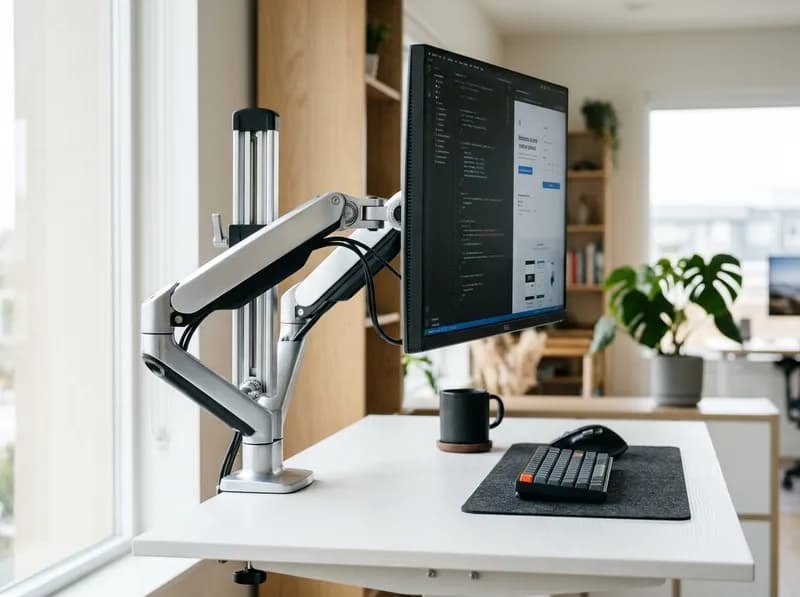
For most office monitors, start with the Ergotron LX Pro or the original LX. The main difference is weight capacity: LX Pro supports monitors weighing 4–22 lb, while the standard LX is rated for 7–25 lb. That makes LX Pro a better fit for some lightweight displays, but the original LX remains the logical choice for monitors weighing 23–25 lb.
The rest of Ergotron's monitor arm lineup targets more specific setups:
Best for most modern office monitors: LX Pro. Its 4–22 lb capacity, updated design and broad range of configurations make it a strong starting point. PCWorld named it the best single-monitor arm in its 2026 testing. However, some owners report that monitors near the upper end of its weight range can be difficult to reposition.
Best established all-rounder: LX. It supports monitors weighing 7–25 lb, has a long track record and often costs less than LX Pro.
Best for heavy monitors: HX. Its 20–42 lb capacity makes it suitable for displays outside the LX family's range, provided the monitor's depth and mounting geometry are compatible.
Best for a slim desk setup: MXV. Its narrow profile suits minimalist workstations, although its clamp accepts a more limited range of desk thicknesses.
Best for frequent repositioning: TRACE. Its movement mechanism is designed for people who regularly move their displays, including standing-desk and treadmill-desk users. Wirecutter named it the smoothest-adjusting mount in its 2026 testing.
Best budget Ergotron: NX. It costs less than the LX family but has a lower maximum load, shorter reach, less tilt and a shorter warranty.
Best for two monitors: LX or LX Pro dual configurations. HX Dual serves a different audience: its per-monitor capacity is much lower than that of a single HX arm.
Best for a large curved gaming monitor: an appropriately configured HX. The exact monitor model, weight, depth and tilt-pivot requirements matter more than the advertised screen-size limit.
Ergotron's U.S. lineup includes LX, LX Pro, MXV, HX, TRACE and NX, along with dual-monitor, wall-mounted and specialized mounting options. Similar-looking models can have substantially different load limits, included hardware and warranties, so checking the exact SKU is worth the extra few minutes.
Ergotron monitor arms compared
The table below covers the main desk-mounted models and configurations available in Ergotron's U.S. catalog. Specifications can vary by SKU, so do not assume every product in a family has identical hardware or capacity.
Model | Published monitor capacity | Screen-size guidance | MSRP / typical street price | Warranty | Best for |
|---|---|---|---|---|---|
LX Desk Monitor Arm | 7–25 lb | Up to 34 in | $219 / ~$193–210 | 10 years | Standard single monitors, including heavier displays |
LX Pro Desk Monitor Arm | 4–22 lb | Up to 34 in | $254–265 / $199–209 on sale | 10 years | Modern single-monitor setups |
LX Pro Tall Pole | 4–22 lb | Up to 34 in | $323–335 / ~$283 | 10 years | Extra vertical clearance |
MXV Desk Monitor Arm | 7–20 lb | Older guidance: up to 24 in; current pages: up to 34 in | $285 / ~$246–252 on sale | 10 years | Slim, compact desk setups |
NX Monitor Arm | Up to 17.6 lb | Up to 34 in | $155 / ~$118 on sale | 5 years | Budget-conscious buyers |
HX Desk Monitor Arm | 20–42 lb | Catalog guidance extends to 49 in; depth matters | $460 / ~$319–359 | 10 years | Heavy single monitors |
HX with HD Pivot | 20–42 lb arm; HD pivot specified for certain 28–42 lb, 6–12 in deep displays | Deep curved screens | $505 / ~$369 on sale | 10 years | Compatible heavy curved displays |
HX with VHD Pivot | 20–42 lb arm; pivot intended for extreme-depth displays | Examples include 57-in 1000R screens | $575 | 10 years | Compatible extra-deep curved displays |
TRACE Monitor Mount | Catalog: 8.1–21.5 lb; another listing states a 6.5 lb minimum | Up to 38 in | $440 / ~$411 on sale | 15 years | Frequent repositioning |
LX Pro Dual Direct | Verify the exact dual SKU and per-arm limits | Configuration-specific | $395 | 10 years | Two displays sharing a mounting point |
LX Pro Dual Side-by-Side | Verify the exact configuration | Two screens side by side | $540 | 10 years | Matched-height dual monitors |
LX Pro Dual Stacking | Verify the exact configuration | Vertical stacking; guidance assumes one screen under about 23 in | $523–540 | 10 years | A primary screen with a secondary display above |
HX Desk Dual Monitor Arm | 5–17.5 lb per monitor; 10–35 lb total | Published guidance up to 32 in; depth affects capacity | $740 / ~$539 on sale | 10 years | Two compatible monitors needing HX-style positioning |
Sources: Ergotron product pages, product sheets, U.S. catalog and retailer listings reviewed in October 2026. Prices fluctuate by finish, SKU, hardware bundle and promotion.
Two details are particularly important. TRACE has a 15-year warranty, while NX has a five-year warranty; most LX, LX Pro, MXV and HX products carry 10 years of coverage. Also, a single HX supports 20–42 lb, but HX Dual is rated for only 5–17.5 lb per screen. A monitor that fits the single HX can be too heavy for the dual version.
Ergotron's U.S. store has frequently discounted its arms below MSRP during 2026. The prices in this guide distinguish list prices from observed sale or street prices where available. Compare the final price for the exact SKU rather than treating MSRP as the amount you should pay.
How this guide evaluates Ergotron monitor arms
This guide draws on Ergotron's published product pages, specification sheets, manuals and U.S. catalog, alongside independent testing from PCWorld, Wirecutter, BTOD.com and Work While Walking. Owner feedback is also considered where it highlights recurring issues or practical limitations.
The arms were not tested firsthand for this guide. Where the evidence differs, the distinction is made clear: a published load rating is not the same thing as effortless movement at that load, and an owner report is not equivalent to a controlled test. Specifications that conflict across product pages or retailer listings are identified rather than treated as settled facts.
Which Ergotron monitor arm fits your setup?
Start with the monitor's actual weight, depth and mounting requirements. Screen size is useful for narrowing the options, but it cannot establish compatibility on its own.
Your setup | Shortlist | Check before buying |
|---|---|---|
24–27-inch office monitor | LX Pro, LX or NX | Actual weight, minimum load and clamp fit |
27–34-inch productivity display | LX Pro or LX | Weight, depth, reach and VESA pattern |
Slim desk or limited rear clearance | MXV | Desk thickness and rear clearance |
Heavy monitor weighing 20–42 lb | HX | Weight, depth and pivot requirements |
Deep, curved ultrawide | HX with HD or VHD Pivot, if required | Exact depth, weight and pivot compatibility |
38-inch-class monitor | TRACE or HX, depending on weight | Load range and clearance |
49-inch super-ultrawide | HX configuration matched to the display | Weight, depth, VESA interface and tilt joint |
Two conventional monitors | LX Pro Dual or LX Dual | Per-screen weight, width and positioning |
Two heavy monitors | Check the exact HX Dual configuration | Per-monitor capacity and depth derating |
Monitor moved throughout the day | TRACE | Movement style, lift range and price |
Wall-mounted workstation | LX Pro Wall, LX Wall or HX Wall | Wall construction, fasteners and SKU-specific capacity |
Tight budget | NX or the Ergotron-made AmazonBasics Premium arm | Load range, features and warranty |
Ergotron LX: the established all-rounder
Published capacity: 7–25 lb (3.2–11.3 kg)
Screen-size guidance: Up to 34 inches
MSRP: $219 for the cited black configuration
Typical street price: Around $193–210, with some earlier 2026 listings near $180
Warranty: 10 years
Example SKU: 45-241-224, black
The LX is the familiar choice in Ergotron's lineup. Its Constant Force mechanism supports height adjustment, tilt, pan and portrait or landscape rotation. The arm provides 13 inches of vertical lift and 75 degrees of total tilt—70 degrees up and five degrees down. When not in use, it folds back toward its base to clear desk space.
For SKU 45-241-224, the listed package includes the arm, extension, base, two-piece clamp, grommet mount, an eight-inch pole and mounting hardware. That combination is useful if you have not decided between clamp and grommet mounting. Other finishes and variants may include different hardware, so check the product listing rather than assuming every LX package is identical.
The LX also has a longer owner track record than the newer LX Pro. Aggregated listings show roughly 11,000 ratings and an average around 4.6 out of 5, compared with approximately 4.0 for LX Pro. Ratings vary by retailer and listing, but the difference is worth considering alongside the published specifications.
Who should buy the LX?
Choose it if your monitor weighs 7–25 lb, you want a conventional fully adjustable arm, and the price is competitive. It is especially relevant for displays weighing 23–25 lb, which exceed LX Pro's published maximum.
What to watch for: The seven-pound minimum excludes some lightweight monitors. A monitor being under the 25 lb maximum does not automatically mean it will move smoothly throughout the arm's full range, particularly if the display is unusually deep.
Ergotron LX Pro: the newer option for lighter monitors
Published capacity: 4–22 lb (1.8–10 kg)
Screen-size guidance: Up to 34 inches
MSRP: $254–265 for listed desk-arm options
Typical sale price: Around $199–209
Tall Pole MSRP: $323–335; observed price around $283
Warranty: 10 years
LX Pro is a current product family, not a discontinued version of the LX. Ergotron offers desk, tall-pole, wall and multi-monitor configurations. The standard desk version has a 5.1-inch pole, while the Tall Pole version uses an 11.8-inch pole to provide additional vertical clearance. The taller pole does not increase the arm's weight capacity.
The product sheet lists approximately 25 inches of maximum extension, 12.6 inches of lift and 85 degrees of tilt. It also publishes a 3.6-inch monitor-depth limit, a specification not stated on the cited original LX sheet. For the cited configuration, the grommet base is sold separately.
The most consequential difference is the weight range. LX Pro starts at four pounds but tops out at 22 lb; the original LX starts at seven pounds and supports up to 25 lb. A lightweight display may therefore suit LX Pro better, while a 24 lb monitor points toward the original LX.
What independent testing says
PCWorld named LX Pro its best single-monitor arm in 2026, highlighting its installation process and wide clamp. Wirecutter's 2026 refresh recommended it for larger and heavier screens in its lineup and singled out the Tall Pole version for taller users.
Owner feedback is less uniform. Some owners report that monitors close to the 22 lb maximum require substantial effort to reposition, while others describe gradual sagging that calls for tension adjustment. One reported example involves a 14.2 lb, 32-inch monitor that took two hands to lift even with the tension near its maximum.
These accounts do not establish that every LX Pro behaves that way. They do show why a load rating should not be interpreted as a guarantee of effortless adjustment at every point in the range.
Who should buy LX Pro?
It makes sense for monitors weighing 4–22 lb, buyers who want the current LX-family design, and people who need the Pro family's wall or multi-monitor options.
What to watch for: LX Pro is not automatically an upgrade for every LX owner. Check the exact capacity, included mounting hardware, grommet-base cost and current street price before paying more for it.
Ergotron HX: for genuinely heavy monitors
Published capacity: 20–42 lb (9.1–19.1 kg)
MSRP: $460 for the cited matte-black model
Observed pricing: Around $329 on Ergotron's store when checked; third-party listings commonly around $319–359
Warranty: 10 years
Example SKU: 45-475-224
The HX is designed for monitors that exceed the LX family's capacity. It provides 11.5 inches of vertical adjustment, cable management, portrait and landscape rotation, and clamp and grommet mounting hardware in the cited configuration. The clamp fits desk surfaces 0.4–2.6 inches thick.
The monitor's depth is just as important as its weight. Ergotron warns that displays deeper than eight inches may affect capacity. For compatible monitors weighing 28–42 lb and measuring six to 12 inches deep, Ergotron recommends the HX Heavy-Duty Tilt Pivot.
That recommendation matters for large curved displays. Two monitors with the same weight can place different leverage on a tilt joint if one has a much deeper housing or a different center of gravity.
What independent testing says
BTOD.com's long-term HX testing found that the arm could support a Samsung Odyssey G9 securely, while criticizing the feel of its cable-management straps. PCWorld reported smooth movement when testing it with 32-inch and 38-inch displays. B&H's buying guidance has also recommended the HX for mounting the Odyssey G9 family.
There is a limitation at the other end of the range. BTOD documented a 42-inch OLED at the lower end of the HX's weight window that was pushed upward by the spring and could not be adjusted to stay in place. That example illustrates an important point: the HX's 20 lb minimum is a real constraint, not a suggestion.
Who should buy the HX?
Choose it for a monitor weighing 20–42 lb when its depth, mounting interface and pivot requirements are compatible.
What to watch for: Do not buy the HX simply because your monitor is large. A large but lightweight display may fall below its minimum load.
HX with HD Pivot vs. VHD Pivot
Ergotron sells the standard HX and configurations with Heavy-Duty Tilt Pivot (HD) or Very Heavy-Duty Tilt Pivot (VHD). These are different mounting configurations, not cosmetic variants.
Configuration | Published price | Intended use |
|---|---|---|
Standard HX | $460 MSRP | Compatible displays weighing 20–42 lb |
HX with HD Pivot | $505 MSRP; around $369 on sale | Certain deep curved monitors weighing 28–42 lb and measuring 6–12 inches deep |
HX with VHD Pivot | $575 MSRP | Extreme-depth curved displays, including compatible 57-inch 1000R screens |
The standard HX is the starting point for displays that meet its weight and depth requirements. The HD Pivot addresses tilt requirements for certain heavier, deeper screens. The VHD Pivot is intended for extreme-depth curved displays, such as the 57-inch Samsung Odyssey Neo G9.
Neither pivot is a universal upgrade. Before ordering, confirm the monitor's exact model, weight without the stand, overall depth and required tilt range. Also check whether the pivot is bundled with the arm or sold separately.
Samsung's proprietary VESA adapter for the G9 series ships with the monitor. The more difficult compatibility question is often the leverage created by the curved housing and whether the tilt joint is suitable.
Ergotron MXV: a slimmer profile for compact desks
Published capacity: 7–20 lb (3.2–9.1 kg)
MSRP: $285
Observed sale price: Around $246–252
Warranty: 10 years
MXV prioritizes a slim appearance rather than maximum load capacity. Ergotron describes its profile as roughly 25% narrower than the LX family. The arm arrives assembled, provides 13 inches of lift and extends up to 22.2 inches from the back of the base to the VESA plate. A rotation stop can help prevent the monitor from swinging into a nearby wall.
Its desk clamp is a more significant limitation: the cited model fits surfaces 0.47–1.25 inches thick. The LX and HX accept thicker desktops. A grommet mount is also sold separately.
Screen-size guidance is inconsistent across Ergotron listings. Older pages and the dual configuration use a 24-inch limit, while current single-arm pages list up to 34 inches. Until the exact SKU's compatibility is confirmed, 24 inches is the more conservative reference.
The MXV Dual configuration has its own limits: each monitor must weigh 7–20 lb, with a combined maximum of 40 lb. Its screen-size guidance is more restrictive than that of a single arm, so it should not be treated as a universal solution for two large monitors.
Who should buy the MXV?
It suits buyers who prefer a slim arm and have a compatible monitor and desk. It is particularly attractive when appearance and a compact mounting footprint matter.
What to watch for: Its 20 lb maximum excludes many heavy ultrawides, and its narrow clamp range rules out some thick desktops.
Ergotron TRACE: for frequent repositioning
Catalog-listed capacity: 8.1–21.5 lb (3.7–9.8 kg)
Conflicting listing: An Ergotron Amazon listing states a 6.5 lb minimum
Screen-size guidance: Up to 38 inches
MSRP: $440; TRACE Dual $660
Observed sale price: Around $411
Warranty: 15 years
TRACE differs from a conventional articulated monitor arm. Its mechanism moves the screen up and down and side to side while keeping it centered over the keyboard. It is designed for people who regularly change their screen position, rather than those who set the display once and rarely touch it.
Wirecutter's 2026 testing called TRACE the smoothest-adjusting mount it tried. Work While Walking highlighted its usefulness for standing desks and treadmill desks, where a conventional arm's swinging motion can be inconvenient.
There are trade-offs. TRACE provides about 11 inches of lift, less than the LX family's 13 inches, and its retracted column still occupies roughly 6.25 inches of desk depth. Taller users may find the lift insufficient, particularly above about 6 feet 4 inches.
The minimum-weight discrepancy matters if your monitor weighs between 6.5 and eight pounds. Check the exact SKU's current specifications before buying.
TRACE Dual is also a distinct configuration rather than two single TRACE mounts combined. Published documentation puts its per-monitor range at approximately 4.05–10.75 lb, with additional restrictions for monitors deeper than 3.5 inches.
Who should buy TRACE?
It is worth considering for shared desks, frequent repositioning, standing workstations and treadmill desks. If your monitor stays in one position all day, LX Pro usually provides the necessary adjustment for less money.
Ergotron NX: the budget option
Published maximum capacity: 17.6 lb
Maximum extension: 14.5 inches
Screen-size guidance: Up to 34 inches
Tilt: Approximately 35 degrees
Pole height: 13 inches
MSRP: $155; around $118 on sale
Warranty: 5 years
NX offers an entry point into Ergotron's lineup, but it is not simply an LX at a lower price. It supports less weight, reaches less far, tilts through a smaller range and carries a shorter warranty.
Ergotron introduced NX for entry-level installations such as registration desks, point-of-sale stations and reference workstations. Its published specifications and price make it reasonable for a compatible standard monitor that does not need frequent or extensive repositioning.
Owner ratings are strong for this category, averaging around 4.6 in aggregated listings.
Who should buy NX?
It is a reasonable choice for buyers who want an Ergotron-branded arm at a lower price and do not need the LX family's full range of movement.
What to watch for: The five-year warranty is shorter than the 10 years offered on most of Ergotron's other desk arms. Compare NX with a discounted LX and the Ergotron-made AmazonBasics Premium Single Monitor Stand before deciding.
Ergotron multi-monitor arms: LX Pro, LX, MXV and HX
Ergotron offers side-by-side, stacking, direct-mount and other multi-monitor configurations. The right layout depends on how the screens will be used and how much room the desk has for mounting hardware.
Side-by-side: Best when two monitors need to sit at roughly the same height.
Stacking: Useful when a secondary display sits above the primary screen.
Dual Direct: Lets two displays share a mounting point, although screen width and arm geometry affect their spacing.
Two separate single arms: Usually better when the monitors differ substantially in size, need independent height adjustment or include a portrait-oriented display.
A dual arm's specifications should not be inferred from the corresponding single-arm model. PCWorld named the LX Side-by-Side its best dual arm, but its per-arm screen guidance is around 27 inches, compared with up to 34 inches for a single LX. The stacking configuration assumes one screen is under about 23 inches.
HX Dual has a published range of 5–17.5 lb per monitor and reduces capacity for monitors deeper than three inches. TRACE Dual is more restrictive still, at approximately 4.05–10.75 lb per screen.
Owner reports also include dual setups that sag until their tension is readjusted. These reports are not proof that a particular arm will fail, but they reinforce the need to check per-monitor load, combined weight and screen depth.
Dual arm or two separate single arms?
For mixed setups, two single arms generally offer more flexibility. Each monitor can be placed at a different height, angle or orientation, which is useful when one display is in portrait mode or the two screens are different sizes.
A dedicated dual arm is a better fit when symmetry matters, both displays are similar, or the desk has limited room for clamps. The choice is primarily about positioning and mounting space, not simply the number of monitors.
Wall-mounted Ergotron arms and WorkFit configurations
Ergotron lists wall-mounted versions of LX, LX Pro, MXV and HX, including configurations with specialized pivots and multi-monitor arrangements.
Wall mounting frees the back edge of the desk, but introduces different installation requirements. Wall material, framing, fasteners, arm reach and cable routing all matter. Do not attach a heavy monitor arm to drywall alone unless the exact mounting system is specifically rated for that installation.
For a heavy or curved display, check the wall-mounted SKU and pivot combination directly. The capacity of a desk-mounted HX should not automatically be assumed to apply to every wall configuration.
WorkFit products need separate consideration. They include sit-stand workstations and desk converters, not just monitor arms. Ergotron specifically limits an LX attached to a WorkFit-T or WorkFit-TL converter to a 14 lb monitor and requires a separately ordered grommet mount. Dual-arm limits on converters can be lower still.
The arm's standalone 25 lb rating does not transfer to a converter installation.
Why Ergotron costs more: Constant Force vs. gas springs
The most useful way to assess Ergotron's price is to look at the mechanism, warranty and intended service life—not just the brand name.
The LX, LX Pro, MXV and HX use Ergotron's Constant Force mechanical spring system rather than a pressurized gas cylinder. Mechanical springs do not lose pressure through a gas leak, which is one reason they are associated with long service life. Budget gas-spring arms, by contrast, can develop sagging or need repeated tension adjustment as they age.
BTOD.com's testing and long-term observations have documented degradation in some budget gas-spring arms within three to five years, with the cheapest models sometimes showing problems much sooner. Ergotron arms have also been used in commercial installations for more than 15 years, although an individual arm's lifespan depends on its environment, load and use.
Mechanical springs still need correct tension settings. The owner reports about LX Pro show that a monitor near the top of a rated range can be harder to adjust than one near the middle. Constant Force is not a substitute for choosing the right capacity.
Published cycle-test figures offer another comparison. Ergotron lists 10,000-cycle motion testing for the LX and MXV. Humanscale publishes 25,000 cycles for its mechanical-spring-and-bearing design. These figures are not directly comparable without identical testing methods, but they show that both brands emphasize durability more than many budget manufacturers do.
The practical rule: Choose an arm whose capacity range comfortably covers your monitor's actual weight. A larger maximum rating does not automatically make an arm better, particularly if the monitor falls below its minimum load.
The AmazonBasics connection: a lower-cost way to get the mechanism
Amazon's AmazonBasics Premium Single Monitor Stand is manufactured by Ergotron, according to multiple independent reviews and owner teardowns. Comparisons have reported the same Constant Force mechanism, similar geometry and compatible hardware to the LX.
The model has typically been listed around $110–130, compared with roughly $193–210 for the LX at common street prices. Its main trade-off is warranty coverage: the AmazonBasics version carries a one-year warranty rather than Ergotron's 10 years. It also lacks the LX family's full selection of finishes, tall-pole, wall and dual configurations.
This is a useful option if the mechanism matters more to you than the brand warranty or accessory ecosystem. If long-term support is one of the reasons you are paying Ergotron prices, the shorter AmazonBasics warranty is a meaningful difference.
Make sure you select the Premium Single Monitor Stand. Amazon also sells less expensive conventional steel gas-spring arms under the AmazonBasics name; those models do not share the same Ergotron lineage.
Ergotron monitor arm prices: what should you actually pay?
The following prices were observed in official listings and retailer pages during October 2026. They are reference points, not guaranteed transaction prices.
Model | MSRP | Observed sale or street price |
|---|---|---|
NX | $155 | ~$118 |
LX | $219 | ~$193–210; occasionally around $180 |
LX Pro | $254–265 | ~$199–209 |
LX Pro Tall Pole | $323–335 | ~$283 |
MXV | $285 | ~$246–252 |
HX | $460 | ~$329 official sale; ~$319–359 street |
HX with HD Pivot | $505 | ~$369 official sale |
HX with VHD Pivot | $575 | Not confirmed |
TRACE | $440 | ~$411 official sale |
TRACE Dual | $660 | Not confirmed |
LX Pro Dual Direct | $395 | Not confirmed |
LX Pro Dual Stacking | $523–540 | Not confirmed |
LX Pro Dual Side-by-Side | $540 | Around $470 in PCWorld's quoted pricing |
HX Dual | $740 | ~$539 official sale |
Ergotron's official store has frequently priced products below MSRP. Compare other retailers with the current official sale price, not just the list price.
Also account for accessories. The cited LX Pro configuration sells its grommet base separately; MXV's grommet mount is an optional accessory; and an HD Pivot can add $85 or more when purchased separately rather than as part of a bundle.
The extra cost makes sense in specific situations:
Choose HX when the monitor exceeds the LX family's capacity and meets HX's weight and geometry requirements.
Choose HD or VHD Pivot when the monitor's depth and tilt requirements call for that configuration.
Choose TRACE when frequent repositioning is a daily benefit, particularly at a standing or treadmill desk.
Choose a dual arm when one mounting point and a coordinated layout are more useful than independent arms.
Save money on NX, a discounted LX or the AmazonBasics Premium arm when the monitor fits the published specifications and the more expensive features would go unused.
Ergotron LX vs. LX Pro
Specification | LX Desk Arm | LX Pro Desk Arm |
|---|---|---|
Monitor capacity | 7–25 lb | 4–22 lb |
Screen-size guidance | Up to 34 in | Up to 34 in |
Vertical lift | 13 in | 12.6 in |
Tilt | 75 degrees | 85 degrees |
Published monitor-depth limit | Not stated on the cited sheet | 3.6 in |
Pole | Varies by SKU | 5.1 in standard / 11.8 in Tall Pole |
Mounting hardware | Clamp and grommet included with cited SKU | Grommet base sold separately for cited configuration |
MSRP | $219 | $254–265 |
Warranty | 10 years | 10 years |
Aggregated owner rating | Around 4.6, roughly 11,000 ratings | Around 4.0 |
Neither arm is the better choice for every monitor.
LX Pro supports lighter displays, offers a wider tilt range and has a published depth limit. PCWorld also praised its installation experience and Ergotron offers more Pro-family mounting configurations.
The original LX supports a heavier monitor, includes grommet hardware in the cited SKU, often costs less and has a stronger aggregated owner rating. For a 23–25 lb monitor, the LX is the appropriate starting point. For a four- to seven-pound display, LX Pro is the better fit.
Between those ranges, compare the actual prices and decide whether the newer design or the LX's longer track record matters more to you.
Ergotron LX vs. MXV
Both are adjustable single-monitor arms, but their priorities differ.
LX: Supports up to 25 lb, provides 13 inches of lift and 75 degrees of tilt, and accepts desk surfaces up to 2.4 inches thick for the cited SKU.
MXV: Supports 7–20 lb, has a slimmer profile, arrives assembled and includes a rotation stop. Its clamp accepts surfaces only 0.47–1.25 inches thick.
MXV Dual: Supports 7–20 lb per monitor and up to 40 lb combined, with more restrictive screen-size guidance than the single LX.
Choose LX when capacity, tilt and desk compatibility matter most. Choose MXV when a slimmer design better suits your desk and its clamp fits the desktop.
Ergotron LX vs. HX
This is a capacity and geometry decision, not a simple quality ranking.
LX: 7–25 lb, with screen-size guidance up to 34 inches.
HX: 20–42 lb, with catalog guidance extending to 49-inch displays, subject to depth and pivot requirements.
A 27-inch monitor weighing 12 lb belongs on the LX-family shortlist, not the standard HX. Its weight is below HX's published minimum. At the other end, a 40-inch-class display weighing 30 lb exceeds the LX's maximum, making HX the relevant family if the monitor's depth and pivot requirements are compatible.
As a rough guide, 27-inch monitors under 15 lb often fit the LX family; 34-inch displays around 15–17 lb can also be LX candidates; and 38-inch monitors weighing 20–25 lb sit near the crossover. A 57-inch Neo G9 weighing roughly 34 lb requires an appropriately configured HX.
These are starting points, not universal compatibility guarantees. Check the exact monitor's specifications before buying.
Ergotron TRACE vs. LX
TRACE is designed for people who frequently move their screens. LX is the more conventional articulated arm, with a broader range of everyday applications.
TRACE has a catalog-listed capacity of 8.1–21.5 lb, compared with LX's 7–25 lb. It costs more but carries a 15-year warranty, and Wirecutter praised its exceptionally smooth adjustment. Its mechanism keeps the display centered over the keyboard as it moves.
LX offers more lift—13 inches versus 11 inches—along with more reach and a lower price. For a screen that stays in one place, LX or LX Pro is generally the more practical purchase. For a standing desk, treadmill desk or shared workstation where the display moves repeatedly, TRACE's design may justify the premium.
HX with HD Pivot vs. VHD Pivot
HD and VHD configurations address the leverage and tilt requirements of compatible curved monitors. They are not generic upgrades for every heavy display.
HD is specified for compatible monitors weighing 28–42 lb and measuring 6–12 inches deep. VHD is intended for extreme-depth curved screens, including compatible 57-inch 1000R displays such as the Samsung Odyssey Neo G9.
Before ordering, confirm:
The monitor's weight without its stand.
Its full housing depth, including the curved enclosure.
The exact HX arm-and-pivot SKU.
Whether the pivot is included or sold separately.
The permitted tilt range and any VESA adapter requirements.
Samsung's proprietary G9 VESA adapter ships with the monitor, but that does not resolve the separate question of whether the arm's tilt joint can safely handle the display's leverage.
Dual-monitor arm vs. two single arms
A purpose-built dual arm is convenient for a symmetrical setup and uses one mounting point. Two single arms usually offer more flexibility when the displays differ in size, height or orientation.
For mixed setups, owner communities and Wirecutter's guidance tend to favor separate arms. If you choose a dual model, check the exact configuration limits: LX Side-by-Side has per-arm screen guidance of around 27 inches; LX Stacking assumes one screen under about 23 inches; HX Dual supports 5–17.5 lb per monitor and derates for displays deeper than three inches; and TRACE Dual tops out around 10.75 lb per screen.
How to check monitor compatibility before buying
A monitor arm's advertised screen-size limit is not enough to establish compatibility. A flat 34-inch display and a deep 34-inch curved monitor can put very different loads on the same arm.
1. Check the monitor's weight without its stand
Use the manufacturer's specification sheet and look for weight without stand or net weight without stand. Do not use the shipping weight or the weight of the monitor with its original base.
Compare the figure with the arm's minimum and maximum load. A six-pound monitor is below the original LX's seven-pound minimum; a 26-pound monitor exceeds its 25-pound maximum. Neither is within the published LX range, even if the VESA pattern fits.
If you plan to attach a light bar, webcam or other accessory to the display, account for the additional weight and how its position may affect balance. An arm usually moves most predictably when the monitor sits comfortably within its range rather than at either extreme.
2. Check the VESA mounting pattern
Many monitors use 75 × 75 mm or 100 × 100 mm VESA patterns. LX and LX Pro support both. HX configurations support MIS-D 75/100 and certain larger MIS-E or MIS-F patterns; other interfaces may require an adapter.
If the monitor has no standard VESA holes, check whether the manufacturer offers a compatible adapter. Recessed mounting points, unusual screw depths or proprietary interfaces can require additional hardware.
Samsung's curved G9 family is a well-known example of a proprietary mounting interface. The VESA adapter is supplied with the monitor, but confirm that it matches the exact display.
3. Check depth and center of gravity
Monitor depth can reduce the usable capacity of an arm. Ergotron warns that displays deeper than eight inches may affect standard HX capacity. The HD Pivot is recommended for certain 28–42 lb monitors measuring 6–12 inches deep, while HX Dual derates for monitors deeper than three inches.
For curved displays, consider the entire housing rather than only the center depth. Also check whether the VESA mounting point sits unusually far forward or backward relative to the screen. That geometry affects the leverage on the tilt joint.
4. Check desk thickness, structure and clearance
For the cited models:
Model | Clamp thickness | Grommet hardware |
|---|---|---|
LX, SKU 45-241-224 | 0.4–2.4 in | Included with the cited configuration |
HX, SKU 45-475-224 | 0.4–2.6 in | Included with the cited configuration |
MXV, SKU 45-486-224 | 0.47–1.25 in | Sold separately |
A thick desk apron, cable tray, raised rear lip or frame close to the desk edge may prevent the clamp from seating properly. Measure the mounting area before ordering.
5. Match the arm to the monitor type
Monitor type | What to verify | Starting point |
|---|---|---|
24–27-inch office monitor | Weight, VESA and minimum load | LX Pro, LX or NX |
32-inch productivity monitor | Weight, depth and reach | LX Pro or LX, within limits |
34-inch ultrawide | Weight and housing depth | LX Pro, LX or HX according to load |
38–40-inch ultrawide | Weight, depth and rear clearance | TRACE or HX, depending on the display |
49-inch super-ultrawide | Weight, curvature, VESA and pivot needs | Compatible HX configuration |
57-inch extreme curved display | Exact model and VHD Pivot compatibility | HX with VHD Pivot, if verified |
Portrait secondary monitor | Rotation and screen clearance | Compatible LX-family arm or dual setup |
Two monitors of different sizes | Individual weight, width and positioning | Two single arms or a verified dual configuration |
This is a selection framework, not a universal compatibility list. Ergotron's product pages provide a compatibility checker for selecting the monitor manufacturer and exact model. If the monitor is not listed, contact Ergotron to verify the combination.
Samsung Odyssey G9 compatibility: why the exact model matters
The Samsung Odyssey G9 name covers monitors with different weights, sizes and curvature. A generic claim that an arm is “G9-compatible” is not enough.
Monitor | Approximate weight without stand | Curvature | What it means for mounting |
|---|---|---|---|
49-inch G91F / G95C | Around 23 lb (10.6 kg) | 1000R | Check HX capacity and depth |
49-inch OLED G9 | Around 19 lb (8.8 kg) | 1800R | May fall below the standard HX's 20 lb minimum |
57-inch Neo G9 | Around 34 lb (15.4 kg) | 1000R | Requires careful HX pivot selection; VHD may be appropriate |
Confirm the exact model number and weight without the stand. The proprietary VESA adapter comes in the box, but the tilt joint is often the more important constraint for an oversized curved display.
Ergotron's HD Pivot addresses leverage for certain 28–42 lb displays measuring 6–12 inches deep. The 57-inch Neo G9 may require the VHD configuration. Do not select a pivot from screen size alone.
Protecting your desk: glass, honeycomb tops and clamp pressure
Hollow-core and honeycomb desktops
Some desks, including many IKEA Linnmon-family tops, have a honeycomb or hollow core beneath a thin surface layer. A clamp may feel secure at first but gradually crush the top, leaving a dent or crack.
A reinforcement plate or hardwood block can spread the load across a larger area. Steel plates commonly cost around $11–25, although the appropriate solution depends on the desk's construction and the arm's load.
Glass desktops
Do not attach a C-clamp directly to a glass desk. A grommet mount with suitable load-spreading hardware may be possible only when the glass and mounting system are explicitly suitable for that installation. If the desk cannot safely accommodate a grommet mount, use a freestanding or floor-standing solution instead.
Do not overtighten the clamp
The clamp should be snug and secure, not tightened as hard as possible. Excessive force can crush the desktop surface, damage threads or crack the desk without meaningfully reducing wobble on a properly installed arm.
Standing desks need cable slack
Leave approximately 25–35 cm (10–14 inches) of cable slack so the monitor can travel through the desk's full height range without pulling on the cables. Test the complete range after installation and check the clamp again after the first few weeks. The desktop may flex slightly during movement, and a clamp that seemed secure on day one can loosen.
For a monitor near the arm's maximum capacity, a properly installed grommet mount may offer greater stability than a clamp, depending on the desk and mounting hardware.
Ergotron warranty: how the models compare
Warranty coverage varies across the product lineup.
Product | Published warranty |
|---|---|
TRACE | 15 years |
LX, LX Pro, MXV and HX families, including cited dual and pivot configurations | 10 years |
NX | 5 years |
WorkFit arms and converter accessories | 5 years |
Ergotron-made AmazonBasics Premium arm | 1 year |
Typical budget-brand arm | Often 1–5 years |
Check the warranty for the exact model and market, especially when buying older inventory or a third-party listing. Coverage follows the specific product and terms, not simply the brand name.
Humanscale also offers a 15-year warranty on relevant monitor arms. Herman Miller Jarvis warranty information has been presented inconsistently across parts of Wirecutter's product page, with both 10- and 15-year references; verify the current terms before buying.
Ergotron vs. other monitor arm brands
Ergotron is not automatically the best purchase for every desk. The right comparison depends on the monitor's weight, the range of motion you need, the mounting setup and the installed cost.
Herman Miller Jarvis: a strong alternative for conventional monitors
Wirecutter's 2026 refresh named the Jarvis its best monitor arm overall, quoting a price around $131. Its published load range is 2.2–19.8 lb, with 19.8 inches of lift and a low-profile clamp.
For a conventional monitor that falls within that range, Jarvis is a serious alternative to LX Pro. Its greater vertical travel may be useful for taller users, and its price is substantially lower than Ergotron's typical MSRP.
Ergotron's advantages are its heavier-duty options, dual and wall-mounted configurations, and support for monitors beyond the Jarvis's published capacity.
Humanscale M2.1 and M8.1: premium alternatives
Humanscale's M2.1 is listed around $487 in the U.S., with a 15.5 lb maximum capacity. It is a candidate for a conventional office monitor rather than a direct substitute for HX.
The M8.1 is the more relevant comparison for buyers focused on mechanism durability. Humanscale publishes a 15-year warranty and 25,000-cycle testing for its mechanical-spring-and-bearing design. Its dual configuration has a published capacity of 40 lb per arm, compared with HX Dual's 17.5 lb per monitor, although the models and testing conditions are not identical.
If warranty and mechanism life are your main priorities, Humanscale deserves a place on the shortlist.
Budget arms: when spending less makes sense
The MSI MAG MT201, typically around $60–80, was PCWorld's budget pick despite an assembly process that took roughly 15–20 minutes. Its advertised 49-inch and 44 lb limits should still be checked carefully against the actual monitor.
BTOD's testing of the HUANUO Basic HD, priced around $60, concluded that a budget arm can be the rational choice when the monitor is comfortably within its range. Saving $150–300 is meaningful if the monitor does not need the premium arm's extra capacity or long-term support.
The trade-off is durability, adjustment quality and warranty coverage. PCWorld's testing was notably negative about the VIVO STAND-V002, a reminder that low price alone does not guarantee a usable arm.
AmazonBasics Premium: the value-focused option
The Ergotron-made AmazonBasics Premium Single Monitor Stand offers the Constant Force mechanism for roughly $110–130, without the same warranty or broader product ecosystem. For a conventional monitor, it may be the best value in the comparison if long-term warranty coverage is not a priority.
Ergotron monitor arms: pros and cons
Pros
Broad selection covering standard, heavy-duty, dual, triple, wall-mounted and specialized setups.
Constant Force mechanical springs, which avoid the pressure-loss problem associated with leaking gas springs.
Published product sheets and manuals that make model-specific load and mounting requirements easier to check.
Ten-year warranties across most of the main lineup, with 15 years for TRACE.
Heavy-monitor options, including HD and VHD pivots for compatible deep curved displays.
Cons
Premium arms can cost several hundred dollars before optional mounting hardware.
Similar model names conceal different weight limits, depth restrictions, included accessories and warranties.
Screen-size guidance can be misleading if weight, depth and VESA geometry are ignored.
Some owners report that monitors near the top of LX Pro's rated range require substantial effort to reposition or periodic tension adjustment.
For conventional monitors under 20 lb, less expensive alternatives may provide enough movement and support for everyday use.
Frequently asked questions
Which Ergotron monitor arm is best in 2026?
For a typical monitor weighing 4–22 lb, start with LX Pro. PCWorld selected it as its best single-monitor arm in 2026, while Wirecutter highlighted it for larger and heavier displays in its lineup. The original LX is the better fit for monitors weighing 23–25 lb and can be cheaper when discounted.
Choose HX for displays that require its 20–42 lb capacity, TRACE for frequent repositioning, and NX for a compatible standard monitor on a tighter budget. If you are open to other brands, Wirecutter's approximately $131 Herman Miller Jarvis is worth comparing for monitors within its 2.2–19.8 lb range.
What is the difference between Ergotron LX and HX?
LX supports monitors weighing 7–25 lb; HX supports 20–42 lb. HX is designed for heavier displays and has additional depth and pivot considerations. Ergotron warns that monitors deeper than eight inches may affect standard HX capacity.
HX is not automatically better for every display. A monitor below 20 lb is outside its published range and may be pushed upward by the spring. For compatible monitors weighing 28–42 lb and measuring 6–12 inches deep, Ergotron recommends the HD Pivot.
Is Ergotron LX Pro worth buying over LX?
It depends on monitor weight, included hardware and price. LX Pro supports lighter displays down to four pounds, offers 85 degrees of tilt and has a published 3.6-inch depth limit. The original LX supports up to 25 lb, includes grommet hardware in the cited SKU and often costs less.
The aggregated owner ratings also differ: approximately 4.6 for LX versus around 4.0 for LX Pro, although ratings vary by listing. For a 23–25 lb monitor, choose LX. For a four- to seven-pound monitor, LX Pro is the more suitable starting point.
Why is Ergotron so expensive? Is it worth the money?
The premium buys a mechanical Constant Force spring system, long warranties and a product range that includes heavy and curved monitors. Budget gas-spring arms can develop sagging or require repeated tension adjustments as they age.
For a conventional 14 lb office monitor, the Herman Miller Jarvis or Ergotron-made AmazonBasics Premium arm may be enough. For a heavy curved display or a workstation expected to operate for years, Ergotron's capacity options and support may justify the extra cost.
Is there a cheaper way to get Ergotron's mechanism?
Yes. The AmazonBasics Premium Single Monitor Stand is manufactured by Ergotron and has been reported to share the LX's Constant Force mechanism and similar hardware. It typically costs around $110–130.
The main trade-off is its one-year warranty, compared with 10 years for the LX, as well as fewer finishes and configurations. Make sure the listing is for the Premium Single Monitor Stand; other AmazonBasics arms use conventional gas-spring designs.
What monitor arm do I need for a 49-inch Samsung Odyssey G9?
Start with the HX family, then check the exact model and its weight without the stand. The 49-inch G91F and G95C weigh around 23 lb, while the 49-inch OLED G9 weighs around 19 lb. Those figures can put different models on opposite sides of the HX's 20 lb minimum.
For compatible displays weighing 28–42 lb and measuring 6–12 inches deep, Ergotron recommends the HD Pivot. The 57-inch Neo G9, at roughly 34 lb, may require the VHD configuration. Samsung's proprietary VESA adapter ships with the monitor, but pivot compatibility and housing depth still need to be checked.
Why does my monitor arm sag, and how can I fix it?
First, check the tension setting and follow the arm's manual to adjust it for the monitor's actual weight. A monitor near the top of a rated range may require more effort to reposition and can need periodic adjustment.
Second, consider the mechanism. Gas-spring arms can lose pressure as they age. A mechanical spring avoids that particular failure mode, although it still needs the correct tension setting.
Third, make sure the monitor is within the arm's practical load range. A monitor near the minimum can be pushed upward, while one near the maximum may be difficult to hold in position. Choosing an arm whose range comfortably covers the monitor is more useful than buying the model with the biggest advertised maximum.
How long is Ergotron's warranty?
TRACE carries a 15-year warranty. LX, LX Pro, MXV and HX families generally carry 10 years, while NX and WorkFit accessories have five-year coverage. The Ergotron-made AmazonBasics Premium arm carries one year.
Check the terms for the exact model and market, particularly when buying older inventory or through a third-party seller.
Can I use an Ergotron monitor arm on a glass desk or IKEA honeycomb desk?
A C-clamp should not be attached directly to a glass desk. A grommet installation may be possible only if the glass and mounting system are suitable for the load. Otherwise, consider a freestanding or floor-standing mount.
Hollow-core and honeycomb desks, including many IKEA Linnmon-family tops, can be damaged by concentrated clamp pressure. A suitable reinforcement plate or hardwood block can spread the load. Tighten the clamp securely, but do not overtighten it.
Is a dual-monitor arm better than two single arms?
Two single arms are generally more flexible for mixed setups because each monitor can be positioned independently. A purpose-built dual arm is convenient when both displays are similar, symmetry matters or the desk has limited space for mounting hardware.
Check the exact dual configuration's load limits. LX Side-by-Side has more restrictive screen-size guidance than a single LX, HX Dual supports 5–17.5 lb per monitor, and TRACE Dual tops out around 10.75 lb per screen.
Can an Ergotron monitor arm be used on a standing desk?
Yes, provided the arm, clamp and desktop are compatible. TRACE is worth considering if you reposition the screen frequently, while LX Pro Tall Pole can provide extra vertical clearance for taller users.
Leave 10–14 inches of cable slack, test the desk's full height range after installation and recheck the clamp after the first few weeks. If an LX is attached to a WorkFit-T or WorkFit-TL converter rather than directly to the desktop, Ergotron limits the monitor to 14 lb and requires a separately ordered grommet mount.
Which Ergotron arm should I buy for a 38-inch or larger monitor?
Weight and depth matter more than the diagonal measurement. TRACE's catalog range extends up to 38 inches and 21.5 lb, while HX supports 20–42 lb. A 38-inch monitor weighing 18 lb may suit TRACE if the other requirements are met; one weighing 25 lb points toward HX.
A deep curved housing can make a monitor incompatible even when its weight appears acceptable. Check the exact model's dimensions, mounting pattern and the arm's published requirements.
Final verdict: choose by weight, geometry and mounting requirements
The easiest way to narrow down Ergotron's monitor arm lineup is to answer six questions:
How much does the monitor weigh without its stand? Eliminate arms whose minimum or maximum capacity does not comfortably cover that weight.
How deep is the monitor? Depth matters particularly for large curved displays, standard HX capacity and HX Dual's depth derating.
Does the VESA pattern match? Confirm any required adapter before ordering.
Can the desk or wall safely support the mount? Check thickness, structure, clamp clearance and whether reinforcement is needed.
How often will you reposition the screen? LX and LX Pro suit conventional setups; MXV prioritizes a slim profile; TRACE targets frequent movement; HX handles heavier displays.
What is the total installed cost? Include grommet bases, pivots, adapters and reinforcement hardware, then compare against sale prices rather than MSRP.
For many office monitors, LX Pro and LX are the sensible starting points. The Herman Miller Jarvis and Ergotron-made AmazonBasics Premium arm are credible alternatives when a premium Ergotron warranty or specialized capacity is unnecessary.
MXV makes sense when a slim profile matters and the clamp fits the desk. NX is the budget option, with a shorter warranty and less adjustment. TRACE is the specialist choice for people who move their screens throughout the day. For heavy or deeply curved ultrawides, HX is the relevant family, but the exact monitor-and-pivot combination determines which configuration is appropriate.
You do not need to buy the most expensive arm by default. Choose the one that supports the exact monitor, fits the desk or wall, provides the movement you will use and offers a fair balance of capability, warranty and price.
Related GuidesMore →

Levoit Humidifiers Explained: Models Compared, Features, Prices, and What to Know Before Buying
Levoit’s humidifier lineup includes several distinct families, from budget-friendly Classic and NeoClassic models to warm-mist OasisMist units and mist-free Superior evaporative humidifiers. This guide compares tank capacities, humidity controls, app connectivity, cleaning requirements, water recommendations, and verified U.S. prices. Independent test results from Wirecutter, Good Housekeeping, RTINGS, Better Homes & Gardens, and Popular Mechanics help you choose a model based on real-world performance rather than specifications alone.
Best TCL TVs in 2026: Which Series Is Right for You?
TCL's 2026 TV lineup ranges from affordable QLED and entry-level Mini-LED models to premium SQD-Mini LED sets and the RGB-Mini LED RM9L. This guide compares the major series, including the QM7L, QM8L, and X11L, using current U.S. prices, manufacturer specifications, and independent test results. Learn which models offer the best value, which suit bright rooms or HDR movies, and what compromises to consider before spending more.
Lasko Space Heater Lineup: Every Major Type Explained and How to Choose
Lasko makes a wide range of space heaters, from low-wattage MyHeat personal models to ceramic towers, Ellipse heaters, infrared quartz units, and bathroom-specific designs. This guide explains the major Lasko heater families, compares key models, and highlights differences in wattage, controls, prices, and safety features. Learn which options make sense for a desk, bedroom, or larger living area—and why checking the exact model number matters before buying.