Ergonomic Office Chair Buying Guide: How to Find the Right Fit
Choosing an ergonomic office chair starts with your body, not the feature list. This guide explains how seat height, seat depth, lumbar support, armrests, backrest adjustment, and weight capacity affect fit. It also compares real chair dimensions and explains how to evaluate mesh vs. foam, headrests, recline, and workstation setup before you buy.
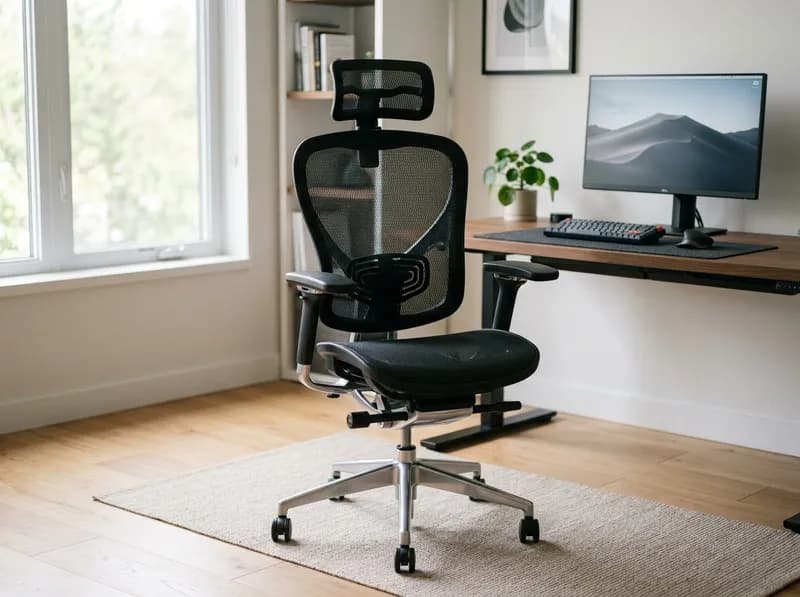
Most office chair buying guides begin with the chair itself. They compare lumbar support, armrests, materials, adjustments, and warranties, then try to tell you which model is right for you.
A better place to start is your body.
Two people who are both 5'9" can need very different office chairs. One may have a longer torso and shorter thighs, while another has longer legs and a shorter torso. Those differences affect seat depth, seat height, lumbar position, and armrest height far more than a basic height range on a product page suggests.
That's why this guide takes a fit-first approach to choosing an office chair. Instead of starting with brands, we start with the measurements that determine whether a chair can actually support you. Then we compare those measurements with real manufacturer specifications from several popular office chairs sold in the U.S.
The goal isn't to find the chair with the longest feature list. It's to figure out which specifications matter for your body, your desk, and the way you work.
Who this guide is for: anyone who spends four or more hours a day at a desk and wants to understand office chair fit before buying. It is also a starting point for more specific guides covering short users, tall users, back-pain considerations, and other office chair categories.
Manufacturer dimensions and specifications referenced below were checked in October 2026. Prices and product specifications can change, so verify current information before purchasing.
Start With Your Body, Not the Chair
Height is useful when narrowing down office chairs, but it is not enough to determine fit.
Your total height is made up of several proportions that vary from person to person. Two people can have the same height while having noticeably different torso, thigh, and lower-leg lengths.
For office chair fit, two measurements are particularly important:
Torso length affects where the lumbar support sits relative to your lower back.
Thigh length affects how much seat depth you need.
This explains why one person can find a 17-inch seat comfortable while another person of exactly the same height feels pressure behind the knees.
It also explains why manufacturer height recommendations sometimes seem inconsistent. A chair advertised for users from 5'1" to 6'2" may have very different seat dimensions from another chair advertised for the same height range.
Before looking at individual office chair models, measure yourself.
At minimum, record:
seated hip-to-back-of-knee length
floor-to-back-of-knee height while seated
height of your lumbar curve above the seat
relaxed elbow height while seated
shoulder width and natural arm position
body weight
These measurements give you something much more useful than a general height recommendation: a way to compare your body with the actual chair specifications.
The Six Measurements That Matter Most
Office chair fit can be reduced to six basic comparisons. Three come from your body, and three describe what you need from the chair.
Your measurement | Chair specification | Why it matters |
|---|---|---|
Back of knee to rear of body | Seat depth | Determines whether the seat supports your thighs without pressing behind your knees |
Floor to back of knee | Seat height range | Determines whether your feet can stay flat while your legs remain comfortably positioned |
Position of your lumbar curve | Lumbar adjustment range | Determines whether lumbar support contacts the lower back rather than the pelvis or mid-back |
Shoulder width and elbow position | Armrest height and width | Keeps your shoulders relaxed while your forearms are supported |
Preferred upper-back contact | Backrest height and shape | Determines how much support you receive without restricting shoulder movement |
Body weight | Weight rating and seat dimensions | Establishes the chair's structural limit and whether the seat is large enough |
One specification deserves particular attention: seat depth.
Seat height is adjustable on most office chairs. Seat depth isn't.
That means a chair with the wrong seat depth can be difficult to make comfortable even if it has excellent lumbar support, sophisticated armrests, and a wide range of height adjustment.
Office Chair Size Chart: Real Manufacturer Dimensions
Searching for an "office chair size chart" usually produces height recommendations from individual brands. Those charts can be useful, but they don't tell you enough about the physical dimensions of the chair.
The actual specifications are more useful when you're trying to determine fit.
The following examples use manufacturer specifications and current product information checked in October 2026.
Chair | Min. seat height | Max. seat height | Seat depth | Weight capacity | Notes |
|---|---|---|---|---|---|
Herman Miller Aeron Size A | 14.75" | ~19.3" | 16" fixed | 300 lb | Smallest Aeron size |
Herman Miller Aeron Size B | 16" | ~22.8" | 17" fixed | 350 lb | Medium/default size |
Herman Miller Aeron Size C | 16" | ~22.8" | 18.5" fixed | 350 lb* | Largest Aeron size |
Steelcase Leap V2 | ~15.5" | ~20.5" | 15.75" + ~4" adjustment | 400 lb | Adjustable seat depth |
Branch Ergonomic Chair | 17" | 21" | Adjustable | 275 lb | Depth slider |
SIDIZ T50 | ~18.1" | ~21.5" | Adjustable | 275 lb | Official fit range 5'1"–6'2" |
*Some current Aeron Size C listings specify a 400-lb capacity, so verify the specification for the exact configuration being purchased.
Three things stand out from this comparison.
Minimum seat height matters for shorter users
A chair can claim to fit a relatively short user while still having a comparatively high minimum seat height.
The SIDIZ T50 is one example. Its published fit range starts at 5'1", but its minimum seat height is around 18.1 inches. The Aeron Size A and Steelcase Leap V2 can be adjusted substantially lower.
This doesn't automatically mean one chair fits better. It means the minimum seat height should be checked against your actual seated leg height rather than relying on the advertised height range.
Seat depth varies considerably
The Aeron uses three fixed seat depths across its three sizes:
Size A: 16"
Size B: 17"
Size C: 18.5"
The Leap V2 takes a different approach, starting at roughly 15.75" and allowing about four inches of adjustment.
For people with unusually short or long thighs, that difference can be more important than many of the headline features on the chair.
Weight capacity varies significantly
A 275-lb rating and a 400-lb rating represent different structural specifications.
That doesn't mean a 400-lb chair will automatically feel more comfortable. It means the chair is designed and tested for a substantially higher load.
Weight capacity should therefore be treated as a specification to check, not a comfort score.
Seat Depth: One of the Most Important Office Chair Measurements
Seat depth is the distance from the rear of the seat to its front edge.
If the seat is too deep, the front edge can press against the area behind your knees. If it's too shallow, your thighs don't receive enough support.
A commonly used starting point is to leave around 2–3 inches, or roughly two to four fingers, between the front of the seat and the back of your knees when you're sitting fully against the backrest.
It's a useful starting point rather than a universal rule.
How to tell if the seat is too deep
Common signs include:
pressure behind the knees
tingling or discomfort in the thighs
sitting toward the front of the seat to escape pressure
difficulty keeping your lower back against the backrest
feet that don't comfortably reach the floor at the lowest seat setting
frequently crossing your legs or tucking your feet underneath you
The last few symptoms can have other causes, but together they are a good reason to check seat depth.
How to tell if the seat is too shallow
A seat can also be too short.
Typical signs include:
insufficient support under the thighs
feeling as though you're perched on the back portion of the seat
sliding forward to find more support
concentrated pressure under the thighs near the hips
Both problems can eventually cause the same behavior: you stop sitting against the backrest.
Seat depth by height: useful, but only as a starting point
If you don't have a way to measure your thigh length, these broad ranges can help narrow down your options:
Height | Approximate starting seat-depth range |
|---|---|
Under ~5'3" | ~15–17" |
~5'3"–5'11" | ~16–18" |
Over ~6'0" | ~18–21" |
These are not replacement measurements.
A 5'7" person with long thighs may need a deeper seat than a 5'10" person with short thighs. If you can measure yourself, use that information instead.
What to do when the seat is too deep
The simplest solution is a chair with an adjustable seat pan.
The Steelcase Leap V2 is a good example because its seat depth can be changed across roughly four inches.
If the chair is otherwise suitable, a firm cushion positioned between you and the backrest can also reduce effective seat depth. It does, however, move your body forward relative to the lumbar support, so check the lumbar position again afterward.
A small amount of recline can also change how your thighs contact the seat, although it isn't a substitute for correct seat dimensions.
What to do when the seat is too shallow
A deeper seat or larger chair size is usually the better solution.
For example, moving from an Aeron Size B to Size C changes the fixed seat depth from 17" to 18.5".
A thin, firm seat cushion can provide a little additional support, but thick soft cushions often change pelvic position and seat height enough to create another fit problem.
Mesh vs. Foam Office Chairs
Mesh versus foam is one of the most common debates when choosing an ergonomic office chair.
The available controlled research doesn't provide a simple winner.
A human-factors laboratory at UC Berkeley conducted an eight-hour comparison of mesh and foam-cushioned office chairs, looking at pain, comfort, fatigue, and task performance. The reported results did not show significant differences between the two materials for pain, comfort, or fatigue, although some task-performance measures showed a slight trend favoring foam.
That makes material more of a secondary consideration than many product pages suggest.
Foam
Poor-quality foam can gradually compress and lose its original shape.
For commercial seating, procurement specifications commonly use seat foam densities around 35–50 kg/m³ (approximately 2.2–3.1 lb/ft³), with lower densities commonly used in backrests.
Retail chair listings don't always publish foam density. If you're considering an inexpensive foam chair for daily use, asking the manufacturer for the seat foam density is worthwhile.
Mesh
Mesh has a different failure mode. Instead of compressing, low-quality suspension material can gradually lose tension and sag.
Mesh quality therefore depends on the material, construction, tension, frame, and warranty rather than simply whether a chair uses mesh.
Which should you choose?
For most buyers, the order should be:
Fit → adjustment range → climate → material quality.
Mesh can be particularly comfortable in warm rooms because it allows more airflow. Foam can provide a more familiar cushioned feel.
Neither material compensates for an incorrect seat depth or poorly positioned lumbar support.
Lumbar Support: Position Matters More Than the Label
Office chairs often advertise "adjustable lumbar support," but that phrase doesn't tell you whether the support will actually land in the right place.
The important question is simple:
Can the lumbar support reach your lower-back curve?
Ergonomics guidance, including BIFMA G1 and university workstation recommendations, generally places lumbar support in the lower-back region rather than the middle of the back. A commonly referenced range is roughly 6–10 inches above the compressed seat, although individual anatomy varies.
The best way to find your own position is to sit naturally against a backrest and locate the deepest part of your lower-back curve. That is the area the chair should support.
Signs the lumbar support is too high
pressure around the lower ribs
pressure in the middle of the back
feeling pushed forward
difficulty relaxing against the backrest
Signs it is too low
pressure around the pelvis or sacrum
a feeling of a bar pressing across the bottom of the back
little support where your actual lumbar curve begins
Firmness matters too
Even correctly positioned lumbar support can feel wrong if it is too aggressive.
If the support creates a strong arch rather than filling the natural curve, it may feel uncomfortable after extended sitting.
This is one reason chairs with both height and depth or firmness adjustment can be useful for people who spend most of the day sitting.
Armrests: Ignore the "3D" and "4D" Labels
"3D" and "4D" armrests sound precise, but there is no universal industry definition for these labels.
One manufacturer may count height, width, and pivot as three dimensions. Another may describe a similar adjustment system differently.
Look at the actual adjustment range instead.
Armrest height
Your armrests should allow your forearms to rest comfortably while your shoulders remain relaxed.
A commonly cited workstation range is around 7–10.5 inches above the compressed seat, although your actual elbow height is more useful than a generic number.
Armrest width
Your arms shouldn't have to spread noticeably outward to reach the pads.
For broader shoulders, width adjustment can make a meaningful difference.
Armrest depth and pivot
These adjustments are useful when you move between keyboard work, mouse use, reading, and other tasks.
They are helpful, but they are secondary to getting the height and width right.
Removable armrests
Removable or fully retractable armrests are sometimes overlooked.
They can be useful for people who prefer to work without arm support, have larger thighs, or need the chair to fit underneath a desk.
The important point is that an armrest isn't automatically beneficial. An armrest set too high can encourage shrugged shoulders, while one set too far outward can pull your arms away from your natural position.
Do You Need a Headrest?
A headrest is useful mainly when you actually recline.
During phone calls, reading, watching presentations, or thinking, you may spend considerable time in a reclined position. A headrest can support the head and neck in those positions.
If you work upright at a monitor for most of the day, the situation is different.
A headrest that contacts the back of your head while you're trying to work can encourage you to move your head forward to avoid it. That's one reason many task chairs don't include a headrest as standard equipment.
The Steelcase Leap V2, for example, is traditionally sold without a factory headrest in its standard configuration.
If you regularly recline, look for a headrest with both height and depth adjustment. If you rarely recline, it may not be worth prioritizing.
Office Chair Weight Capacity: What the Number Means
Weight capacity is another specification that is easy to overlook.
A chair rated for 275 lb and one rated for 400 lb aren't simply different versions of the same comfort level. They are designed and tested for different load requirements.
Many office chairs use ANSI/BIFMA testing standards as part of their certification or product specifications.
The important distinction is that weight capacity is a structural limit, not a comfort recommendation.
If you're close to the published maximum, also consider:
seat width
seat depth
base construction
gas cylinder specification
warranty coverage
how frequently you'll recline or move in the chair
A larger user may be perfectly comfortable in a chair rated at 275 lb, but the chair's seat dimensions can matter just as much as its published weight capacity.
The Aeron Size C and Steelcase Leap V2 illustrate the point. Both provide substantially more room and higher published capacities than many entry-level ergonomic chairs.
How to Test an Office Chair Before Buying
A one-minute showroom test tells you very little.
If possible, give the chair at least 20–30 minutes and use it as you would during a normal workday.
Start from the default settings
Adjust the chair yourself rather than sitting in a preconfigured showroom position.
Set:
seat height
seat depth
lumbar support
armrests
recline tension and backrest position
If you cannot get the basic fit right after several minutes of adjustment, the chair probably isn't a good match.
Sit fully back
Put your lower back against the backrest.
Check whether the lumbar support meets your actual lumbar curve and whether the seat leaves enough room behind your knees.
Do your normal work
Typing on a keyboard is different from sitting back and talking to a salesperson.
If possible, bring your laptop or use a similar keyboard and mouse setup.
Spend several minutes typing, switching between the keyboard and mouse, and looking at the screen.
Change positions
Recline.
Lean forward.
Rotate.
Reach for something beside you.
A good office chair should accommodate normal changes in posture rather than feeling comfortable only in one carefully positioned pose.
Check the contact points
Pay attention to:
the front edge of the seat
the lumbar support
armrest pads
the backrest frame
pressure around the hips and thighs
These are often where an uncomfortable chair reveals itself.
Use the return window
If you buy online, the return period is part of the buying process.
Twenty or thirty minutes is enough to identify obvious fit problems, but several days of normal work can reveal issues that aren't obvious in a showroom.
What Does the Research Say About Ergonomic Chairs and Back Pain?
This is one area where office chair marketing can easily go beyond the available evidence.
A 2021 systematic review of chair interventions for office workers found low to very low quality evidence for reducing lower-back pain and discomfort through chair interventions, with results that were not consistent across studies.
A larger systematic review and network meta-analysis covering 24 studies and more than 7,000 office workers similarly found that many workplace interventions, including ergonomic equipment changes, did not produce statistically significant effects, with much of the evidence rated low or very low certainty.
Physical activity showed a more consistent signal than equipment alone, although the overall effects were still limited.
The practical takeaway isn't that ergonomic chairs don't matter.
It is that a chair should be purchased for fit, support, adjustability, and comfort, rather than on the promise that it will "fix" an existing back problem.
A well-fitted chair can make long periods of sitting more comfortable. It cannot replace movement, appropriate workstation setup, or medical care when persistent pain needs professional evaluation.
When the Office Chair Isn't the Real Problem
If a chair seems to cause discomfort, check the rest of the workstation before replacing it.
Check the desk
A desk that is too high can force the shoulders upward while typing.
A desk that is too low can encourage you to bend forward.
If you raise the chair to get your arms into a comfortable position and your feet stop reaching the floor, the problem may be the desk height rather than the chair.
Check the monitor
The monitor should generally be positioned around eye level or slightly below, at a comfortable viewing distance.
A poorly positioned screen can encourage prolonged neck flexion even when the chair itself is properly adjusted.
Check the chair settings
Seat depth and lumbar position are worth checking before assuming the chair is defective.
A chair can feel completely different after the seat pan or lumbar support is adjusted correctly.
Check how long you stay still
Even a very good ergonomic chair doesn't make prolonged static sitting harmless.
Changing position throughout the day and getting up periodically are still important parts of a comfortable workstation.
Do you actually need a footrest?
A footrest is useful when your feet cannot reach the floor after the chair has been correctly adjusted.
The order should be:
Lower the chair → check desk and keyboard height → adjust the work surface if possible → add a footrest if necessary.
Buying a footrest before checking the chair and desk can simply hide the underlying fit problem.
Choosing an Office Chair for Programmers
Programmers and other deep-focus workers often spend long periods typing and using a mouse, which puts particular emphasis on the relationship between the chair, desk, keyboard, and arms.
For this type of work, pay particular attention to:
Armrest height: your shoulders should remain relaxed while your forearms are supported.
Desk compatibility: armrests should not force your shoulders upward to reach the keyboard.
Seat depth: you should be able to sit against the backrest without pressure behind the knees.
Recline: a modest reclined position can be more comfortable than locking yourself into a perfectly upright posture.
Height range: especially important if you use a sit-stand desk.
For programmers, the best office chair isn't necessarily the chair with the most adjustments. It's the chair that works with the entire workstation.
Gaming Chairs Should Follow the Same Fit Rules
Gaming chairs often look very different from conventional ergonomic office chairs, but the basic fit criteria don't change.
Ignore the racing-style appearance and check:
minimum seat height
seat depth
lumbar position
armrest height and width
backrest shape
weight rating
return policy
Some gaming chairs perform reasonably well under these criteria. Others rely heavily on fixed seat dimensions and aggressive side bolsters.
The category itself doesn't tell you whether a chair will fit. The specifications do.
Frequently Asked Questions
How do I know if an office chair will fit me?
Measure your seated thigh length, seated floor-to-knee height, and lumbar position. Then compare those measurements with the chair's seat depth, minimum seat height, and lumbar adjustment range.
Manufacturer fit ranges are useful for narrowing down options, but actual dimensions are more informative.
What seat depth do I need for my height?
As a rough starting point, people under about 5'3" may need around 15–17 inches, people around 5'3"–5'11" may fit approximately 16–18 inches, and people above 6 feet may need 18 inches or more.
Those ranges are only a starting point. Your thigh length is more useful than height alone.
Why does my office chair hurt the back of my knees?
The seat may be too deep.
Sit fully against the backrest and check the distance between the front edge of the seat and the back of your knees. Around 2–3 inches is a useful starting point.
If there is little or no space, look for a shorter seat or adjustable seat depth.
Are 4D armrests better than 3D armrests?
Not necessarily.
There is no universal industry definition for "3D" and "4D" armrests. Compare the actual height, width, depth, and pivot adjustments instead.
Do I need a headrest on an office chair?
Not necessarily.
A headrest is most useful if you regularly recline for reading, calls, or other tasks. If you spend most of your day working upright at a monitor, a headrest may provide little benefit.
Can an ergonomic chair fix back pain?
There is limited and inconsistent evidence that office chair interventions alone reduce back pain.
A properly fitted chair can improve comfort and support while sitting, but it should not be treated as a treatment for persistent pain.
What should a 5'2" person look for in an office chair?
Start with the minimum seat height.
For shorter users, a chair that cannot drop low enough can leave the feet unsupported. The Herman Miller Aeron Size A, with a minimum seat height around 14.75 inches, and the Steelcase Leap V2, at around 15.5 inches with its standard cylinder, are examples of chairs with relatively low starting heights.
Also check seat depth and armrest height.
Is mesh or foam better for an eight-hour workday?
Neither material has a clear universal advantage.
Controlled testing has not established a major difference in pain, comfort, or fatigue between mesh and foam. Build quality, fit, climate, and personal preference are more useful deciding factors.
How long should I test an office chair?
Aim for at least 20–30 minutes in one sitting, using the chair for actual work rather than simply sitting in it.
If the chair has a generous return period, use several normal workdays to evaluate it before making the final decision.
Do I need a footrest or a better office chair?
First lower the chair until your feet are flat.
If that makes the desk too high, adjust the desk or keyboard position if possible. If the work surface cannot be changed, then a footrest may be appropriate.
The Fit-First Office Chair Checklist
Before buying an office chair, check these six specifications against your own measurements:
☐ Seat height: the minimum height is low enough for your seated leg height.
☐ Seat depth: you can sit fully back while keeping roughly a 2–3 inch gap behind your knees.
☐ Lumbar support: the adjustment range reaches your natural lumbar curve.
☐ Armrests: the height and width work with your relaxed elbows and shoulders.
☐ Weight capacity: your body weight is comfortably below the published rating.
☐ Testing/returns: you can test the chair for at least 20–30 minutes and have a reasonable return option.
If a chair passes all six checks, you have already eliminated many of the common fit problems before getting distracted by materials, colors, headrests, or feature counts.
The Bottom Line: How to Choose an Office Chair
The best way to choose an office chair is to work backward from your body.
Start with seat height and seat depth, because those determine whether you can sit with your feet supported and your thighs properly supported. Then check lumbar position, armrest height, backrest fit, and weight capacity.
After that, consider the features that matter to your working style: mesh versus foam, headrest, recline mechanism, armrest adjustments, warranty, and materials.
The biggest mistake is buying from the feature list first.
A chair with 4D armrests, adjustable lumbar support, a premium mesh back, and a 12-year warranty can still be a poor choice if the seat is too deep or the minimum height is too high for you.
For most buyers, the specification sheet is more useful than the marketing headline.
Measure yourself first. Then choose the chair.
Related GuidesMore →

Levoit Humidifiers Explained: Models Compared, Features, Prices, and What to Know Before Buying
Levoit’s humidifier lineup includes several distinct families, from budget-friendly Classic and NeoClassic models to warm-mist OasisMist units and mist-free Superior evaporative humidifiers. This guide compares tank capacities, humidity controls, app connectivity, cleaning requirements, water recommendations, and verified U.S. prices. Independent test results from Wirecutter, Good Housekeeping, RTINGS, Better Homes & Gardens, and Popular Mechanics help you choose a model based on real-world performance rather than specifications alone.

Best TCL TVs in 2026: Which Series Is Right for You?
TCL's 2026 TV lineup ranges from affordable QLED and entry-level Mini-LED models to premium SQD-Mini LED sets and the RGB-Mini LED RM9L. This guide compares the major series, including the QM7L, QM8L, and X11L, using current U.S. prices, manufacturer specifications, and independent test results. Learn which models offer the best value, which suit bright rooms or HDR movies, and what compromises to consider before spending more.
Lasko Space Heater Lineup: Every Major Type Explained and How to Choose
Lasko makes a wide range of space heaters, from low-wattage MyHeat personal models to ceramic towers, Ellipse heaters, infrared quartz units, and bathroom-specific designs. This guide explains the major Lasko heater families, compares key models, and highlights differences in wattage, controls, prices, and safety features. Learn which options make sense for a desk, bedroom, or larger living area—and why checking the exact model number matters before buying.