Best Standing Desks for Small Spaces in 2026: Compact Picks That Fit
A compact standing desk needs to fit more than the available wall space. You also need room for your chair, monitor, keyboard, cables, and normal movement around the room. This buying guide explains how to measure a small bedroom, apartment, or home office before choosing a desk. Learn how to compare desktop dimensions, avoid common layout mistakes, and decide whether a compact workstation or standing-desk converter makes better use of your space.
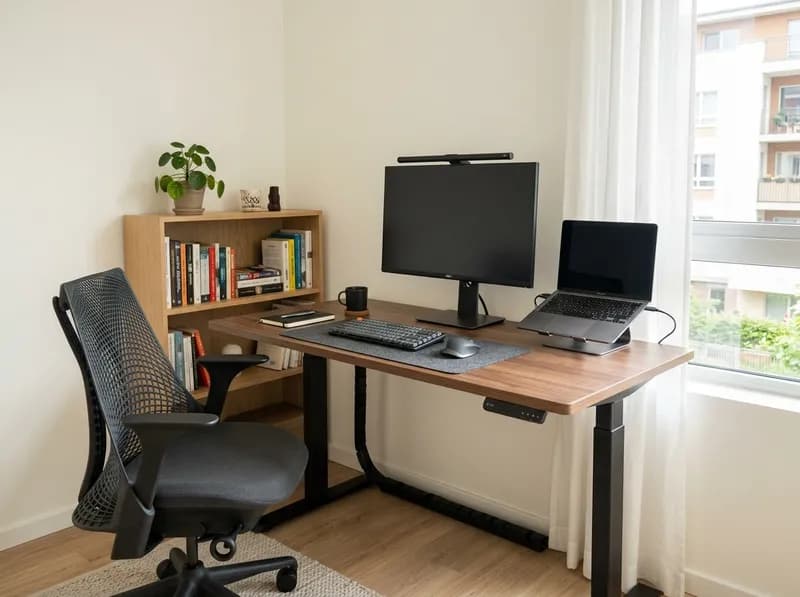
The best standing desk for a small space depends on what you need to fit on it, how much room you have, and whether the desk can reach a comfortable working height. A 48-inch desktop may work well in a home office but leave too little room to move around in a small bedroom. A 36-inch desk may be perfectly adequate for a laptop and mouse but feel cramped once you add an external monitor.
Before choosing a compact standing desk, measure both the available floor space and the usable desktop area. Width determines how much equipment fits side by side; depth affects monitor placement, keyboard space, and viewing distance. The desk’s minimum and maximum heights matter just as much, particularly for shorter users and anyone planning to use a walking pad.
This guide compares compact electric standing desks, explains when a manual desk or standing-desk converter makes more sense, and identifies the measurements worth checking before you buy. Product specifications and reference prices are based on the cited U.S. configurations at research time; verify current details on the manufacturer’s website before ordering.
1. Measure Your Space Before Choosing a Desk
A standing desk can fit against a wall and still be impractical to use. The chair may block a doorway, the desktop may interfere with a closet, or the frame may collide with a baseboard when the desk moves.
Measure the complete workstation area before comparing products.
Measurement | What to check | Why it matters |
|---|---|---|
Available width | Space between walls, furniture, and doorways | Sets the maximum desktop width |
Available depth | Distance from the wall to the room’s usable boundary | Determines monitor, keyboard, and mouse placement |
Chair clearance | Space to pull the chair back and get in or out | Keeps the desk from blocking movement |
Side clearance | Room beside the desk legs and feet | Allows access to drawers and nearby furniture |
Vertical clearance | Windowsills, shelves, sloped ceilings, and wall-mounted equipment | Prevents collisions as the desktop rises |
Under-desk clearance | Frame, feet, drawers, and control boxes | Determines usable legroom |
Electrical access | Outlets and cable-routing paths | Prevents cables from snagging or becoming taut |
Walking-pad storage | Pad dimensions and approved storage position | Determines whether the pad is practical to use daily |
Leave some clearance rather than ordering a desktop that exactly matches the available wall width. The frame, feet, and cable connections may extend beyond the desktop itself. Check the assembly instructions for baseboard clearance and any restrictions on placing the desk against a wall.
Width and depth are different constraints
A wider desk provides more room for multiple monitors, speakers, and other equipment. A deeper desk provides more front-to-back space for the monitor, keyboard, and mouse.
A wide but shallow desktop can accommodate a large screen while leaving the keyboard too close to the front edge. Conversely, a deep desk may provide comfortable monitor placement but take up too much floor space in a bedroom.
OSHA recommends positioning a computer monitor at least 20 inches from the eyes, with a generally preferred viewing distance of 20–40 inches depending on the screen and user. This is a workstation guideline, not a requirement that every desk have a particular depth. A monitor arm can help with positioning, but it cannot compensate for insufficient reach or a cramped keyboard area.
Before ordering, mark the desk footprint on the floor, check chair movement and door access, and plan the positions of the monitor, keyboard, mouse, and laptop. If you use a walking pad, include its full footprint and storage location in the same plan.
2. What Counts as a Small Standing Desk?
There is no official size definition for a small standing desk. For shopping purposes, these approximate categories provide a useful starting point.
Desk category | Approximate dimensions (width × depth) | Best suited to |
|---|---|---|
Very compact | 36–42 × 20–24 inches | Laptop-first work and very tight rooms |
Compact | 40–48 × 24–30 inches | Laptop setups and many single-monitor workstations |
Compact with extra room | 48–55 × 24–30 inches | Larger monitors and laptop-plus-monitor setups |
Small-space workstation | 55–60 × 27–30+ inches | Equipment-heavy setups and some walking-pad arrangements |
These are shopping categories, not ergonomic standards. Desks with identical desktop dimensions can differ in frame footprint, legroom, usable surface area, and height range.
A 36-inch desk may be enough for a laptop and mouse but leave little room for an external monitor, full-size keyboard, speakers, and accessories. A 55-inch desk offers more flexibility but may be a poor choice if it blocks the main route through a small apartment.
Choose the desktop around your equipment first, then confirm that the entire desk fits the room.
3. How Much Desktop Space Do You Need?
The equipment layout often matters more than the desk’s advertised size. Decide what needs to sit on the desktop before choosing a model.
Workstation setup | Main constraint | What to check | Possible space saver |
|---|---|---|---|
Laptop only | Usable surface area | Mouse and typing space | Laptop stand or compact keyboard |
One monitor | Depth and viewing distance | Monitor-stand footprint and keyboard clearance | Compatible monitor arm |
Two monitors | Width and depth | Screen size, viewing angles, and mounting limits | Compatible dual-monitor arm |
Laptop plus monitor | Shared surface area | Whether the laptop remains open | Laptop stand or closed-laptop setup |
Walking pad | Floor footprint and desk height | Pad dimensions, legroom, and movement clearance | A stowable pad, if approved by its manufacturer |
Laptop-only workstations
A laptop, mouse, and typing area can fit on a very compact desk. Adding an external keyboard, laptop stand, notebook, or separate monitor changes the space requirements.
If you raise the laptop screen to a more comfortable viewing height, an external keyboard and mouse can improve the arrangement, but they need additional surface area.
Single-monitor workstations
Check the monitor’s stand footprint, keyboard position, mouse space, and viewing distance. A large monitor on a deep stand can consume much of a shallow desktop.
A compatible monitor arm can free up the area beneath the screen. Before buying one, confirm that the desktop edge, thickness, construction, and frame leave enough room for the clamp.
Dual-monitor workstations
Two monitors can fit on some 48-inch desks, depending on screen sizes, bezels, mounting hardware, and the angles at which the displays are positioned. However, fitting both screens is not the same as creating a comfortable workstation.
The keyboard and mouse still need to sit in front of the user without being pushed to an awkward position. If your setup includes two large monitors, compare 48-inch and 55–58-inch desktops where the room allows.
Can a monitor arm make a shallow desk work?
Sometimes. A monitor arm removes the space occupied by a conventional stand and allows more flexible screen placement. Check five details before buying:
Desktop construction: The edge must support the clamp, and the desktop must be suitable for the mounting method.
Edge shape: Bevels, cable cutouts, and rear lips can prevent the clamp from fitting.
Arm reach: The monitor must be positionable at a comfortable viewing distance without hitting the wall.
Monitor compatibility: The arm must support the specific screen’s weight and dimensions.
Frame clearance: The clamp, arm, and cables must not interfere with the moving desk frame.
A monitor arm solves a mounting problem, not every depth problem. If the screen cannot be positioned far enough back or the keyboard area remains cramped, a deeper desk may be the better choice.
4. Standing Desks for Walking Pads: Measure the Whole Setup
A walking pad changes the space calculation. You need room for the desk, the moving surface, your standing position, and safe access around the workstation.
Measure the pad’s full length and width, the positions of the desk feet, and the space needed to step on and off. Check nearby walls, doors, furniture, and power connections. A desk that fits neatly against a wall may still leave the combined desk-and-pad arrangement blocking a doorway.
Check the working height
Your ideal desk height while walking may differ from the height you prefer while standing still. Body proportions, footwear, keyboard position, and the task all affect the fit.
Confirm the minimum and maximum height of the exact desk configuration, including whether the manufacturer measures the frame alone or the assembled desk with its desktop. A high maximum does not automatically make a desk suitable for a tall user, and a low minimum does not guarantee a comfortable fit for someone shorter.
With the setup assembled, your shoulders should remain relaxed, your elbows should stay close to your body, and the keyboard should be within comfortable reach. OSHA’s workstation guidance provides a useful reference for positioning keyboards and other equipment.
Is a compact standing desk stable enough for walking?
Desktop size and motor count alone cannot establish whether a standing desk is stable during walking. Movement depends on the frame, extension height, desktop, floor, assembly, and equipment load. Walking can make movement that is barely noticeable while standing still more apparent.
Before using a walking pad, check whether independent testing covers movement at standing height. Confirm that the desktop, monitor arms, and accessories comply with their manufacturers’ load and mounting restrictions. Test the assembled setup at the intended working height and stop if screen movement interferes with comfortable viewing or typing.
A high advertised weight capacity does not prove low wobble, and dual motors are not a guarantee of stability. The products in this guide are compared using their published dimensions and specifications, not a claim that they have passed independent walking-stability tests.
Plan for storage
If the walking pad needs to be put away every evening, check its weight, dimensions, wheels or handles, and approved storage orientation. Do not store a pad vertically unless its manufacturer explicitly permits it.
A pad that requires daily heavy lifting, cable disconnection, or furniture rearrangement may be less practical than it appears in product photos.
Walking-pad recommendation: Choose the desk and walking pad as one workstation system. If the combined setup blocks movement or compromises your working position, a conventional sit-stand desk without a walking pad may be the more practical choice.
5. Electric Standing Desk, Manual Desk, or Converter?
The best mechanism depends on how often you change positions, whether you already own a suitable desk, and how much floor space you can spare.
Type | Best for | Main trade-offs |
|---|---|---|
Electric standing desk | Frequent sitting-to-standing transitions | Higher cost, power access, cable management, and moving-frame clearance |
Manual standing desk | Buyers prioritizing cost or avoiding a motor | Adjustment effort and speed vary by mechanism |
Standing-desk converter | People who already own a sturdy desk | Consumes desktop space and may leave limited room for the keyboard or mouse |
An electric desk is convenient if you regularly alternate between sitting and standing. Memory presets can make it easier to switch between seated, standing, and walking-pad heights.
A manual desk may cost less, but it is not necessarily smaller or more stable. Compare its adjustment mechanism and dimensions rather than assuming that manual operation makes it a better fit for a small room.
A standing-desk converter is worth considering if you rent, cannot replace existing furniture, or need to keep the desk’s floor footprint unchanged. However, the converter occupies part of the existing desktop and may raise the monitor while placing the keyboard on a separate tray.
Measure the complete converter, including its platform and keyboard tray. On a shallow desk, the remaining usable area may be too limited for comfortable work.
For frequent height changes, an electric desk is generally the more convenient starting point. For occasional standing on a strict budget, compare manual models and converters before replacing an existing desk.
6. Frame Design, Stability, and Weight Capacity
A standing desk’s advertised weight capacity tells you how much load the manufacturer permits under its stated conditions. It is not a universal measure of stability.
Estimate the combined weight of your monitors, monitor arms, computer, docking station, speakers, and accessories. Then check the capacity and any configuration restrictions for the exact model.
Pay attention to the distinction between lift capacity and maximum load. Manufacturers may define these figures differently, so they should not automatically be treated as interchangeable.
What affects desk stability?
Frame geometry, leg construction, crossbars, floor level, desktop dimensions, and extension height can all influence movement. A desk that feels steady while seated may behave differently near its maximum height.
Dual motors can affect lifting performance, but they do not prove that one desk will resist wobble better than every single-motor alternative. Independent tests that describe the testing method are more informative than a general marketing claim.
How to reduce wobble in an existing desk
Before replacing a desk that moves, check the basics:
Tighten the fasteners. Loose bolts can develop over months of height adjustments. Follow the assembly instructions and check the frame systematically.
Level the feet. Uneven flooring can contribute to side-to-side movement.
Check soft flooring. Carpet can allow desk feet to sink or shift. Suitable rigid carpet cups or a firm support surface may help.
Consider a crossbar. Some frames support an optional stretcher that can reduce movement.
Identify the height at which wobble starts. If movement becomes noticeable near maximum extension, working slightly lower may improve the experience.
If the movement persists, the frame design may be the limiting factor. Adding accessories or increasing the load is not a reliable fix.
Also confirm that the frame supports the desktop’s width, depth, thickness, and mounting positions. Cable trays, control boxes, power supplies, and monitor-arm clamps can take up space underneath or behind the desk, so check them before assembly.
7. Height Range: An Important Issue for Shorter Users
A compact standing desk can fit a small room and still be too tall for comfortable seated work. The published height range deserves as much attention as the desktop dimensions.
Some manufacturers quote frame height without the desktop. A 1-inch-thick top can raise the assembled desk’s minimum height by roughly that amount. Check how the exact model’s height is measured before comparing specifications.
How to check your seated desk height
Sit in the chair you intend to use. Let your shoulders relax, keep your upper arms near your body, and bend your elbows to approximately 90 degrees. Measure from the floor to the underside of your elbow to estimate a suitable keyboard height.
This is a practical starting point rather than a precise ergonomic prescription. Chair height, armrests, keyboard thickness, and individual proportions all affect the result.
For users around 5'0"–5'4", a seated keyboard height in the mid-20-inch range or lower may be necessary. A desk with a true minimum around 25 inches or below is worth investigating, but your own measurement is more useful than height alone.
This matters because some compact electric desks start around 28 inches. That minimum may work for many users but be too high for shorter people, even when the desktop fits the room perfectly.
Possible adjustments include a footrest to support the legs, a different chair that allows a better working position, or a converter on a lower fixed desk. These solutions are not interchangeable, so check the complete sitting position before buying.
Tall users and walking-pad users should also verify the maximum height. The desk needs to reach the intended working position without forcing the shoulders upward or the wrists into an uncomfortable angle.
8. Desktop Material, Shape, and Storage
The desktop material affects weight, care requirements, and frame compatibility, but a more expensive surface is not automatically better for a compact workstation.
Laminate or engineered wood: Common practical options for home offices, with a range of finishes and relatively straightforward care. Check the specific desktop’s thickness and mounting requirements.
Solid wood: Can offer a durable, attractive surface, but its weight and construction must be compatible with the frame.
Other materials: Follow the manufacturer’s mounting and care instructions rather than judging durability by appearance alone.
Rectangular versus corner desks
A rectangular desk is usually easier to place against a straight wall or reposition in a shared room. A corner desk may provide more usable surface where two walls meet, but it can occupy more floor space and make walking-pad placement harder.
Are drawers worth it?
Built-in drawers can reduce desktop clutter, but they may compromise knee clearance and legroom. Check the underside of the desk before choosing a model with drawers, particularly if you plan to alternate between sitting and standing or use a walking pad.
In a very small room, a wall shelf or separate storage unit may offer more flexibility than adding storage beneath the desktop.
9. Best Standing Desks for Small Spaces: Product Shortlist
These recommendations focus on identifiable dimensions, height ranges, and practical use cases rather than declaring one desk the best choice for every room.
The reference prices below reflect the cited U.S. manufacturer listings at research time. Prices, configurations, included accessories, and availability can change, so confirm the details on the official product pages before purchasing.
1. Branch Duo Standing Desk — Best for Compact Electric Setups
Reference price: $549
The Branch Duo is available in three desktop sizes: 36 × 24 inches, 48 × 24 inches, and 58 × 27 inches. That range makes it easier to choose a desktop around the room and equipment rather than settling for a single standard size.
The 36-inch version is a plausible fit for laptop-first work or a carefully arranged single-monitor setup. The 48-inch version gives a typical single-monitor workstation more room, while the 58-inch option provides additional width and depth for larger equipment layouts.
The manufacturer lists a 28–47.3-inch height range, a 275-pound lift capacity, two memory presets, collision detection, and a 10-year warranty. Compatible accessories include a monitor arm, optional drawer, and cable organizer.
Best for: Buyers who want an electric standing desk with multiple compact desktop options.
Limitations: The 28-inch minimum may be too high for some seated users. The 36-inch desktop is restrictive for dual-monitor setups, and published specifications do not independently establish stability during walking.
Verification note: Third-party reviews may describe different prices or configurations. The figures here refer to the manufacturer’s published U.S. listing at research time. Confirm the current model and specifications before ordering.
Official product page: Branch Duo Standing Desk.
2. IKEA MITTZON Sit/Stand Desk, 55⅛ × 23⅝ Inches — Best for Limited Depth
Reference price: $529.99
This MITTZON configuration combines a relatively long desktop with a shallow front-to-back footprint. Its 55⅛-inch width can accommodate many single-monitor arrangements, while the 23⅝-inch depth makes it worth considering when floor space is restricted.
IKEA lists a minimum height of 24⅜ inches, a maximum of 49⅝ inches, a 176-pound maximum load, and two memory settings. Cable-management features and a 10-year limited warranty are useful for a permanent home workstation.
Best for: Buyers who need more desktop width, have limited room depth, or need a lower minimum height than the Branch Duo provides.
Limitations: The shallow surface leaves less room for deep monitor stands and equipment-heavy setups. The height range and desktop dimensions alone do not establish suitability for a walking pad.
Official product page: IKEA MITTZON sit/stand desk, 55⅛ × 23⅝ inches.
3. IKEA MITTZON Sit/Stand Desk, 47¼ × 31½ Inches — Best for Extra Desktop Depth
Reference price: Check the current IKEA configuration and finish.
This configuration trades width for depth. At 47¼ inches wide and 31½ inches deep, it may suit a large single monitor, a laptop-plus-monitor arrangement, or equipment that needs additional front-to-back space.
IKEA lists a 24⅜–49⅝-inch height range and a 176-pound maximum load for this configuration family. The frame is designed for specified MITTZON desktop sizes, so do not assume it will accept any aftermarket top.
Best for: People with a narrow wall who can spare additional floor depth.
Limitations: The deeper footprint may interfere with chair movement, closet access, or the main walking route through a bedroom.
Official product page: IKEA MITTZON sit/stand desk, 47¼ × 31½ inches.
Compact standing desk comparison
Desk | Best use case | Desktop dimensions | Published height range | Published capacity |
|---|---|---|---|---|
Branch Duo | Compact electric workstation | 36 × 24, 48 × 24, or 58 × 27 in | 28–47.3 in | 275 lb lift capacity |
IKEA MITTZON, shallow | Limited room depth | 55⅛ × 23⅝ in | 24⅜–49⅝ in | 176 lb maximum load |
IKEA MITTZON, deeper | Limited width, more desktop depth | 47¼ × 31½ in | 24⅜–49⅝ in | 176 lb maximum load |
Dimensions are width × depth. Height and load figures refer to the cited manufacturer configurations. Lift capacity and maximum load may use different definitions, so compare the manufacturer's specifications rather than assuming the figures are equivalent.
IKEA’s BEKANT sit/stand desk is also worth treating cautiously when reading older reviews. Check the current U.S. range and any remaining clearance stock before relying on an older recommendation.
What can you get for $100–$300?
A compact electric standing desk does not necessarily require a $500 budget. The $100–$300 range is worth investigating, especially for laptop-first work and simpler single-monitor setups.
Brands that frequently appear in U.S. budget desk roundups include:
FlexiSpot EN1 and E2: Entry-level electric options commonly sold with 48 × 24-inch desktops. Compare the exact frame, capacity, and included top rather than assuming every package is identical.
Fezibo: Offers compact electric desks and configurations with drawers. Check the specific model’s specifications, warranty, and recent owner feedback.
VIVO: A broad range of electric desk frames, compact desks, and standing-desk converters.
HUANUO: Offers compact desktop options, including sizes around 32 inches wide, for particularly restricted rooms.
Prices vary with promotions, desktop size, and configuration. Treat $100–$300 as a shopping budget rather than a guaranteed price for any particular model.
For budget standing desks, pay particular attention to the assembled minimum height, usable desktop depth, stated load limits, and warranty. A low-priced desk is poor value if it cannot reach your seated working height or leaves insufficient room for your equipment.
For occasional standing and laptop or single-monitor use, the budget tier can be a sensible starting point. Buyers with heavy multi-monitor equipment, shorter seated users, or walking-pad plans should verify the fit carefully before ordering.
Which desk should you choose?
Choose the Branch Duo 36 × 24 inches if floor space is extremely limited and your equipment layout is simple.
Consider the 55⅛ × 23⅝-inch MITTZON if you need more width but have little front-to-back room.
Consider the 47¼ × 31½-inch MITTZON if monitor placement and desktop depth matter more than maximizing width.
Compare budget electric desks or a converter if cost is the main constraint and your workstation does not require extensive equipment.
None of these products should be treated as automatically suitable for walking-pad use. Check the complete layout and look for credible, model-specific evidence about stability at standing height.
10. Match the Desk to Your Room
The best compact standing desk depends on how it fits around the furniture and activities already occupying the room.
Small apartment or studio: Prioritize a manageable footprint, cable organization, and a desktop large enough for your equipment. A 36–48-inch desk can be a reasonable starting point for laptop or single-monitor work if it leaves room for the chair and main walking route. A converter may be easier to accommodate if the room serves several purposes.
Small bedroom: Measure the gap between the bed, closet, and door. Check whether the desk can rise without hitting a windowsill or shelf, and make sure it does not prevent access to storage or leave too little space to move the chair.
Narrow home office: Compare depth before width. A 47-inch desk with generous depth may be more practical than a 55-inch model that forces the monitor and keyboard too close together.
Dual-monitor workstation: Start with the actual screen dimensions and mounting arrangement. A 48-inch desktop may work for two modest-size displays, but a 55–58-inch option gives you more layout flexibility if the room allows it.
Walking-pad workstation: Include the pad, desk frame, standing position, cable routing, and storage area in the floor plan. If the pad must be moved every day, consider whether the extra setup effort is realistic for your routine.
Shared or multipurpose room: A converter or compact desk may be easier to accommodate than a larger permanent workstation. Check the complete footprint and weight before assuming a portable design will be convenient for daily work.
11. Common Standing Desk Buying Mistakes
Mistake | How to avoid it |
|---|---|
Choosing by width alone | Measure depth and plan the monitor, keyboard, and mouse positions |
Ignoring chair clearance | Mark the desk footprint on the floor and test chair movement |
Assuming a monitor arm solves every problem | Check viewing distance, clamp fit, desktop thickness, and arm reach |
Comparing only maximum height | Verify both minimum and maximum working heights |
Confusing frame height with assembled height | Confirm whether the desktop is included in the published range |
Ignoring seated elbow height | Measure your actual working position before buying |
Treating weight capacity as a stability rating | Look for suitable independent testing and review the frame design |
Buying a walking pad separately from the desk | Measure the complete workstation footprint |
Forgetting pad storage | Check weight, dimensions, and manufacturer-approved storage positions |
Assuming accessories fit every desk | Verify desktop, frame, monitor-arm, and accessory compatibility |
Overlooking cable movement | Check power access and cable clearance throughout the adjustment range |
Buying a converter without measuring it | Include the platform, keyboard tray, monitor, and remaining desktop area |
Choosing drawers without checking legroom | Inspect the underside of the desk and the clearance needed for standing |
Trusting a roundup without measuring your room | Use recommendations as a shortlist, not a substitute for a fit check |
Frequently Asked Questions
What size standing desk is best for a small space?
For laptop-first work, start by comparing desks around 36–42 inches wide. A 40–48-inch desktop may offer more flexibility for a single monitor. Depth matters just as much: compare 24-inch-deep desks with deeper alternatives if your monitor stand, keyboard, and accessories need more room. These are shopping starting points, not universal minimums.
Is a 24-inch-deep desk enough for a monitor?
It can be, depending on the monitor’s stand, mounting position, screen size, and viewing distance. OSHA describes 20–40 inches as a generally preferred monitor viewing-distance range, with individual needs varying. A monitor arm may help, but check its reach and compatibility before relying on it.
Can a small standing desk support two monitors?
Yes, if the desktop and frame can accommodate the displays and mounting hardware. Check screen dimensions, available keyboard and mouse space, monitor-arm capacity, and the desk manufacturer's restrictions. A desktop that physically holds two monitors is not necessarily comfortable for everyday work.
Is an electric standing desk worth it in a small apartment?
It can be worthwhile if you regularly alternate between sitting and standing. Height presets make transitions easier, but an electric desk also needs power access, cable clearance, and room for its moving frame. A manual desk or standing-desk converter may be more practical for occasional standing.
What is the best standing desk for a walking pad?
There is no universal winner. Look for a desk that reaches your working height, provides enough legroom, accommodates your equipment, and has credible stability evidence at standing height. The Branch Duo and IKEA MITTZON are options to evaluate based on their dimensions and height ranges, but their published specifications alone do not establish suitability for walking-pad use.
How much room do I need for a desk and walking pad?
Measure the desk, pad, frame feet, and your standing position together. Include space to step on and off the pad, move around the workstation, and access nearby furniture. Also measure where the pad will be stored when not in use. The required footprint depends on the exact equipment and room layout.
Can a monitor arm make a shallow desk more practical?
Often. A monitor arm can free up the surface occupied by a conventional monitor stand and provide more flexibility when positioning the screen. It cannot compensate for insufficient arm reach, an incompatible desktop edge, inadequate viewing distance, or too little keyboard space.
How do I choose the right standing-desk height?
Aim for a working position that allows relaxed shoulders, elbows close to your body, and comfortable wrist alignment. Check both seated and standing requirements, and confirm whether the published height range includes the desktop. Your body proportions, chair, footwear, and keyboard arrangement all affect the result.
What is the lowest desk height a short person needs?
Your seated keyboard should generally be close to elbow height with your shoulders relaxed. People around 5'0"–5'4" may need a seated keyboard height in the mid-20-inch range or lower, but individual proportions vary. Measure your own position and confirm the assembled desk’s true minimum height, including the desktop.
How much should I spend on a small standing desk?
A compact electric desk in the $100–$300 range is worth investigating for simpler workstations. The Branch Duo and IKEA MITTZON configurations discussed here have reference prices around $530–$550. Higher prices may buy longer warranties, additional size options, or more clearly documented specifications, but they do not automatically guarantee better stability.
Did IKEA discontinue the BEKANT sit/stand desk?
The U.S. availability of BEKANT configurations has changed, and older buying guides may refer to products that are no longer part of the current range. Check IKEA’s U.S. website for current availability and compare the exact MITTZON configuration before treating an older recommendation as a current option.
Is a standing-desk converter better than a full standing desk?
A converter can be more practical if you already own a sturdy desk and cannot spare additional floor space. A full standing desk provides an integrated height-adjustable surface. Compare the converter’s footprint, height range, keyboard tray, and remaining usable desktop area before deciding.
How much weight should a compact standing desk support?
Add the weight of your monitors, computers, monitor arms, speakers, and accessories, then compare the total with the manufacturer's stated capacity and any configuration restrictions. Load definitions can differ between manufacturers, and weight capacity should not be used as a substitute for stability testing.
Why does my standing desk wobble, and can I fix it?
Loose fasteners, uneven feet, soft flooring, and frame geometry at extension can all contribute. Re-tighten the bolts, level the feet, check the floor surface, and consider a compatible crossbar if the frame supports one. If movement persists, the frame design may be the limiting factor.
Final Recommendations
Choosing the best standing desk for a small space comes down to three practical questions: what equipment must fit on the desktop, what working heights do you need, and how much room remains once the desk is assembled?
The Branch Duo is a reasonable starting point for buyers who want an electric desk with several compact size options. The 55⅛ × 23⅝-inch IKEA MITTZON is worth considering when room depth is limited and a lower minimum height is useful. The 47¼ × 31½-inch MITTZON offers more front-to-back space for equipment when the wall is narrow. Budget electric desks and standing-desk converters remain viable alternatives for simpler setups, provided their dimensions and height ranges suit your needs.
For shorter seated users, verify the true minimum height before buying. For dual-monitor setups, plan the screen arrangement and keyboard space rather than choosing by desktop width alone. For walking-pad users, measure the entire workstation and prioritize credible stability evidence over marketing claims.
The right compact standing desk is not necessarily the smallest or most expensive option. It is the one that fits your room, supports your equipment, and lets you work comfortably without getting in the way of everything else.
Related GuidesMore →

Levoit Humidifiers Explained: Models Compared, Features, Prices, and What to Know Before Buying
Levoit’s humidifier lineup includes several distinct families, from budget-friendly Classic and NeoClassic models to warm-mist OasisMist units and mist-free Superior evaporative humidifiers. This guide compares tank capacities, humidity controls, app connectivity, cleaning requirements, water recommendations, and verified U.S. prices. Independent test results from Wirecutter, Good Housekeeping, RTINGS, Better Homes & Gardens, and Popular Mechanics help you choose a model based on real-world performance rather than specifications alone.
Best TCL TVs in 2026: Which Series Is Right for You?
TCL's 2026 TV lineup ranges from affordable QLED and entry-level Mini-LED models to premium SQD-Mini LED sets and the RGB-Mini LED RM9L. This guide compares the major series, including the QM7L, QM8L, and X11L, using current U.S. prices, manufacturer specifications, and independent test results. Learn which models offer the best value, which suit bright rooms or HDR movies, and what compromises to consider before spending more.
Lasko Space Heater Lineup: Every Major Type Explained and How to Choose
Lasko makes a wide range of space heaters, from low-wattage MyHeat personal models to ceramic towers, Ellipse heaters, infrared quartz units, and bathroom-specific designs. This guide explains the major Lasko heater families, compares key models, and highlights differences in wattage, controls, prices, and safety features. Learn which options make sense for a desk, bedroom, or larger living area—and why checking the exact model number matters before buying.