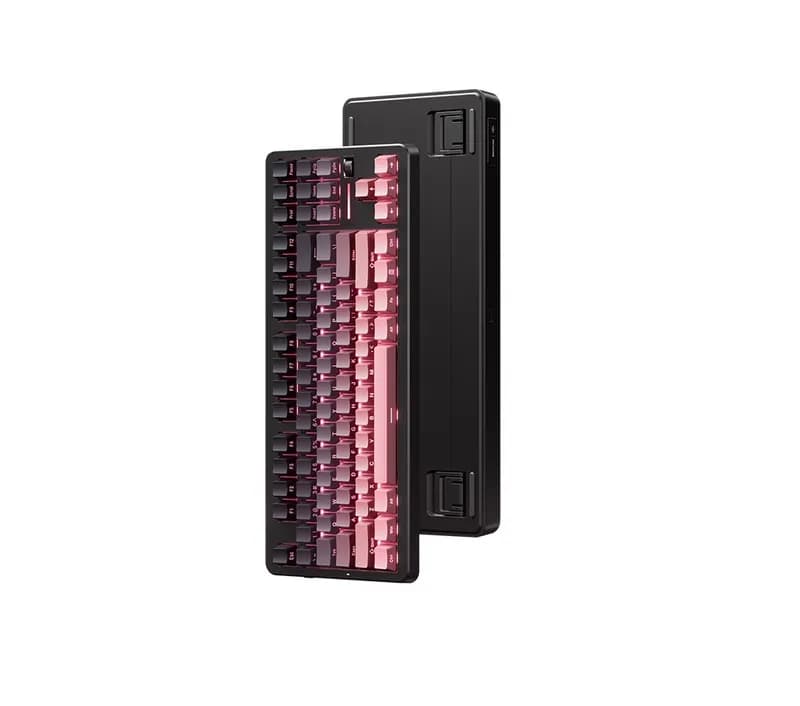
Detailed Review
The MCHOSE G87 V2 is an 87-key TKL mechanical keyboard aimed at users who want a compact layout without giving up the function row, arrow keys, or navigation cluster. Its strongest combination is a gasket-mounted design, hot-swappable PCB, PBT keycaps, tri-mode connectivity, up to 8K polling, a rotary knob, and a large battery.
Its biggest limitation is also important to understand: the G87 V2 is a conventional mechanical keyboard, not a Hall Effect keyboard. The 8K polling rate provides fast input reporting, but it does not offer Rapid Trigger or adjustable magnetic actuation.
For U.S. buyers, the keyboard is most interesting when the delivered price remains in the affordable-to-midrange category. Depending on the version and seller, pricing can vary substantially, so the exact switch configuration and final shipping cost should be checked before purchasing.
Overall, the G87 V2 is better suited to people looking for one keyboard for gaming, work, and everyday typing than to competitive FPS players specifically shopping for Rapid Trigger.
What Is the MCHOSE G87 V2?
The MCHOSE G87 V2 is an 87-key TKL mechanical keyboard.
The layout eliminates the dedicated number pad while keeping the keys that most desktop users rely on:
Full F1–F12 function row
Dedicated arrow keys
Navigation keys
Standard alphanumeric section
This makes it considerably more compact than a full-size keyboard while remaining more practical for office work than many 60% or 65% keyboards.
For gaming, the TKL format also provides more room for mouse movement, which is particularly useful for players who use low sensitivity in FPS games.
The G87 V2 is available in multiple configurations, and switch choice can affect both typing feel and sound. Buyers should therefore check the exact version rather than treating every G87 V2 listing as identical.
Key Specifications
Feature | MCHOSE G87 V2 |
|---|---|
Layout | 87-key / TKL |
Keyboard Type | Mechanical |
Mounting | Gasket |
Connectivity | USB-C / 2.4GHz / Bluetooth |
Polling Rate | Up to 8K |
Battery | Large-capacity battery, depending on version |
Keycaps | PBT |
Hot-swappable | Yes |
Backlight | RGB |
Rotary Knob | Yes |
Software | M HUB |
Primary Use | Gaming + Productivity |
The overall specification is strong for a keyboard positioned below the premium enthusiast segment.
More importantly, the G87 V2 does not rely on a single headline feature. It combines several features that are actually useful in daily use.
TKL Layout: One of Its Best Features
The 87-key layout is arguably more important than the 8K polling rate for most buyers.
You get a complete function row and dedicated navigation keys without the footprint of a traditional full-size keyboard.
This is especially useful for:
FPS gaming
Programming
Office work
Writing
General desktop use
The main compromise is obvious: there is no dedicated number pad.
If you regularly work with spreadsheets, accounting software, or large amounts of numerical data, a 98% or full-size keyboard may be more practical.
For everyone else, TKL is one of the most balanced mechanical keyboard layouts available.
Typing Feel
The G87 V2's gasket-mounted structure is designed to give the keyboard a softer and more cushioned typing response than a rigid-mounted board.
Its internal construction also includes multiple layers of dampening material. This helps control vibration and reduces some of the hollow resonance that can appear in inexpensive mechanical keyboards.
The actual typing experience depends heavily on the switch configuration.
TTC Speed Gold V2
The Speed Gold V2 configuration is more gaming-oriented.
Its lighter actuation and relatively short triggering behavior make it suitable for users who prefer quick and light key presses.
This can work particularly well for:
FPS games
Fast-paced games
Rapid typing
Users who prefer light switches
The trade-off is that light switches can feel too sensitive for users accustomed to heavier mechanical switches.
Matcha Latte V2
The Matcha Latte V2 configuration is more appealing to users who want a more substantial everyday typing experience.
It is worth considering for people who spend more time typing or working than gaming.
The important point is that the G87 V2 should not be judged entirely by one switch version. The switch can significantly change the keyboard's sound, force curve, and overall feel.
Sound Performance
The G87 V2 is designed around a relatively controlled acoustic profile.
The gasket structure and internal dampening help reduce excessive resonance, while the switch determines much of the character of each keystroke.
Lighter, more gaming-oriented switches can produce a brighter and more noticeable sound, while other configurations may sound deeper or more restrained.
The keyboard is not a silent mechanical keyboard, so users working in a shared office should still consider the switch carefully.
One advantage is that the hot-swappable PCB allows enthusiasts to experiment with different compatible switches later.
Gaming Performance
The G87 V2 supports up to 8K polling in compatible wired and 2.4GHz modes.
This means the keyboard can report input to the computer at a much higher frequency than traditional 1K keyboards.
However, there is an important distinction:
8K polling does not equal Rapid Trigger.
The G87 V2 uses conventional mechanical switches. It does not continuously measure the physical position of a key in the same way as a Hall Effect magnetic keyboard.
That means it does not provide the same type of:
Adjustable actuation
Rapid Trigger
Continuous key-position detection
Magnetic-switch gaming behavior
For normal gaming, this is unlikely to be a serious problem.
For competitive FPS players specifically shopping for Rapid Trigger, however, the G87 V2 belongs to a different category.
FPS Gaming
The TKL layout is well suited to FPS games.
Removing the number pad gives the mouse more room, especially on smaller desks.
The 2.4GHz connection and high polling rate also make the keyboard appropriate for gaming setups where wireless convenience is important.
But the keyboard should not be purchased purely because of the "8K" specification.
For an FPS player, the more important questions are:
Do you need Rapid Trigger?
Do you prefer light or heavy switches?
How much desk space do you have?
Do you prefer wired or wireless gaming?
How important is battery life?
If Rapid Trigger is a requirement, a Hall Effect keyboard should be compared instead.
Advanced Gaming Functions
MCHOSE also provides functions such as:
SOCD
MT
TGL
CB
Macros
Key remapping
RGB customization
These features are useful for enthusiasts who want to configure their keyboard around particular games or workflows.
For most users, however, they are secondary features.
A typical user is more likely to benefit from key remapping, macros, wireless connectivity, and a comfortable switch than from advanced combinations such as SOCD.
This is an important distinction when evaluating the G87 V2: the large feature list is useful, but not every feature has equal practical value.
Wireless Connectivity
The G87 V2 supports:
USB-C wired mode
2.4GHz wireless
Bluetooth
This makes it suitable for a multi-device setup.
For example, you can use 2.4GHz with a gaming PC, Bluetooth with a laptop, and USB-C when you want a wired connection.
The 2.4GHz mode is the most relevant wireless option for gaming because it is designed for lower-latency communication than conventional Bluetooth.
For competitive environments, wired mode remains the simplest option when maximum consistency is the priority.
Battery
One of the G87 V2's more notable features is its large battery capacity on supported versions.
A larger battery makes the keyboard more practical for users who primarily use wireless mode.
However, advertised maximum battery life should not be treated as a guaranteed real-world number.
Battery consumption depends on:
RGB brightness
Polling rate
Wireless mode
Usage frequency
Sleep settings
Firmware behavior
High polling rates and continuous RGB use can consume considerably more power than low-power Bluetooth use.
Therefore, buyers should judge the battery primarily by its capacity and intended use rather than relying solely on a manufacturer's maximum runtime claim.
Build Quality and Construction
The G87 V2 is built around a plastic outer case rather than a premium CNC-machined aluminum chassis.
That is an important distinction.
It will not have the same weight, rigidity, or material feel as a significantly more expensive aluminum keyboard.
However, the internal construction is considerably more sophisticated than a basic entry-level mechanical keyboard.
The gasket structure, multiple dampening layers, PBT keycaps, and hot-swappable PCB give it a more enthusiast-oriented design.
This is a sensible allocation of cost.
Instead of putting most of the budget into an aluminum shell, MCHOSE has invested in the typing experience, wireless hardware, switches, and internal construction.
PBT Keycaps
PBT keycaps are another practical advantage.
Compared with cheaper ABS keycaps, PBT generally provides better resistance to the glossy surface that can develop with prolonged use.
The exact keycap profile and texture depend on the configuration, but the use of PBT fits the keyboard's overall positioning.
For a keyboard intended for both gaming and daily work, this is a useful feature rather than merely a specification-sheet upgrade.
Hot-Swappable Design
The G87 V2 supports hot-swappable switches.
This means users can replace compatible mechanical switches without soldering.
That is particularly useful for beginners entering the custom mechanical keyboard hobby.
You can start with the included switches and later experiment with:
Linear switches
Tactile switches
Silent switches
Different spring weights
Different sound profiles
This gives the G87 V2 more long-term flexibility than a keyboard locked to its original switch.
Rotary Knob
The rotary knob is a small but practical addition.
It can be useful for:
Volume control
Muting
Media functions
Other configurable commands
A physical volume control is particularly convenient during gaming and office work.
It is also more useful in daily use than many decorative keyboard features.
Software
The G87 V2 uses MCHOSE's M HUB software ecosystem.
It provides configuration options for key assignments, profiles, macros, lighting, and other supported functions.
For users who want to customize their keyboard, this is a significant advantage.
The software is more complicated than what a basic office keyboard needs, but that is expected given the number of gaming and customization features.
Firmware and software support can change over time, so buyers should use the current official version rather than relying on old third-party software packages.
Pros and Cons
Pros
Practical 87-key TKL layout
Gasket-mounted construction
Multiple internal dampening layers
PBT keycaps
Full-key hot-swappable design
USB-C, 2.4GHz, and Bluetooth
Up to 8K polling
Rotary knob
Multiple switch configurations
Strong feature set for its price category
Cons
No dedicated number pad
Not a Hall Effect keyboard
No true Rapid Trigger
Plastic case rather than aluminum
Wireless performance can depend on the surrounding environment
Different switch versions can provide noticeably different experiences
Many advanced gaming functions are unnecessary for casual users
Who Should Buy the MCHOSE G87 V2?
Good For
FPS players: The TKL layout provides more mouse space, while 2.4GHz and high polling make it suitable for gaming.
General gamers: The keyboard works well for FPS, MOBA, RPG, strategy, and other game types.
Programmers: The function row and navigation keys are more convenient than on many compact layouts.
Office users: The TKL layout offers a good balance between functionality and desk space.
First-time mechanical keyboard buyers: Hot-swappable switches and a gasket structure provide an accessible introduction to custom keyboard features.
Users with limited desk space: TKL is considerably more compact than a traditional full-size keyboard.
Who Should Skip It?
Heavy number-pad users: If you frequently work with spreadsheets or numerical data, a 98% or full-size keyboard is more convenient.
Competitive FPS players who need Rapid Trigger: A Hall Effect keyboard is a more appropriate category.
Users who want a premium aluminum chassis: The G87 V2 prioritizes functionality over luxury materials.
Users who need a very quiet keyboard: The switch configuration should be carefully selected, and a dedicated silent-switch keyboard may be a better option.
How Does It Compare With Other Mechanical Keyboards?
When comparing the G87 V2 with other keyboards in its price range, buyers should look beyond polling rate.
Feature | Importance |
|---|---|
Layout | ★★★★★ |
Switch Feel | ★★★★★ |
Price | ★★★★★ |
Wireless Connectivity | ★★★★★ |
Stabilizers | ★★★★☆ |
Sound | ★★★★☆ |
Build Quality | ★★★★☆ |
Battery | ★★★★☆ |
Software | ★★★☆☆ |
8K Polling | ★★★☆☆ |
If your priority is gaming + wireless + compact layout, the G87 V2's overall package is more important than any individual specification.
If your priority is competitive FPS + Rapid Trigger, compare it with Hall Effect keyboards.
If your priority is premium materials and enthusiast-level construction, look at higher-priced aluminum keyboards.
MCHOSE G87 V2 Rating
Category | Score |
|---|---|
Build Quality | 4.1/5 |
Typing Feel | 4.4/5 |
Gaming | 4.3/5 |
Sound | 4.3/5 |
Software | 4.0/5 |
Connectivity | 4.5/5 |
Customization | 4.5/5 |
Value | 4.7/5 |
Overall | 4.4/5 |
The overall score reflects the G87 V2 as an all-purpose mechanical keyboard rather than a dedicated competitive FPS keyboard.
Is the MCHOSE G87 V2 Worth Buying?
The MCHOSE G87 V2's biggest strength is its overall balance.
It combines a practical TKL layout with gasket construction, multiple layers of internal dampening, hot-swappable switches, PBT keycaps, tri-mode connectivity, a rotary knob, and high polling-rate support.
The 8K specification is useful, but it should not be the main reason to buy the keyboard. For most users, the layout, switch feel, wireless connectivity, sound, and typing comfort will have a much greater effect on everyday experience.
The most important decision is therefore choosing the right version.
If you prefer fast and light input for gaming, a Speed Gold V2-style configuration may make more sense. If you spend more time typing and working, a more balanced switch such as Matcha Latte V2 may be preferable.
The other major consideration is Rapid Trigger. The G87 V2 is not a Hall Effect keyboard, so buyers looking for adjustable actuation and magnetic Rapid Trigger should compare products from that category instead.
For U.S. buyers, the final purchase price should include shipping and any applicable taxes or import charges. The G87 V2 becomes less compelling as its delivered price approaches more expensive competitors with additional features.
Overall, the G87 V2 is best described as a well-equipped TKL mechanical keyboard for users who want one board for gaming, work, and everyday typing. It is not the most specialized keyboard in any single category, but its combination of layout, connectivity, customization, and price is what makes it interesting.
FAQ
Is the MCHOSE G87 V2 worth buying?
It is worth considering if you want an 87-key TKL keyboard with gasket construction, wireless connectivity, hot-swappable switches, and gaming-oriented features. Its value depends heavily on the exact configuration and final U.S. price.
Is the MCHOSE G87 V2 good for FPS gaming?
Yes. The TKL layout provides more mouse space, while 2.4GHz wireless and up to 8K polling provide fast input reporting. However, it does not offer Rapid Trigger.
Is the MCHOSE G87 V2 a Hall Effect keyboard?
No. It uses conventional mechanical switches. The keyboard's 8K polling should therefore not be confused with Hall Effect technology or Rapid Trigger.
Does the MCHOSE G87 V2 support hot-swapping?
Yes. The hot-swappable PCB allows compatible mechanical switches to be replaced without soldering.
Is the G87 V2 good for office work?
Yes. The TKL layout is a practical compromise for office work, programming, and general typing. The main limitation is the lack of a dedicated number pad.
Which switch should I choose?
The choice depends on how you use the keyboard. A lighter, faster switch can be attractive for gaming and rapid typing, while a more balanced switch may be more comfortable for long office sessions. Always check the exact switch included with the version you are buying.
Does the G87 V2 support wireless connectivity?
Yes. It supports USB-C wired mode, 2.4GHz wireless, and Bluetooth.
Does 8K polling make the G87 V2 better than a 1K keyboard?
Not necessarily for every user. 8K reduces the input reporting interval, but the practical difference depends on the game, system, display, and user. It should be considered an additional feature rather than the primary reason to buy the keyboard.
Does the G87 V2 have a number pad?
No. It uses an 87-key TKL layout. If you frequently enter numerical data, consider a 98% or full-size keyboard instead.
Who should not buy the G87 V2?
Users who specifically need Rapid Trigger, a dedicated number pad, or a premium aluminum chassis may be better served by another keyboard category.