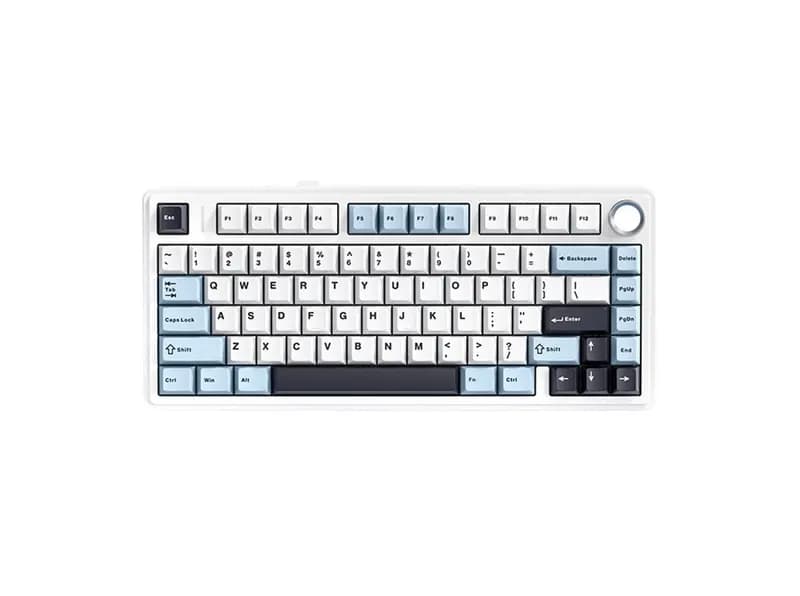
Detailed Review
If you are searching for AULA F75 Max reviews, whether the AULA F75 Max is worth buying, or whether it is good for gaming and office work, the short answer is fairly straightforward: the F75 Max is a feature-rich 75% mechanical keyboard aimed at users who want a good out-of-the-box typing experience without moving into the price range of premium custom keyboards.
Its biggest strengths are the gasket-mounted construction, LEOBOG Reaper linear switches, multi-layer sound-dampening design, hot-swappable PCB, tri-mode connectivity, and TFT display. Its main limitations are the ABS plastic case, relatively modest 4000mAh battery, closed software ecosystem, and lack of Hall Effect features such as Rapid Trigger.
For US buyers, the official price is around $79.99, although promotional pricing can bring it closer to the mid-$60 range. That makes the actual street price an important part of the value proposition.
What Is the AULA F75 Max?
The AULA F75 Max is a 75% mechanical keyboard with an 80-key layout, rotary knob, and TFT display.
Feature | AULA F75 Max |
|---|---|
Layout | 75% ANSI |
Keys | 80 keys + rotary knob |
Switches | LEOBOG Reaper linear |
Mounting | Gasket mount |
Plate | PC plate |
Keycaps | Cherry-profile PBT double-shot |
Connectivity | USB-C / 2.4GHz / Bluetooth 5.0 |
Polling rate | Up to 1000Hz via USB/2.4GHz |
Battery | 4000mAh |
Hot-swap | Yes |
Lighting | Per-key RGB |
Case | ABS plastic |
Weight | Around 0.96kg |
Display | TFT screen |
The exact configuration can vary by version, switch, keycap, and regional listing, so buyers should check the specific product page before ordering.
Most importantly, the F75 Max is a traditional mechanical keyboard, not a Hall Effect keyboard.
That distinction matters if your main reason for upgrading is Rapid Trigger or adjustable magnetic actuation.
Why the 75% Layout Makes Sense
The 75% layout is one of the F75 Max's strongest practical features.
Compared with a TKL keyboard, it takes up less horizontal desk space while retaining the function row and dedicated arrow keys. Compared with a 60% keyboard, it requires fewer Fn-layer shortcuts for everyday work.
That makes it a particularly versatile format.
For FPS players, the smaller footprint leaves more room for mouse movement. For programmers and office users, the dedicated function row and arrow keys make the transition from a traditional keyboard relatively easy.
The trade-off is the lack of a dedicated numpad.
If you frequently work with spreadsheets, accounting software, or large amounts of numeric data, a 96% or full-size keyboard may be more practical.
LEOBOG Reaper Switches and Typing Feel
The F75 Max is commonly configured with LEOBOG Reaper linear switches.
AULA lists specifications including approximately 45gf initial operating force, 55gf bottom-out force, a 1.8mm actuation point, and a 3.6mm total travel, with factory lubrication.
The important point is not simply the specification sheet.
The Reaper switch follows a linear typing profile. There is no tactile bump during the keypress, so the movement is relatively continuous from the initial press to bottom-out.
That makes the switch suitable for gaming and users who prefer smooth linear switches.
It is less suitable for someone specifically looking for a pronounced tactile bump or clicky feedback.
For everyday typing, the final experience is also influenced by the gasket structure, plate, keycaps, and internal dampening, rather than the switch alone.
Gasket Mount and Sound Design
The F75 Max puts considerable emphasis on its internal construction.
AULA lists multiple sound-dampening layers, including a sandwich pad, IXPE switch pad, PET sound-enhancement layer, bottom foam, and bottom silicone.
Combined with the gasket-mounted design and PC plate, this gives the keyboard a softer and more controlled typing character than a basic tray-mounted budget keyboard.
The design is clearly aimed at reducing unwanted resonance and producing a fuller sound.
However, sound is highly dependent on the switch, keycaps, desk surface, and individual assembly. It would be misleading to claim that every F75 Max will sound exactly the same.
Community discussions around the F75 series generally show positive reactions to its sound and typing feel, although individual experiences vary between configurations and units.
Is the AULA F75 Max Good for Gaming?
Yes, for mainstream gaming.
The keyboard supports up to 1000Hz polling via USB and 2.4GHz, which is more than adequate for most gamers.
AULA also lists different latency figures for its connection modes, with wired USB being the fastest option and Bluetooth being more oriented toward convenience than competitive gaming.
For:
FPS
MOBA
RPG
RTS
general PC gaming
the F75 Max is a capable mechanical keyboard.
However, there is an important limitation.
It is not a Hall Effect gaming keyboard.
The F75 Max does not provide:
Rapid Trigger
Adjustable magnetic actuation
Continuous analog-style switch position detection
Magnetic rapid-reset functions
If you play competitive games such as VALORANT or Counter-Strike and specifically want Rapid Trigger, you should look at Hall Effect keyboards instead.
For ordinary gaming, however, the difference may not justify choosing a magnetic keyboard over a conventional mechanical model.
What Does the TFT Display Actually Do?
The TFT display is one of the main reasons to choose the Max version.
It can display information as well as customized graphics or animations, giving the keyboard a more personalized appearance.
For a desktop setup, this is a fun feature.
But it should not be confused with a performance upgrade.
The display does not make the keyboard faster, improve typing accuracy, or provide Rapid Trigger.
It is better understood as a desktop customization feature.
There is also a practical downside: the screen consumes additional power when the keyboard is being used wirelessly.
Therefore, users who do not care about desk aesthetics may be better served by spending their money on a keyboard with a larger battery, better case material, or more advanced firmware.
Battery Life
The F75 Max uses a 4000mAh battery.
AULA's published figures indicate roughly 30.5 hours with lighting enabled and around 80 hours with lighting disabled, although actual battery life will depend on usage.
Factors such as:
RGB brightness
wireless mode
TFT display usage
screen animations
connection behavior
can all affect endurance.
This means the F75 Max is best viewed as a wireless-capable mechanical keyboard, rather than a keyboard designed around extreme battery life.
If you use the keyboard for several hours every day with RGB and the TFT display enabled, expect to charge it more frequently than a simple wireless keyboard without a screen.
Tri-Mode Connectivity
Connectivity is another strong point.
The F75 Max supports:
USB-C + 2.4GHz + Bluetooth 5.0.
USB is the obvious choice for gaming and extended desktop use.
2.4GHz is better suited to wireless gaming.
Bluetooth is useful when connecting to:
laptops
tablets
phones
multiple office devices
AULA also lists compatibility with Windows, macOS, Android, and Linux.
That makes the keyboard flexible enough for both gaming and productivity.
Software Experience
The F75 Max has official software for configuration.
Depending on the version and firmware, users can configure functions such as:
key remapping
macros
RGB
profiles
display settings
other keyboard functions
For a mainstream buyer, that is enough.
The bigger limitation is the lack of a QMK/VIA-style open firmware ecosystem.
If you are a casual user, this probably will not matter.
If you are a serious keyboard enthusiast who wants extensive layers, firmware-level customization, and highly flexible key mappings, the F75 Max is less attractive than a keyboard built around QMK/VIA.
Build Quality
The F75 Max uses an ABS plastic case rather than a CNC-machined aluminum case.
That is worth keeping in mind when comparing it with more expensive custom keyboards.
The plastic case keeps the product relatively accessible while allowing AULA to spend more of the budget on the internal structure.
The keyboard combines:
gasket mounting
PC plate
multiple foam layers
PBT keycaps
metal rotary knob
So although it is not a premium aluminum keyboard, its construction is more sophisticated than a basic budget mechanical keyboard.
At around $65–$80, that is a reasonable compromise.
Pros
Strong out-of-the-box configuration
The combination of gasket mounting, sound dampening, PBT keycaps, hot-swap sockets, tri-mode connectivity, and a TFT screen is unusually complete for a budget-oriented keyboard.
Good 75% layout
It provides a strong balance between desk space and everyday usability.
Good sound-focused construction
The multiple internal dampening layers are a major part of the keyboard's appeal.
Useful wireless options
USB, 2.4GHz, and Bluetooth make it flexible for both gaming and productivity.
Hot-swappable
The ability to replace compatible mechanical switches gives owners room to customize the typing experience later.
Cons
ABS case
The keyboard does not have the premium weight and rigidity of an aluminum custom keyboard.
No Rapid Trigger
This is the biggest limitation for competitive FPS players who specifically want Hall Effect features.
4000mAh battery
The battery is reasonable, but the TFT display and RGB can significantly increase power consumption.
Closed software ecosystem
It offers the main configuration features but does not compete with the flexibility of QMK/VIA.
TFT display is optional in practical terms
It adds personality rather than fundamental typing or gaming performance.
Who Should Buy the AULA F75 Max?
The F75 Max makes the most sense for:
mainstream gamers
FPS players who do not specifically need Rapid Trigger
MOBA players
RPG players
office users
programmers
frequent typists
people who prefer 75% keyboards
desktop setup enthusiasts
first-time mechanical keyboard buyers
It is especially suitable for someone who wants a prebuilt keyboard that already has many custom-keyboard characteristics without having to assemble one from individual components.
Who Should Skip It?
Consider another keyboard if you:
need a dedicated numpad
want extremely long wireless battery life
specifically need Rapid Trigger
want Hall Effect switches
require an aluminum case
want QMK/VIA
prioritize an open firmware ecosystem
These are not minor preferences; they directly affect whether the F75 Max makes sense for your use case.
AULA F75 vs F75 Max
The F75 Max and standard F75 share the same general product philosophy, but the Max version adds features such as the TFT display and upgraded configuration options.
If the price difference is small and you enjoy desktop customization, the Max version makes more sense.
If the standard F75 is substantially cheaper and you do not care about the screen, spending less may be the more rational choice.
Buyers should also pay attention to the exact switch, keycap, and lighting configuration because the F75 family has appeared in multiple versions.
AULA F75 Max vs Hall Effect Keyboards
This is not simply a question of which technology is better.
Use Case | Better Direction |
|---|---|
General gaming | F75 Max is sufficient |
MOBA/RPG | F75 Max |
Office work | F75 Max |
Long typing sessions | F75 Max |
Smooth linear switches | F75 Max |
Gaming sound/feel | F75 Max |
Competitive FPS | Consider Hall Effect |
Rapid Trigger | Hall Effect |
Adjustable actuation | Hall Effect |
QMK/VIA customization | QMK/VIA keyboard |
Multi-device use | F75 Max |
Heavy numeric input | 96% or full-size |
A Hall Effect keyboard is not automatically better for every user.
If you value typing feel, sound, wireless connectivity, and a conventional mechanical experience, the F75 Max remains a sensible option.
AULA F75 Max Rating
Category | Score | Assessment |
|---|---|---|
Build Quality | 4.1/5 | Good construction, but plastic case |
Typing Feel | 4.5/5 | Smooth linear switches and gasket structure |
Gaming | 4.2/5 | 1000Hz and compact layout |
Sound | 4.6/5 | Strong internal sound-dampening design |
Software | 3.8/5 | Functional but not QMK/VIA |
Connectivity | 4.5/5 | Strong tri-mode implementation |
Customization | 4.3/5 | Hot-swap and mechanical-switch compatibility |
Value | 4.5/5 | Strong feature set around the $65–$80 range |
Overall: 4.3/5
The score reflects its position as a feature-rich prebuilt mechanical keyboard rather than a premium custom keyboard.
FAQ
Is the AULA F75 Max worth buying?
It makes sense if you want a 75% keyboard with gasket mounting, tri-mode connectivity, hot-swappable switches, a strong out-of-box sound profile, and a TFT display. Around $65–$80 in the US market, the feature set is competitive.
Is the AULA F75 Max good for FPS gaming?
Yes, for mainstream FPS gaming. Its 1000Hz USB/2.4GHz polling rate is adequate for most players. However, it does not have Rapid Trigger, so competitive players specifically looking for Hall Effect functionality should consider a magnetic-switch keyboard.
Is the AULA F75 Max good for office work?
Yes. The 75% layout retains the function row and arrow keys while taking less desk space than a TKL keyboard. The main limitation is the lack of a dedicated numpad.
What is the biggest weakness of the AULA F75 Max?
The main limitations are the ABS plastic case, relatively modest battery capacity for a feature-heavy wireless keyboard, and the absence of Rapid Trigger and QMK/VIA.
Is the AULA F75 Max a Hall Effect keyboard?
No. It uses conventional mechanical linear switches rather than Hall Effect magnetic switches.
Does the AULA F75 Max support Mac?
AULA lists macOS among its supported platforms. However, users should check the current software and firmware documentation because configuration features can differ between operating systems.
Can you replace the switches?
Yes. The keyboard uses hot-swappable sockets and supports compatible 3-pin and 5-pin mechanical switches.
Final Verdict
The AULA F75 Max is best understood as a feature-rich prebuilt 75% mechanical keyboard, not as a high-end custom keyboard and not as a competitive Hall Effect gaming keyboard.
Its strongest combination is straightforward:
75% layout + gasket mounting + linear switches + multi-layer sound treatment + hot-swap + tri-mode connectivity + TFT display.
For a mainstream gamer, office worker, programmer, or first-time mechanical keyboard buyer, that combination covers a lot of practical requirements without requiring the user to build a keyboard themselves.
For competitive FPS players, the lack of Rapid Trigger is the main reason to look elsewhere. For enthusiasts, the ABS case and closed software ecosystem may also become limiting factors.
At roughly $65–$80 in the US market, the AULA F75 Max is most compelling for buyers who want a ready-to-use mechanical keyboard with a strong typing and sound profile, rather than users chasing one specific extreme feature.
If you want a balanced 75% mechanical keyboard with plenty of features, it is worth considering. If you want Rapid Trigger, Hall Effect switches, an aluminum case, or QMK/VIA, those should be higher priorities when choosing your next keyboard.