Detailed Review
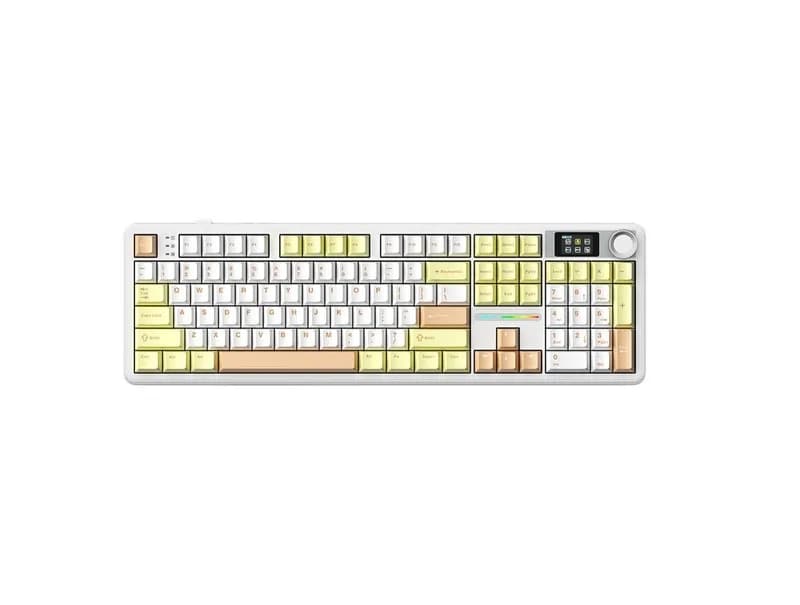
The AULA F108 Pro is a full-size mechanical keyboard designed for users who want a traditional layout combined with modern wireless connectivity and a more enthusiast-oriented internal design.
Its strongest selling points are the full-size layout, tri-mode connectivity, hot-swappable PCB, gasket structure, large 8,000mAh battery, and multiple switch options. Its biggest weakness is equally straightforward: this is a conventional mechanical keyboard rather than a Hall Effect gaming keyboard, so it does not offer Rapid Trigger or adjustable magnetic actuation.
At roughly $40–$50 in the US market, depending on the version, switch, retailer, and current promotion, the F108 Pro is best viewed as an affordable all-purpose keyboard rather than a specialized esports product.
For office work, programming, data entry, general gaming, and users who genuinely need a number pad, it makes considerably more sense than many compact gaming keyboards. For competitive FPS players specifically looking for Rapid Trigger, adjustable actuation, or other Hall Effect features, it is the wrong type of keyboard.
What Is the AULA F108 Pro?
The F108 Pro is AULA's full-size mechanical keyboard designed around a conventional layout with a dedicated number pad, function row, navigation cluster, and arrow keys.
Depending on the version, the keyboard can include features such as a small display and multifunction knob. AULA's product information also lists USB-C wired, 2.4GHz wireless, and Bluetooth connectivity.
The important specifications include:
Feature | AULA F108 Pro |
|---|---|
Layout | Full-size |
Switch type | Mechanical |
Connectivity | USB-C / 2.4GHz / Bluetooth |
Mounting style | Gasket |
Hot-swappable | Yes |
RGB | Yes |
Battery | 8,000mAh rechargeable battery |
Polling rate | Up to around 1,000Hz in wired/2.4GHz modes |
Switch options | Varies by version |
Approx. US price | About $40–$50 |
Main audience | Gaming, office, programming, general desktop use |
There are multiple F108 Pro configurations, so buyers should verify the exact listing before purchasing. Switches, display/knob configurations, colors, and regional packaging can differ.
Typing Experience
The F108 Pro is more interesting for typing than its price might initially suggest.
Its gasket-mounted construction and multiple layers of internal acoustic material are designed to soften bottom-out impact and reduce some of the hollow resonance associated with inexpensive full-size mechanical keyboards.
The exact feel depends heavily on the selected switch.
Switch Options
AULA has offered the F108 Pro with several factory switch options, including variants such as Wind Spirit, Caramel Latte, and Listening Rain switches. Availability varies by market.
The important point is not the marketing name of the switch but its actual characteristics.
A lighter linear switch will generally feel faster and easier to operate during long typing sessions, while a different factory switch may place more emphasis on sound or a slightly different bottom-out sensation.
Because switch specifications can vary by version, buyers should check the actual switch specification on the listing rather than assuming that two F108 Pro models with different names will feel identical.
For office work and general typing, the F108 Pro's larger layout is also a major advantage for users who regularly use the number pad.
Is the AULA F108 Pro Good for Gaming?
Yes, but its gaming strengths should be understood correctly.
The F108 Pro supports up to around 1,000Hz polling in wired and 2.4GHz modes, which is more than adequate for most conventional PC gaming.
For games such as:
League of Legends
World of Warcraft
RPGs
Strategy games
Action games
General multiplayer games
there is little reason to consider its polling rate a major limitation.
The situation is different for competitive FPS.
The F108 Pro uses traditional mechanical switches rather than Hall Effect magnetic switches. Therefore, it does not provide features such as:
Rapid Trigger
Adjustable actuation
Dynamic actuation
Analog-style Hall Effect input
For games such as Counter-Strike 2 or VALORANT, these features can be relevant to players who specifically want more control over rapid movement and directional changes.
That does not make the F108 Pro a bad gaming keyboard. It simply means that its priorities are different.
Its 1,000Hz polling rate is sufficient; it is not the reason to buy this keyboard.
Sound and Acoustics
The F108 Pro uses a combination of gasket mounting and internal acoustic materials to control resonance and bottom-out noise.
This gives it a more refined acoustic foundation than many basic budget mechanical keyboards.
However, keyboard sound is heavily affected by:
Switch choice
Keycap material
Keycap profile
Plate material
Factory tuning
Individual unit variation
Therefore, it would be misleading to describe one particular review sample's sound as representative of every F108 Pro configuration.
The general design goal is a more controlled and less hollow sound rather than an especially loud or sharp mechanical keyboard profile.
Build Quality and Construction
For a keyboard in the roughly $40–$50 US price range, the F108 Pro offers a relatively complete hardware package.
Depending on the version, its construction includes:
Gasket mounting
PC positioning plate
Multiple acoustic layers
Hot-swappable PCB
PBT keycaps
RGB lighting
Large battery
Tri-mode wireless connectivity
The full-size chassis is also relatively large and heavy.
That is a disadvantage if you want a portable keyboard, but it can be beneficial on a permanent desk because the keyboard is less likely to move around during use.
The bigger question is whether you actually need a full-size keyboard.
If you never use the number pad, a 75% or TKL keyboard will give you substantially more mouse space.
Wireless Connectivity
The F108 Pro supports three connection methods:
USB-C wired, 2.4GHz wireless, and Bluetooth.
This is one of its strongest practical features.
USB-C is appropriate for stationary desktop use and charging, 2.4GHz is better suited to gaming, while Bluetooth is convenient for laptops, tablets, and secondary devices.
The 8,000mAh battery is also unusually large for an affordable full-size keyboard.
However, wireless performance still depends on the surrounding environment. USB hubs, metal surfaces, other wireless receivers, and radio interference can affect 2.4GHz performance.
That is not unique to AULA, but it is something to keep in mind when setting up a wireless gaming keyboard.
Software and Customization
The F108 Pro uses AULA's proprietary software rather than the open QMK/VIA ecosystem.
Depending on the version and firmware, the software can be used for functions such as:
Key remapping
Macros
RGB configuration
Profiles
Display customization
Firmware updates
This is enough for most mainstream users.
However, enthusiasts who specifically want deep firmware-level customization may prefer a keyboard with native VIA or QMK support.
The F108 Pro is better understood as a consumer gaming keyboard with customization features, rather than a fully open custom-keyboard platform.
Display and Knob
Some F108 Pro configurations include a small display and multifunction knob.
The display provides additional visual feedback, while the knob can be useful for functions such as volume control.
These features are not essential to the keyboard's core performance.
They are best treated as convenience features rather than reasons to buy the keyboard by themselves.
Because AULA sells different F108 Pro configurations, make sure the exact US or international listing includes the display and knob if those features matter to you.
The Biggest Advantages
Full-size layout
The dedicated number pad is useful for spreadsheets, accounting, data entry, programming workflows, and users who simply prefer a traditional keyboard.
Strong connectivity package
USB-C, 2.4GHz, and Bluetooth make the F108 Pro suitable for both desktop and mobile workflows.
Large battery
The 8,000mAh battery gives the keyboard substantial wireless capacity and is one of its notable specifications.
Gasket construction
The internal design is more sophisticated than the basic fixed structures commonly found on inexpensive full-size keyboards.
Hot-swappable switches
Users can replace compatible switches without replacing the entire PCB, providing a reasonable upgrade path.
The Main Disadvantages
Large footprint
The full-size layout consumes substantially more desk space than a 75% or TKL keyboard.
No Hall Effect functionality
There is no Rapid Trigger or adjustable magnetic actuation.
Multiple configurations can be confusing
Different switches, colors, displays, knobs, and regional listings make it important to verify the exact version before ordering.
Proprietary software
The software provides useful mainstream functions, but it does not offer the same open customization ecosystem as QMK/VIA.
Not optimized specifically for competitive FPS
It can absolutely be used for FPS gaming, but its feature set does not target the Hall Effect gaming market.
Who Should Buy the AULA F108 Pro?
The F108 Pro makes the most sense for:
Office workers who need a number pad
Programmers who prefer full-size layouts
Data-entry users
Writers and frequent typists
MMO and RPG players
General PC gamers
Users who want wireless connectivity
People who want a gasket-mounted keyboard at a relatively low price
Buyers who prefer traditional mechanical switches
Who Should Skip It?
Consider another keyboard if you:
Have a very small desk
Rarely use the number pad
Mainly play competitive FPS games
Specifically want Rapid Trigger
Want adjustable actuation
Want Hall Effect switches
Expect deep QMK/VIA customization
Frequently travel with your keyboard
AULA F108 Pro vs. Other Budget Keyboards
When comparing the F108 Pro with other keyboards around the same US price, do not focus only on RGB or polling rate.
The more important questions are:
Category | What to Compare |
|---|---|
Layout | Full-size vs. TKL/75% |
Switches | Feel, actuation, sound |
Structure | Gasket vs. conventional mount |
Wireless | 2.4GHz stability and Bluetooth |
Battery | Capacity and real-world endurance |
Gaming | Polling rate and input features |
Customization | Hot-swap, software, VIA/QMK |
Keycaps | Material and profile |
Sound | Factory tuning and consistency |
Price | Actual street price rather than MSRP |
If another keyboard costs approximately the same but offers Hall Effect switches, that product should not automatically be considered superior. It depends on whether you actually need magnetic-switch features.
For office users who need a number pad, the F108 Pro's full-size layout may be more important than Rapid Trigger.
Rating
Category | Score | Notes |
|---|---|---|
Build Quality | 4.5/5 | Strong feature set for the price |
Typing | 4.5/5 | Gasket design and internal dampening help |
Gaming | 4.0/5 | Good for general gaming, less specialized for FPS |
Sound | 4.5/5 | Multiple layers of acoustic treatment |
Software | 4.0/5 | Functional but proprietary |
Connectivity | 4.5/5 | Wired, 2.4GHz and Bluetooth |
Customization | 4.0/5 | Hot-swap is useful, but ecosystem is limited |
Value | 4.5/5 | Competitive feature set around $40–$50 |
Overall: 4.3/5
This score reflects the F108 Pro as an all-purpose full-size mechanical keyboard, rather than as a dedicated competitive FPS keyboard.
Is the AULA F108 Pro Worth Buying?
The answer depends heavily on what you want from a keyboard.
If you need a full-size layout, wireless connectivity, hot-swappable switches, a large battery, and a gasket-mounted construction, the F108 Pro offers a lot of hardware for its typical US street price of around $40–$50.
If you are primarily a competitive FPS player looking for Rapid Trigger and adjustable actuation, you should instead compare Hall Effect keyboards.
The F108 Pro is essentially a traditional mechanical keyboard upgraded with modern wireless connectivity and enthusiast-oriented construction. Its appeal is not one extreme specification; it is the combination of several useful features at a relatively accessible price.
FAQ
Is the AULA F108 Pro worth buying?
It is worth considering if you want a full-size wireless mechanical keyboard with a number pad, gasket construction, hot-swappable switches, and a large battery. It is less suitable if your priority is Hall Effect gaming functionality.
Is the AULA F108 Pro good for FPS gaming?
Yes for general FPS gaming, but it is not specifically designed around competitive magnetic-switch features. Players who want Rapid Trigger or adjustable actuation should consider a Hall Effect keyboard instead.
Is the AULA F108 Pro good for office work?
Yes. Its full-size layout is particularly useful for spreadsheets, accounting, data entry, and other workflows where the number pad is frequently used.
Does the AULA F108 Pro support wireless connections?
Yes. It supports USB-C wired mode, 2.4GHz wireless, and Bluetooth, although the exact wireless specifications can vary by version.
Does the AULA F108 Pro have Hall Effect switches?
No. The F108 Pro uses conventional mechanical switches rather than Hall Effect magnetic switches.
Does the AULA F108 Pro support Mac?
AULA lists macOS compatibility for the F108 Pro. However, software functionality can differ between operating systems, so Mac users should check the exact software and firmware support for their version.
What is the biggest disadvantage of the F108 Pro?
Its biggest compromises are the large full-size footprint and lack of Hall Effect gaming features. Users who do not need a number pad may get a better desk setup from a smaller keyboard.
Does the AULA F108 Pro have a lithium battery?
Yes. The keyboard uses a built-in 8,000mAh rechargeable lithium battery.
This matters for international buyers. If you are ordering the F108 Pro from China and using a forwarding service, check the forwarder's lithium-battery policy before placing the order. Some forwarding companies restrict or require special handling for devices containing lithium batteries, and air-shipping rules can differ between routes and carriers.
Final Buying Advice
The AULA F108 Pro is easiest to understand when you match it to your actual workflow.
Need a number pad and mostly work at a desk? The F108 Pro's full-size layout is one of its biggest advantages.
Want wireless gaming and everyday use? Its 2.4GHz, Bluetooth, and USB-C combination is practical.
Want a softer, more refined mechanical-keyboard feel without spending heavily? The gasket construction and internal dampening are worth considering.
Mainly play competitive FPS games? Focus on Hall Effect keyboards with Rapid Trigger and adjustable actuation instead.
Have a small desk? A 75% or TKL keyboard will probably make better use of your available space.
Want deep firmware customization? Look for a VIA/QMK-compatible keyboard rather than relying solely on AULA's proprietary software.
For buyers in the US, the F108 Pro makes the most sense when its street price remains around the $40–$50 range. At that level, its combination of full-size functionality, wireless connectivity, battery capacity, hot-swap support, and gasket construction is more important than any single headline specification.
For international buyers, remember that the built-in lithium battery can also affect shipping options and forwarding costs, so the final landed price should include any restrictions or special shipping requirements before comparing it with locally available keyboards.